Overview
Spira is uniquely designed with traceability in mind. The requirement detailed reports starts iterating through the list of requirements drilling into the test cases, tasks, test runs, incidents, and lateral associations among others. Similarly, the test case detailed report also has a nested structure beginning with test cases and finding what other relevant artifacts, such as incidents, are associated with it. In order to create this bidirectional traceability, we will start with the Test Case Detailed Report.
When we mean bidirectional traceability, the following structure is maintained.
- Forward Traceability: Test Cases to Incidents
- Reverse Traceability: Incidents to Test Cases
Bidirectional Traceability XSLT
Given below is the XSLT for this report.
<?xml version="1.0" encoding="utf-8"?>
<xsl:stylesheet version="1.0" xmlns:xsl="http://www.w3.org/1999/XSL/Transform" xmlns:msxsl="urn:schemas-microsoft-com:xslt" exclude-result-prefixes="msxsl">

<xsl:template match="/TestCaseData">

<!-- ========================================================= -->
<!--   FORWARD TRACEABILITY: Test Case → Incidents             -->
<!-- ========================================================= -->
<div class="Title3">Forward Traceability</div>
  <xsl:for-each select="TestCaseFolder">
<div class="Title2">
        Folder: <xsl:value-of select="Name"/>
      </div>

<table class="DataGrid">
  <tr>
    <th>Folder</th>
	<th>Test Case ID</th>
    <th>Test Case Name</th>
    <th>Execution Status</th>
    <th>Linked Incidents</th>
  </tr>

  <xsl:for-each select="TestCases/TestCase">

      <xsl:sort select="TestCaseId" data-type="number"/>
    <tr>
      <td><xsl:value-of select="../../Name"/></td>
	  <td><xsl:value-of select="TestCaseId"/></td>
      <td><xsl:value-of select="Name"/></td>
      <td><xsl:value-of select="ExecutionStatusName"/></td>

      <!-- Comma-separated list of incidents -->
      <td>
        <xsl:for-each select="Incidents/Incident">
		    <xsl:sort select="IncidentId" data-type="number"/>
          <xsl:value-of select="concat(IncidentId, ' - ', Name, ' - ', IncidentStatusName)"/><br/>
        </xsl:for-each>
      </td>
    </tr>
  </xsl:for-each>
</table>
</xsl:for-each>
<br/>

<!-- ========================================================= -->
<!--   REVERSE TRACEABILITY: Incident → Test Cases             -->
<!-- ========================================================= -->

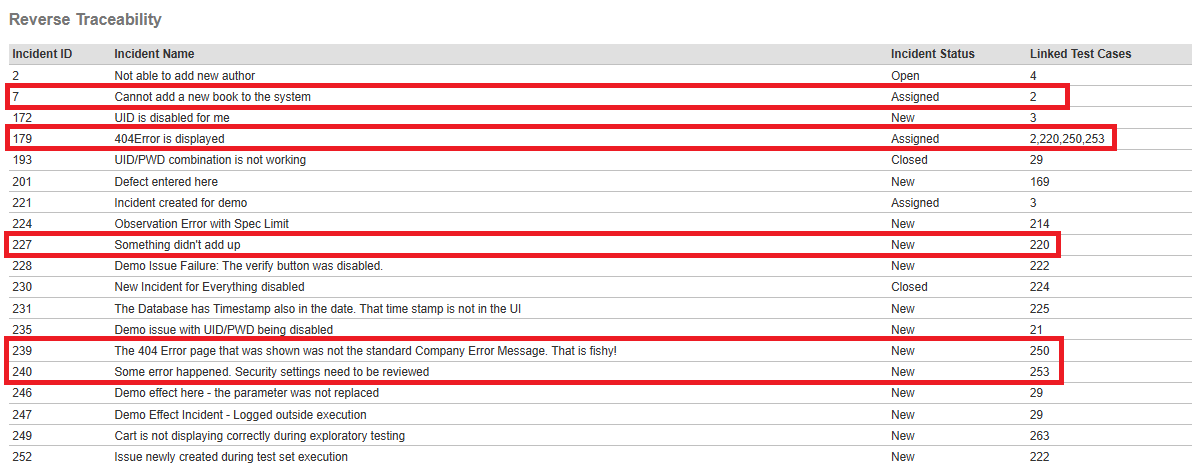
<div class="Title3">Reverse Traceability</div>

<table class="DataGrid">
  <tr>
    <th>Incident ID</th>
    <th>Incident Name</th>
    <th>Incident Status</th>
    <th>Linked Test Cases</th>
  </tr>

  <!-- Loop over every unique Incident in the entire document -->
  <xsl:for-each select="//Incident[not(IncidentId = preceding::Incident/IncidentId)]">

    <xsl:sort select="IncidentId" data-type="number"/>

    <tr>
      <td><xsl:value-of select="IncidentId"/></td>
      <td><xsl:value-of select="Name"/></td>
      <td><xsl:value-of select="IncidentStatusName"/></td>

      <!-- Find every test case that contains this Incident ID -->
      <td>
        <xsl:for-each select="//TestCase[Incidents/Incident/IncidentId = current()/IncidentId]">
		 <xsl:sort select="TestCaseId" data-type="number"/>
          <xsl:value-of select="TestCaseId"/>
          <xsl:if test="position() != last()">, </xsl:if>
        </xsl:for-each>
      </td>
    </tr>
  </xsl:for-each>
</table>
</xsl:template>
</xsl:stylesheet>
XSLT Explanation: Forward Traceability
- Test Cases are often organized by the test case folder. So, the test case detailed report that we used as the base already starts iterating through the test case folders. So, breaking down the test cases by the test case folder and then iterating through the test cases within that folder for the incidents is handled in the code.
<div class="Title2">
        Folder: <xsl:value-of select="Name"/>
</div>
- When the report is printed, if there are many test cases or many incidents for multiple test cases, then the report may span multiple pages. To make it easier to locate the folder in such scenarios, the folder is identified as an additional redundant column.
<table class="DataGrid">
  <tr>
    <th>Folder</th>
    Other columns appear in the XSLT but removed here for explanation purposes
  </tr>

  <xsl:for-each select="TestCases/TestCase">
      <xsl:sort select="TestCaseId" data-type="number"/>
    <tr>
      <td><xsl:value-of select="../../Name"/></td>
    Review the XSLT for retrieving data for other columns that are removed here for explanation purposes
    </tr>
  </xsl:for-each>
</table>
- In the following section of XSLT, we are iterating through the incidents for every test case in an ascending order. As part of the defect triaging process, the details behind the name and status of the will be beneficial. So, these details are brought forward as a concatenated string with "hyphen" as the delimiter. If these incident name and status are not needed and a comma separated list of incidents alone are desired, please check the code for reverse traceability where this is accomplished.
- To make it easier to look for an incident number if multiple incidents are listed for a test case, we are adding an additional sort by the Incident number.
<xsl:for-each select="Incidents/Incident">
	<xsl:sort select="IncidentId" data-type="number"/>
    <xsl:value-of select="concat(IncidentId, ' - ', Name, ' - ', IncidentStatusName)"/><br/>
</xsl:for-each>
XSLT Explanation: Reverse Traceability
- In order to accomplish the reverse traceability, we need to traverse the XML chain backwards for every unique incident id. This is done by:
<xsl:for-each select="//Incident[not(IncidentId = preceding::Incident/IncidentId)]">
- It is important to remember that one incident may be associated with multiple test cases. This is done by:
<xsl:for-each select="//TestCase[Incidents/Incident/IncidentId = current()/IncidentId]">
	<xsl:sort select="TestCaseId" data-type="number"/>
      <xsl:value-of select="TestCaseId"/>
    <xsl:if test="position() != last()">, </xsl:if>
</xsl:for-each>
Data Setup: Example
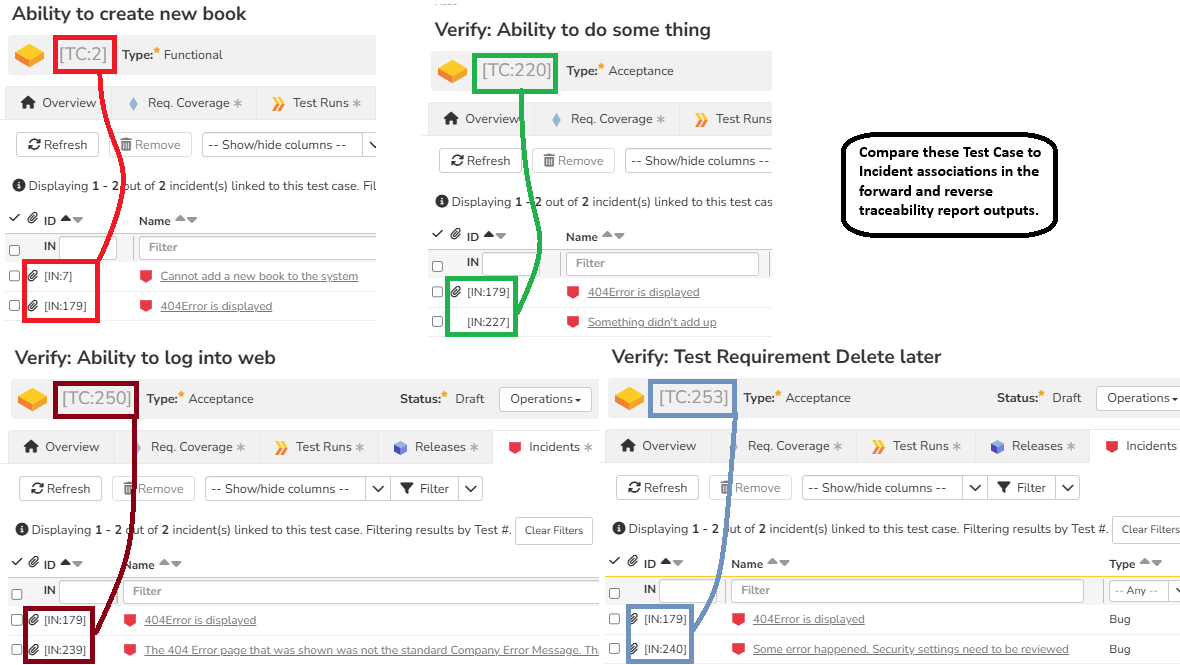
In the screenshot below, you can see four different test cases and their associated incidents. These traceability can be observed in both the forward and reverse traceability sections of the report.
Report Output
The forward traceability is iterated through the folders. So, given below are two folders to connect with the test cases in that folder and their associated incidents.
Forward Traceability
In the sections below, you can see the forward traceability of test cases to the incidents by two different folders.
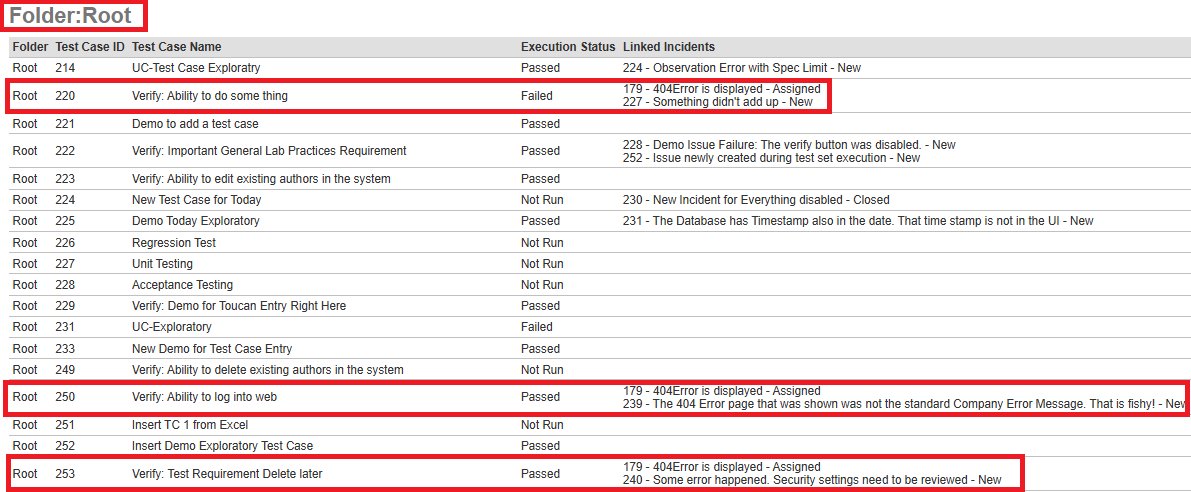
Root Folder Traceability
You can see the highlighted traceability between Test Cases and Incidents in the root folder below.
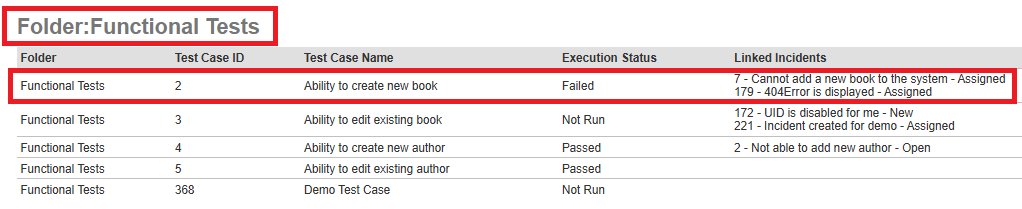
Sub Folder Traceability
You can see the highlighted traceability between Test Cases and Incidents in the Functional Tests folder below.
Reverse Traceability
Given below is the reverse or backward traceability from incidents to their test cases.
Options in Rendering the Report
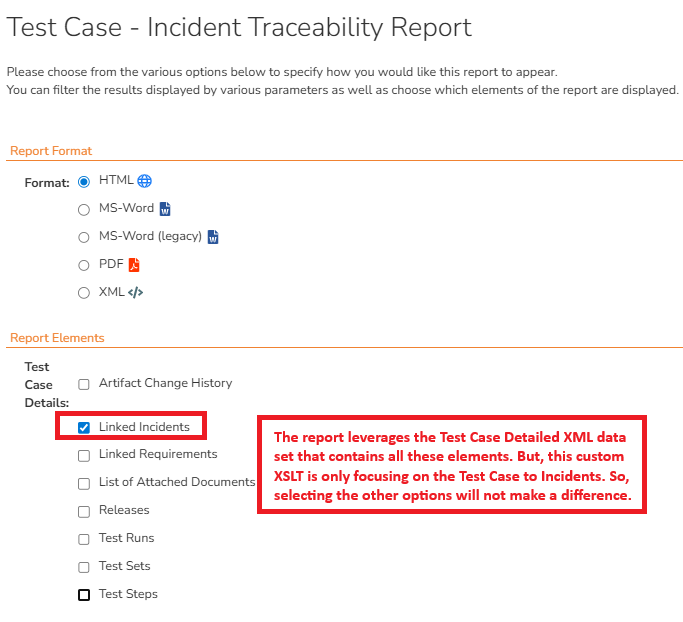
Since this report uses the XML dataset of the Test Case Detailed Report in the standard section, there are number of other data elements available (e.g.: Test Run, Test Set, etc.). However, the XSLT has been modified to focus only on testcases and incidents. So, selecting the other options will not add them to the report.