Overview of the Metric
This metrics is used to arrive at testing quality by measuring the number of defects observed in production relative to the total number of defects that were found (in both testing and production):
Defect Leakage = No. of acceptance defects found after delivery / (No. of defects found during testing + No. of acceptance defects found after delivery) *100%
To create this report we just just need to join the count of incidents from the Spira Incidents table with the Releases table for incidents found during testing vs. those found during post-release.
In our example, we are using the following assumptions:
- Incidents that are linked to a test run were found during testing
- Incidents that are not linked to a test run were found during production
If you log ad-hoc incidents during testing as well as afterwards, then obviously this categorization will not make sense. In that case we'd recommend using a separate incident type for incidents found in production vs. testing.
The Custom Report
The following Entity SQL custom report can be used to create this report:
select GR2.RELEASE_NAME, GR2.ACCEPTANCE_COUNT * 100 / (GR2.TESTING_COUNT + GR2.ACCEPTANCE_COUNT) as DEFECT_LEAKAGE_PERCENT
from
(
select GR.RELEASE_NAME, sum(GR.TESTING_COUNT) as TESTING_COUNT, sum(GR.ACCEPTANCE_COUNT) as ACCEPTANCE_COUNT
from
((select RL.VERSION_NUMBER as RELEASE_NAME, count(IC.INCIDENT_ID) as TESTING_COUNT, 0 as ACCEPTANCE_COUNT
from SpiraTestEntities.R_Releases as RL
inner join SpiraTestEntities.R_Incidents as IC on RL.RELEASE_ID = IC.DETECTED_RELEASE_ID
where RL.PROJECT_ID = ${ProjectId}
and IC.IS_DELETED = False
and RL.IS_DELETED = False
and exists (
	select value TRI
	from SpiraTestEntities.R_TestRunIncidents as TRI
	where TRI.INCIDENT_ID = IC.INCIDENT_ID
)
group by RL.VERSION_NUMBER)
union
(select RL.VERSION_NUMBER as RELEASE_NAME, 0 as TESTING_COUNT, count(IC.INCIDENT_ID) as ACCEPTANCE_COUNT
from SpiraTestEntities.R_Releases as RL
inner join SpiraTestEntities.R_Incidents as IC on RL.RELEASE_ID = IC.DETECTED_RELEASE_ID
where RL.PROJECT_ID = ${ProjectId}
and IC.IS_DELETED = False
and RL.IS_DELETED = False
and not exists (
	select value TRI
	from SpiraTestEntities.R_TestRunIncidents as TRI
	where TRI.INCIDENT_ID = IC.INCIDENT_ID
)
group by RL.VERSION_NUMBER)) as GR
group by GR.RELEASE_NAME) as GR2
order by GR2.RELEASE_NAME
When you run this report for a project, you will see a bar chart that looks like the following:
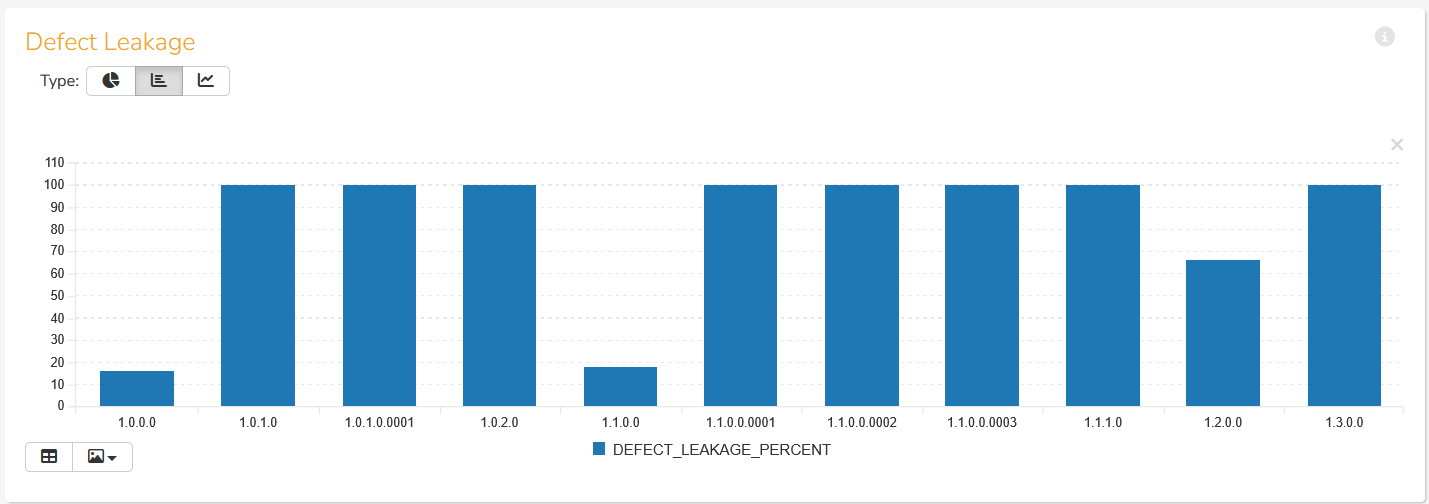
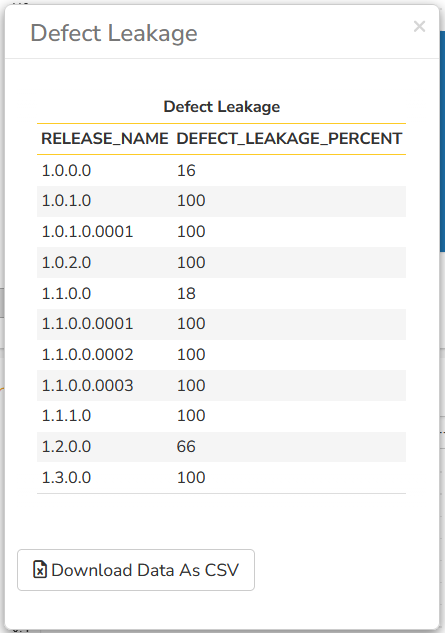
You can of course get the raw data from the report as well: