Inflectra’s AI Options
Choosing between SpiraApps (AI plugins) and the Inflectra.ai Cloud Service depends entirely on where your data is hosted.
Key Differences
Inflectra.ai (The "One-Click" Cloud Solution)
This is the modern, integrated generative AI engine designed specifically for Spira Cloud customers. It is meant to be a frictionless, "no-configuration" experience.
Best For: Teams on Spira Cloud who want a ready-to-use AI without managing API keys or complex prompts.
Key Capabilities:
Unlimited Usage: Licensed as a flat-rate add-on based on your concurrent user count, meaning no worrying about "token costs."
Managed Models: Inflectra manages the LLM (using Amazon Bedrock/Nova) in secure, regional AWS zones to ensure data residency compliance.
Context-Aware: It automatically detects the artifact you are looking at (Requirement, Test Case, etc.) and suggests relevant AI actions (e.g., "Generate Test Cases from this Requirement").
Secure: Inflectra.ai is backed by Inflectra’s Responsible AI Policy
Roadmap: Inflectra continues to develop features for Inflectra.ai as and has a published Roadmap here.
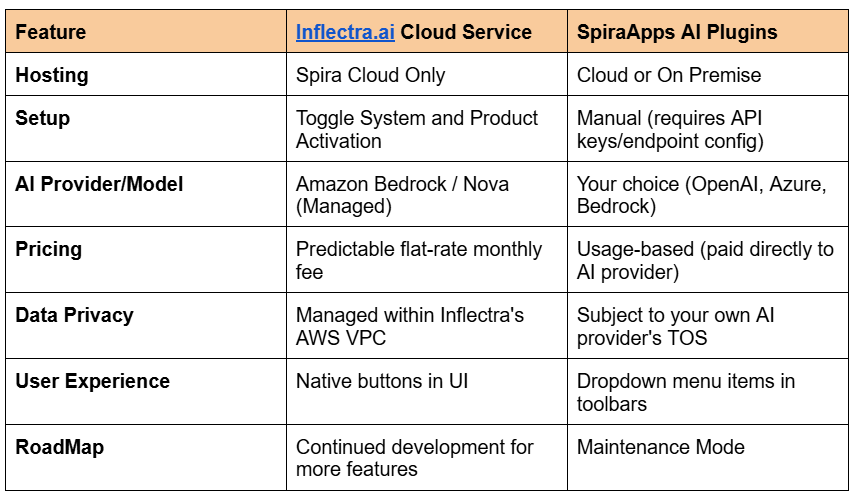
SpiraApps AI Plugins (The "Bring Your Own" Solution)
Before the launch of the unified Inflectra.ai service, Inflectra released specific SpiraApps (like the OpenAI SpiraApp or AWS Bedrock SpiraApp). These act as bridges to external AI providers.
Best For: On-premise customers or organizations that have strict corporate mandates to use a specific AI provider (like a private Azure OpenAI instance).
Key Capabilities:
Bring Your Own LLM (BYOLLM): You must provide your own API keys for services like OpenAI (ChatGPT), Azure OpenAI, or Amazon Bedrock.
Cost Management: You pay the AI provider directly for usage (tokens). Inflectra doesn't charge for the app itself, but you manage the "gas tank."
Granular Control: You can choose exactly which model version you want to use (e.g., GPT-4o vs. GPT-3.5).
Functional Limits: While they can generate the same artifacts (test cases, risks, tasks), they lack the "agentic" orchestration and seamless UI integration found in the dedicated Inflectra.ai service.
Fixed Feature set: While Inflectra will continue to maintain the SpiraApps, no new functionality for the SpiraApps is currently planned.
Granular Functional Differences
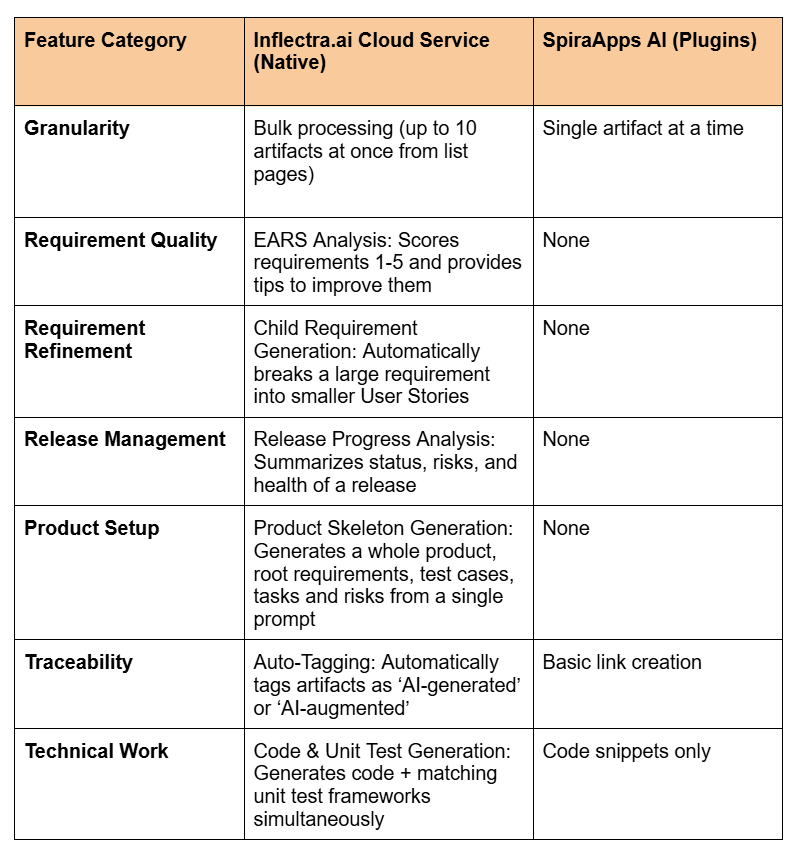
When looking at the granular differences between the AI SpiraApps (plugins) and the Inflectra.ai Cloud Service (the integrated engine), the distinction is between manual artifact generation and intelligent lifecycle analysis.
While both can generate a test case from a requirement, Inflectra.ai includes "Agentic" features like quality scoring, bulk processing, and project-level orchestration that the SpiraApps lack.
Functional Scope Comparison
Specific Function Availability by Artifact
Requirements
Both: Can generate Test Cases, Tasks, BDD Scenarios, and Risks.
Inflectra.ai Exclusive:
EARS Analysis: Analyzes syntax and provides a qualitative score.
Improvement Suggestions: Rewrite your requirement to be more clear/unambiguous.
Decomposition: Takes one requirement and generates multiple child requirements (User Stories).
Test Cases
Both: Can generate Test Steps for an existing case or suggest a Requirement for a test case (TDD).
Inflectra.ai Exclusive:
Releases & Dashboards
SpiraApp: No functionality.
Inflectra.ai Exclusive:
Release Summary: Analyzes all associated requirements and incidents to write a status report.
My Page (Admin Only): A Product Creation Option that lets you type a Product title and description and generates the Product, Folders, and Requirements in one go.
The "Control" Factor: Prompts & Models
A major granular difference is who controls the prompt:
AI SpiraApps: You have full access to Prompt Customization. If you want the AI to write test cases in a very specific format (e.g., "Must include data for SQL injection"), you can edit the JSON prompt in the SpiraApp settings. You also choose your specific model (Claude 3, Llama 3, or Nova).
Inflectra.ai: The prompts are professionally engineered and protected by Inflectra.ai guardrails. You cannot change the underlying prompt logic, but in return, the output is much more consistent and reliable because Inflectra has tuned the "temperature" and "top-p" settings for the specific Spira schema.
Summary Recommendation
Use the SpiraApp if: You are on-premise, have a specific AI provider and model preference, or want to write your own custom prompt templates.
Use Inflectra.ai if: You are on the cloud and want the AI to act as a Business Analyst (scoring requirements, summarizing releases, and building product structures) rather than just a "content generator."