Overview
A test run is an immutable snapshot of executing either a test case or a test set. When the execution is marked completed, they appear in the Test Runs. The Test Run Steps contain details of the execution. When incidents are logged during execution at a specific test step level, the Test Run Incidents table contain details.
Data Setup
The following section illustrates the type of data that should be excluded/included in the resulting report.
Exclusion: Test Runs from Test Cases
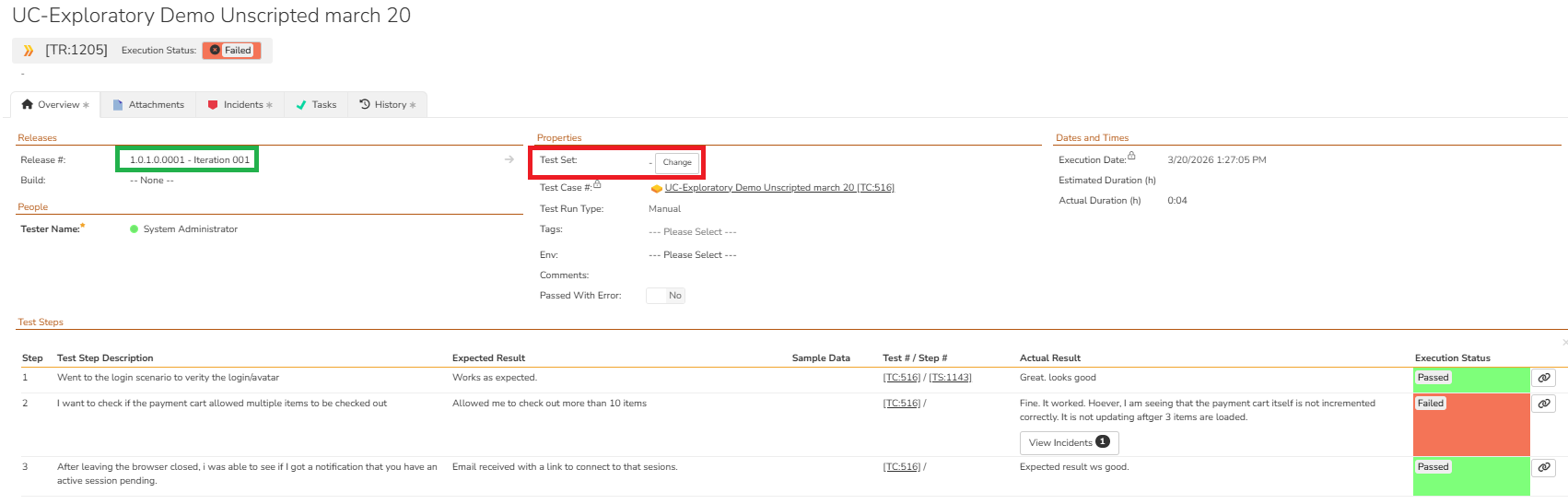
One of the prerequisites for this report is to eliminate the test runs that are initiated directly from the test case. Given below is an example of a test run (TR 1205) that is associated with a specific release (Green box) but not associated as part of the test set (red box). These types of Test Runs must be excluded from this report although this test run is in a failed state.
Inclusion: Failed Test Runs from Test Set Execution
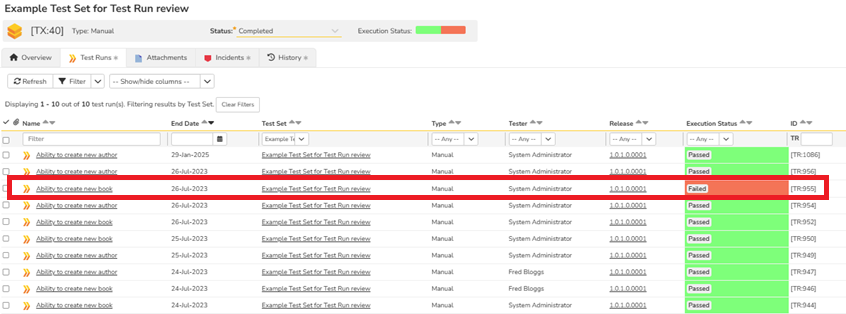
When a Test Set containing multiple test cases is executed, it is possible that some test cases are passed while others are not. In such cases, the passed test runs must be excluded and the report should be limited to failed test runs only. In this example shown below, this means all test runs will be excluded except the test run (TR:955) in the failed state.
Inclusion: Actual Test Run Steps with any incidents attached at the Test Run Step level
A test case may have many test steps. When the test case is executed as part of the Test Set, some test steps may fail and others may be in different status depending on the business flow. Incidents may be attached as well at the time of test execution. All these results must be part of the report. So, in the screenshot below, all the details related to the Test Run 955 from the test run steps must be brought.
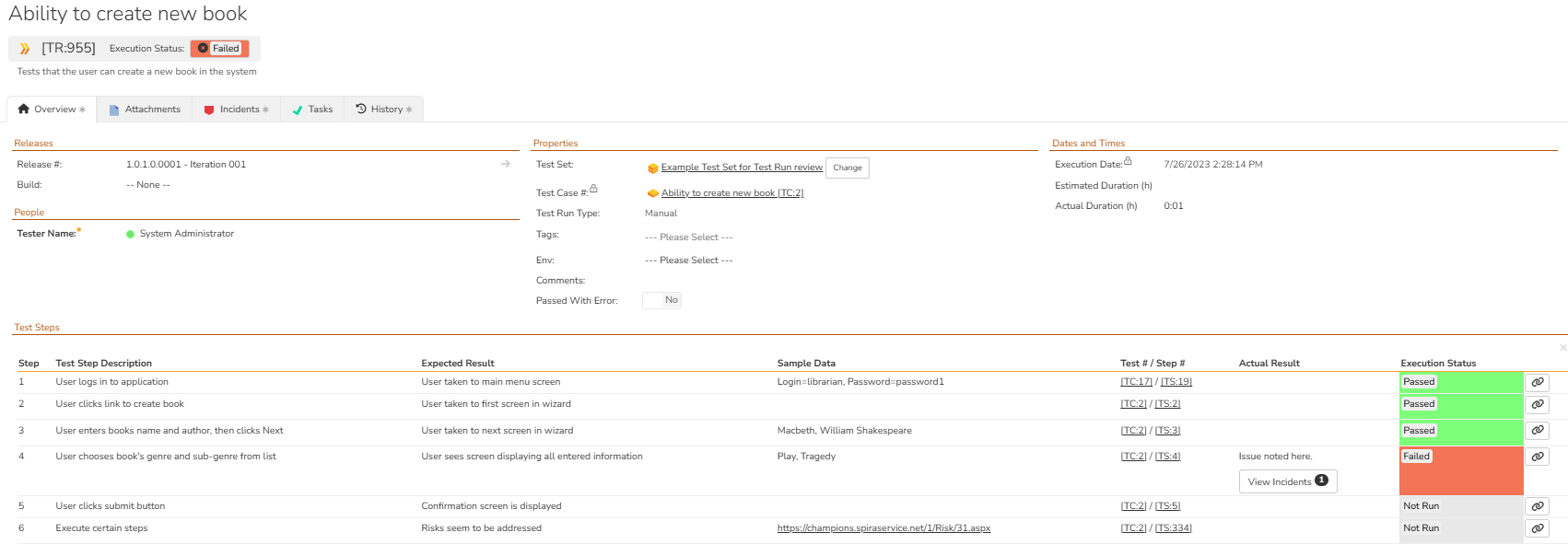
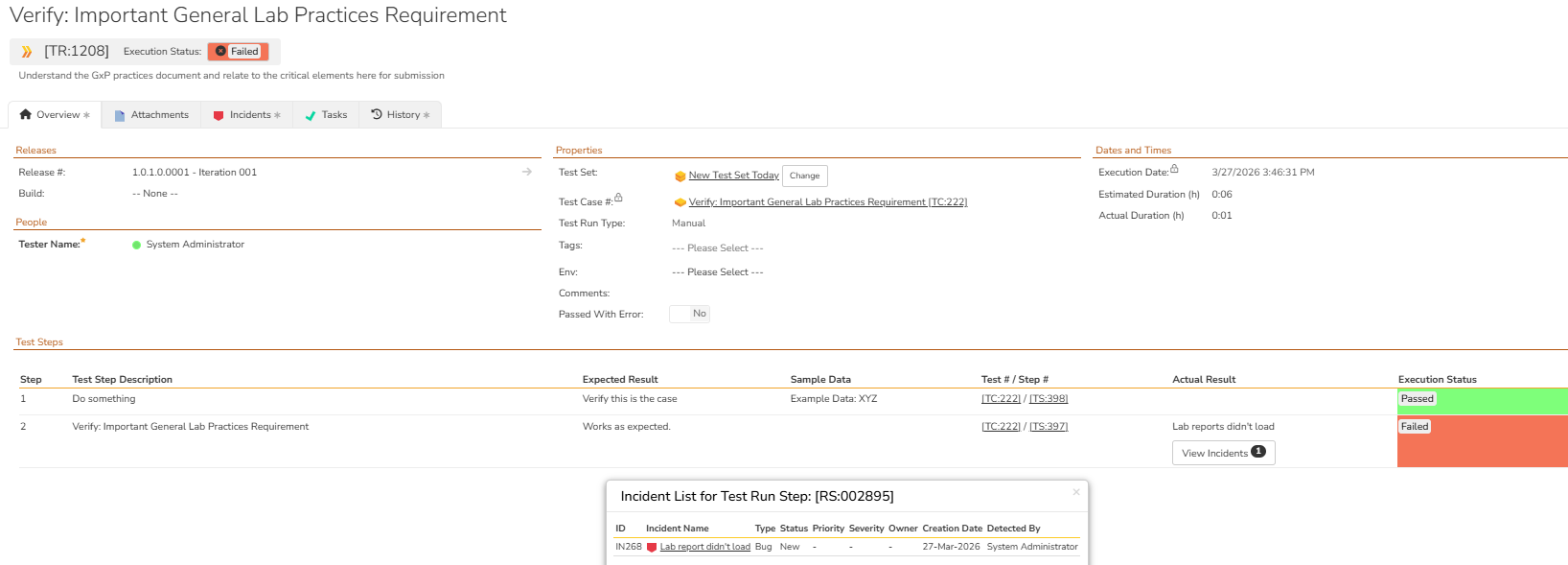
Here is another test run with fewer test run steps but with a failed test run step linked to an incident.
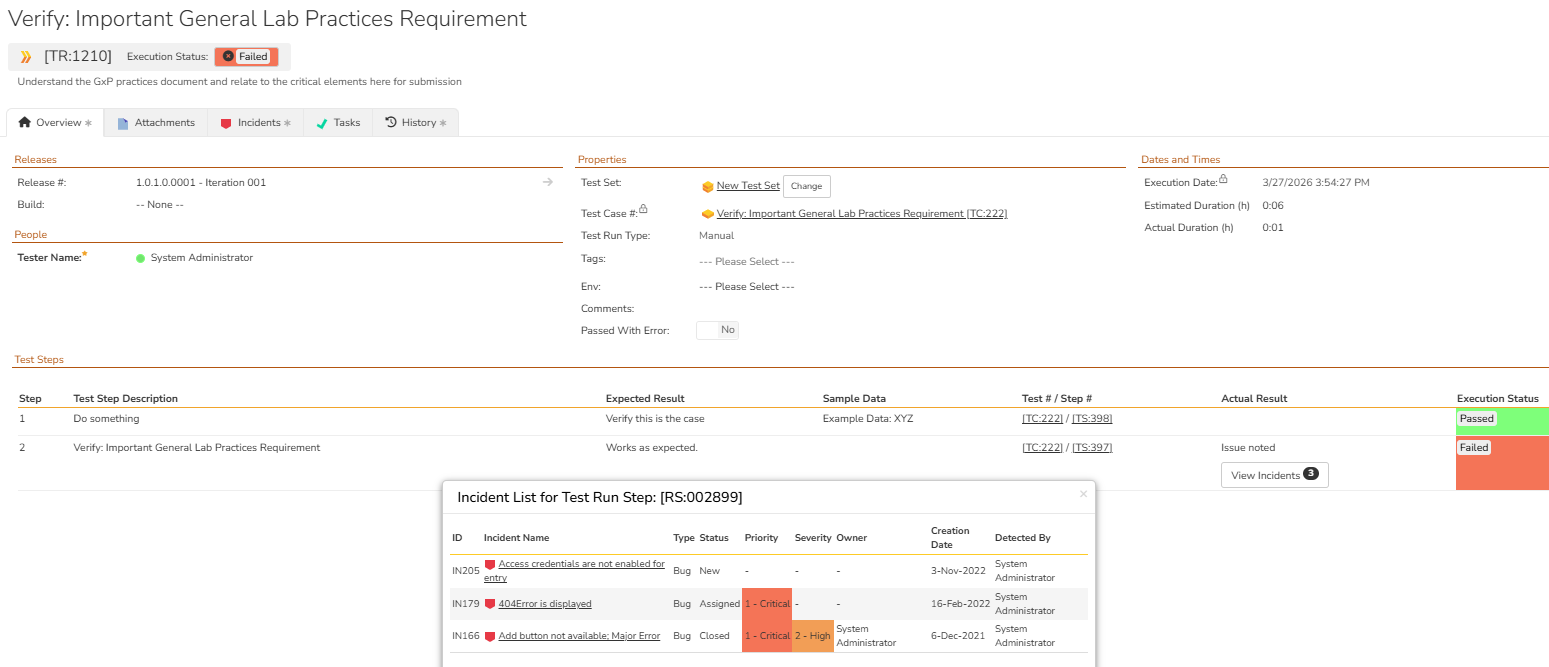
Here is another test run with fewer test run steps but with a failed test run step linked to three incidents.
Steps
- Click on the "Edit Reports" in the System Administration panel
- Click on "Add a New Report" at the bottom of the report listing
- Provide the required name and description
- Select the "category" (Test Case) and "format" (preferably HTML and Excel)
- Click on the "Add new Custom Section" in the Custom Section
- Provide a name and description
- Copy the ESQL from the section below in the "Query" section.
- Click on "Preview Results" to verify the sample data (Note: You may have to replace ${ReleaseId} with an actual Release # for preview. But, later change this back to ${ReleaseId}
- Click on "Create Default Template"
- Copy the XSLT modifications from the section below in the "Template" section
- Save the custom section
- Save the report
Now, you can select a product, go to the report section, select the release and render the report.
ESQL
Given below is the ESQL for this report.
SELECT
    TR.TEST_SET_NAME,
    TR.TEST_RUN_ID,
    TR.NAME AS TEST_RUN_NAME,
    TR.END_DATE,
    TRS.POSITION AS TEST_STEP_NUMBER,
    TRS.DESCRIPTION AS TEST_STEP_DESCRIPTION,
    TRS.EXPECTED_RESULT,
    TRS.ACTUAL_RESULT,
    TRS.EXECUTION_STATUS_NAME AS STEP_STATUS,
    U.EMAIL_ADDRESS as TESTER_NAME,
    TRI.INCIDENT_ID
FROM SpiraTestEntities.R_TestRuns as TR
INNER JOIN SpiraTestEntities.R_TestRunSteps as TRS
    ON TR.TEST_RUN_ID = TRS.TEST_RUN_ID
INNER JOIN SpiraTestEntities.R_Users AS U
    ON TR.TESTER_ID = U.USER_ID
LEFT JOIN SpiraTestEntities.R_TestRunIncidents as TRI
    ON TRS.TEST_RUN_STEP_ID = TRI.TEST_RUN_STEP_ID
INNER JOIN SpiraTestEntities.R_TestSets as TX
    ON TR.TEST_SET_ID = TX.TEST_SET_ID
INNER JOIN SpiraTestEntities.R_TestCases as TC
    ON TR.TEST_CASE_ID = TC.TEST_CASE_ID
WHERE
    TR.PROJECT_ID = ${ProjectId} and
    TR.RELEASE_ID = ${ReleaseId} and
    TR.TEST_SET_ID is NOT NULL and
    TR.IS_DELETED = False and
    TX.IS_DELETED = False and
    TC.IS_DELETED = False and
    TR.EXECUTION_STATUS_NAME = 'Failed'
ORDER BY
    TR.TEST_RUN_ID,
    TRS.POSITION,
    TRI.INCIDENT_ID
ESQL Explanation
- The main table we are going after is the Test Runs table that has the list of completed test runs.
- We need to join it with the Test Run Steps that contain additional information about the test step details such as the position, description, expected result , actual result, and execution status of that test step inside the test run.
- We need to join it with Users to get the email address from the Users table.
- We need to join it with the Test Run Incidents to get the details of the Incidents. Here, we need left join to ensure that we get all the results even when there is no incident attached with that test step (e.g.: passed test step).
- We are limiting the data set by filtering on the current product and release.
- We are removing test runs that do not have a test set associated with it.
- We are removing delete test runs, test sets, test cases. They will not appear in the UI also.
- Finally, we are limiting the result set where the test run itself is in a failed state.
XSLT
<?xml version="1.0" encoding="utf-8"?>
<xsl:stylesheet version="1.0"
xmlns:xsl="http://www.w3.org/1999/XSL/Transform">
<!-- Group rows by step -->
<xsl:key name="step-group"
match="ROW"
use="concat(TEST_RUN_ID, '|', TEST_STEP_NUMBER)" />
<!-- Only rows with incidents -->
<xsl:key name="incident-by-step"
match="ROW[normalize-space(INCIDENT_ID) != '']"
use="concat(TEST_RUN_ID, '|', TEST_STEP_NUMBER)" />
<xsl:template match="/RESULTS">
<table class="DataGrid" border="1">
<tr>
<th>TEST_SET_NAME</th>
<th>TEST_RUN_ID</th>
<th>TEST_RUN_NAME</th>
<th>END_DATE</th>
<th>TEST_STEP_NUMBER</th>
<th>TEST_STEP_DESCRIPTION</th>
<th>EXPECTED_RESULT</th>
<th>ACTUAL_RESULT</th>
<th>STEP_STATUS</th>
<th>TESTER_NAME</th>
<th>INCIDENT COUNT</th>
<th>INCIDENTS</th>
</tr>
<!-- Grouped by step -->
<xsl:for-each select="ROW[
generate-id() = generate-id(
key('step-group', concat(TEST_RUN_ID, '|', TEST_STEP_NUMBER))[1]
)
]">
<tr>
<td><xsl:value-of select="TEST_SET_NAME"/></td>
<td><xsl:value-of select="TEST_RUN_ID"/></td>
<td><xsl:value-of select="TEST_RUN_NAME"/></td>
<td class="Date">
<xsl:call-template name="format-date">
<xsl:with-param name="datetime" select="END_DATE" />
</xsl:call-template>
</td>
<td><xsl:value-of select="TEST_STEP_NUMBER"/></td>
<td><xsl:value-of select="TEST_STEP_DESCRIPTION"/></td>
<td><xsl:value-of select="EXPECTED_RESULT"/></td>
<td><xsl:value-of select="ACTUAL_RESULT"/></td>
<td><xsl:value-of select="STEP_STATUS"/></td>
<td><xsl:value-of select="TESTER_NAME"/></td>
<!-- Incident Count : list value only > 0 -->
<td>
<xsl:variable name="incCount"
select="count(key('incident-by-step', concat(TEST_RUN_ID, '|', TEST_STEP_NUMBER)))"/>
<xsl:if test="$incCount > 0">
<xsl:value-of select="$incCount"/>
</xsl:if>
</td>
<!-- Incident List -->
<td>
<xsl:for-each select="
key('incident-by-step', concat(TEST_RUN_ID, '|', TEST_STEP_NUMBER))
">
<xsl:value-of select="INCIDENT_ID"/>
<xsl:if test="position() != last()">, </xsl:if>
</xsl:for-each>
</td>
</tr>
</xsl:for-each>
</table>
</xsl:template>
<xsl:template name="format-date">
<xsl:param name="datetime"/>
<xsl:variable name="date" select="substring-before($datetime, 'T')" />
<xsl:variable name="year" select="substring-before($date, '-')" />
<xsl:variable name="month" select="substring-before(substring-after($date, '-'), '-')" />
<xsl:variable name="day" select="substring-after(substring-after($date, '-'), '-')" />
<xsl:variable name="time" select="substring-before(substring-after($datetime, 'T'), '.')" />
<xsl:variable name="monthname">
<xsl:choose>
<xsl:when test="$month='01'">
<xsl:value-of select="'Jan'"/>
</xsl:when>
<xsl:when test="$month='02'">
<xsl:value-of select="'Feb'"/>
</xsl:when>
<xsl:when test="$month='03'">
<xsl:value-of select="'Mar'"/>
</xsl:when>
<xsl:when test="$month='04'">
<xsl:value-of select="'Apr'"/>
</xsl:when>
<xsl:when test="$month='05'">
<xsl:value-of select="'May'"/>
</xsl:when>
<xsl:when test="$month='06'">
<xsl:value-of select="'Jun'"/>
</xsl:when>
<xsl:when test="$month='07'">
<xsl:value-of select="'Jul'"/>
</xsl:when>
<xsl:when test="$month='08'">
<xsl:value-of select="'Aug'"/>
</xsl:when>
<xsl:when test="$month='09'">
<xsl:value-of select="'Sep'"/>
</xsl:when>
<xsl:when test="$month='10'">
<xsl:value-of select="'Oct'"/>
</xsl:when>
<xsl:when test="$month='11'">
<xsl:value-of select="'Nov'"/>
</xsl:when>
<xsl:when test="$month='12'">
<xsl:value-of select="'Dec'"/>
</xsl:when>
<xsl:otherwise>
<xsl:value-of select="''" />
</xsl:otherwise>
</xsl:choose>
</xsl:variable>
<xsl:value-of select="concat($day, '-' ,$monthname, '-', $year , ' ', $time)" />
</xsl:template>
</xsl:stylesheet>
XSLT Explanation
The default XSLT needs modification as we are not just reporting on the default data set. We need to add two columns:
- A defect-count of the number of defects at that test run step
- A comma separated list of defects at that test run step
This requires additional XSLT modifications.
- Create a key by matching the test_run_id and test_step number. This helps to group the rows first.
- Create a second key by counting the incidents within this group set.
- Add the two columns to the table header.
- Add a template definition for format-date so that the datetime stamp can be in a specific format. Apply that format on the END_DATE field.
- Count using the key created earlier counting the unique list of incidents. List them only if the number is greater than zero.
- Count using the key created earlier listing the unique list of incidents.
Report Output
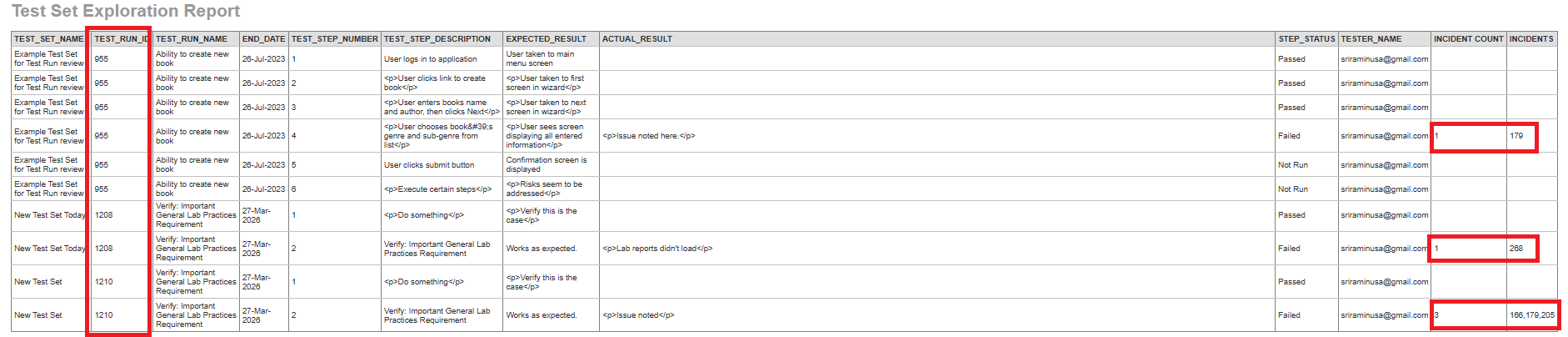
Given below is the report output.