Overview
Test cases can optionally be part of one or more test sets. When test cases are executed, incidents may be created. It is also important to keep in mind that the test cases are organized into a folder structure. Therefore, one request may be to identify both the test sets associated with the test sets for planning purposes and the incidents arising from the test case execution.
Data Setup
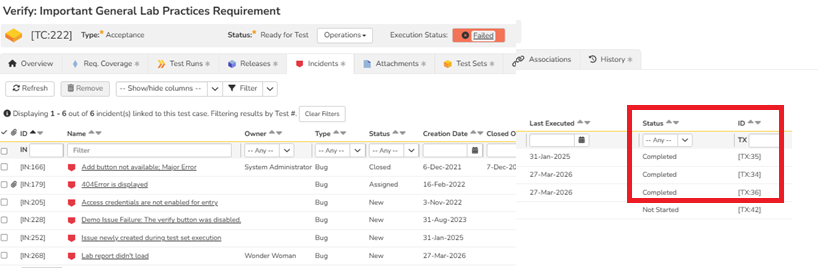
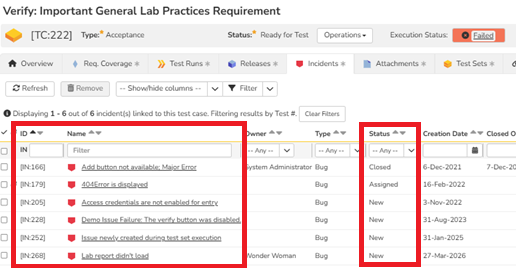
Here is an example of a Test Case to Test Set setup and Test Case to Incident setup for a currently failed test case.
Example of a Test Case mapped to Test Set
Example of a Test Case mapped to Incident
Report Creation Steps
- Go to the Administration section
- Go to the "Edit Reports" under the system settings
- Add a new report
- Give it a name
- Select the appropriate category (Test Case Reports)
- In the standard section of the report, please select "Test Case Details"
- Insert the attached XSLT into the "Template" section.
- Save the section
- Save the report
XSLT
<?xml version="1.0" encoding="utf-8"?>
<xsl:stylesheet version="1.0"
    xmlns:xsl="http://www.w3.org/1999/XSL/Transform"
    xmlns:msxsl="urn:schemas-microsoft-com:xslt"
    exclude-result-prefixes="msxsl">

  <!-- ========================================================= -->
  <!-- Key to identify unique Test Sets within each Test Case    -->
  <!-- ========================================================= -->
  <xsl:key name="TestSetByTestCase"
           match="TestRun[TestSetId]"
           use="concat(generate-id(ancestor::TestCase[1]), '|', TestSetId)"/>

  <xsl:template match="/TestCaseData">
    <div class="Title3">Failed Test Cases with Linked Incidents</div>
    <xsl:for-each select="TestCaseFolder">

      <!-- Only folders containing failed test cases -->
      <xsl:if test="TestCases/TestCase[ExecutionStatusName='Failed']">

        <div class="Title2">
          Folder: <xsl:value-of select="Name"/>
        </div>

        <table class="DataGrid">
          <tr>
            <th>Test Set(s)</th>
            <th>Folder</th>
            <th>Test Case ID</th>
            <th>Test Case Name</th>
            <th>Execution Status</th>
            <th>Linked Incidents</th>
          </tr>

          <xsl:for-each select="TestCases/TestCase[ExecutionStatusName='Failed']">
            <xsl:sort select="TestCaseId" data-type="number"/>
            <tr>

              <!-- ========================================= -->
              <!-- Test Sets (unique within Test Case)        -->
              <!-- ========================================= -->

              <td>
                <xsl:choose>
                  <xsl:when test="TestRuns/TestRun[TestSetId]">
                    <xsl:for-each select="
                      TestRuns/TestRun
                      [
                        generate-id()
                        =
                        generate-id(
                          key(
                            'TestSetByTestCase',
                            concat(generate-id(ancestor::TestCase[1]), '|', TestSetId)
                          )[1]
                        )
                      ]">

                      <xsl:sort select="TestSetId" data-type="number"/>
                      <xsl:value-of select="concat(TestSetId, ' - ', TestSetName)"/>
                      <xsl:if test="position()!=last()">
                        <br/>
                      </xsl:if>
                    </xsl:for-each>
                  </xsl:when>
                  <xsl:otherwise>-</xsl:otherwise>
                </xsl:choose>

              </td>

              <!-- Folder -->
              <td>
                <xsl:value-of select="../../Name"/>
              </td>

              <!-- Test Case ID -->
              <td>
                <xsl:value-of select="TestCaseId"/>
              </td>

              <!-- Test Case Name -->
              <td>
                <xsl:value-of select="Name"/>
              </td>

              <!-- Execution Status -->
              <td>
                <xsl:value-of select="ExecutionStatusName"/>
              </td>

              <!-- Linked Incidents -->
              <td>
                <xsl:choose>

                  <xsl:when test="Incidents/Incident">
                    <xsl:for-each select="Incidents/Incident">
                      <xsl:sort select="IncidentId"
                                data-type="number"/>

                      <xsl:value-of select="concat(IncidentId,
                                                   ' - ',
                                                   Name,
                                                   ' - ',
                                                   IncidentStatusName)"/>

                      <xsl:if test="position()!=last()">
                        <br/>
                      </xsl:if>
                    </xsl:for-each>
                  </xsl:when>
                  <xsl:otherwise>
                    None
                  </xsl:otherwise>
                </xsl:choose>
              </td>
            </tr>
          </xsl:for-each>
        </table>
      </xsl:if>
    </xsl:for-each>
  </xsl:template>
</xsl:stylesheet>
XSLT Explanation
- Starts at the XML root (TestCaseData).
- Examines each test case folder.
- Includes only folders containing failed test cases (ExecutionStatusName = 'Failed').
- Includes only failed test cases within those folders.
- Eliminates duplicate Test Set references using an XSLT key (TestSetByTestCase and later iterating for TestRuns).
- Reports the current execution status for each failed test case.
- Lists all linked incidents for each failed test case, ordered by Incident ID.
- Displays a placeholder when no Test Set or Incident information is available.
- Use "-" if no Test Sets are associated with a Test Case
- Concatenate Test Set ID - Test Set Name if available
- Use "None" if no Incidents exists for a "Failed" test case
- Concatenate "Incident ID - Incident Name - Incident Status" if available
Report Output
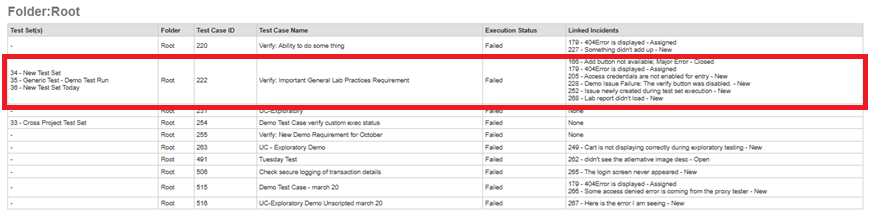
Given below is an example of a Test Case with associated Test Sets and Incidents under the root folder