Overview
- Spira supports a "Caution" status to mark the status of a test step during execution. This information is captured at the test run step level.
- The organizational practices may allow a test case to passed regardless of the test run 'caution' status or failed because not all the steps are marked as 'passed'. Therefore, this report should bring the latest test case execution status along with any test steps that are listed in the 'caution' status.
- To keep the report focused on the continual improvement process, only the cautioned test run steps in a test case are brought so that the the report is not long.
Data Setup
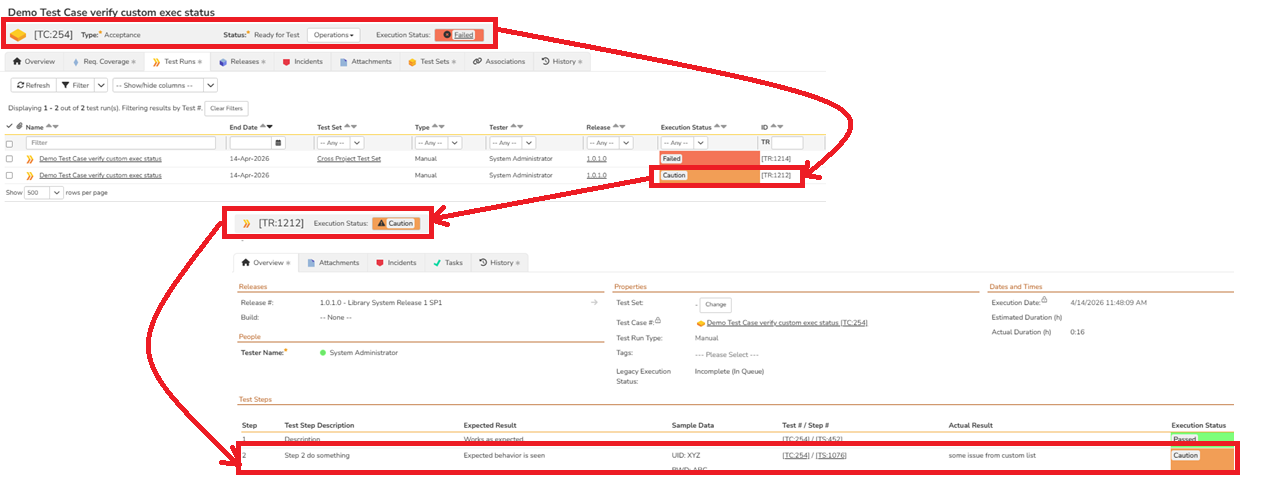
Given below is an example of a failed test case with two test runs. One of the test runs has test run steps in a caution state.
Steps
- Go to the Administration section
- Go to the "Edit Reports" under the system settings
- Add a new report
- Give it a name
- Select the appropriate category (Test Case Reports)
- Click on custom section of the report
- Give it a name (e.g.: "Caution Test Steps Report")
- Insert the ESQL query in the "Query" section
- Preview results for verification
- Click on Create Default Template (Note that this default template need not be modified)
- Save the section
- Save the report
ESQL
Given below is the example of the ESQL.
select
  R.TEST_CASE_ID,
  R.TEST_CASE_NAME,
  TC.EXECUTION_STATUS_NAME as TESTCASE_STATUS,
  R.EXECUTION_STATUS_NAME as TESTRUNSTEP_STATUS,
  R.EXPECTED_RESULT,
  R.ACTUAL_RESULT
from
  SpiraTestEntities6.R_TestRunSteps as R
join  SpiraTestEntities6.R_TestCases as TC on
  TC.TEST_CASE_ID = R.TEST_CASE_ID
where
  R.PROJECT_ID = ${ProjectId} and
  R.EXECUTION_STATUS_NAME="Caution"
ESQL Explanation
- The ESQL goes after the TestRunSteps
- It joins with the TestCases based on TEST_CASE_ID
- The where clause applies the current project filter and checks only for test run status = "Caution"
Report Output
Given below is the report output.
