Overview
- Spira automatically logs a CREATION_DATE when any incident is created.
- However, there are two additional dates (START_DATE, CLODED_ON) that needs to be filled by the team as part of their workflow.
- When an incident is picked for working on it, the START_DATE filled must be filled.
- When it is officially fixed, verified, validated, and approved as part of the triaging workflow, the CLOSED_ON field must be filled.
- But, if the workflow is not modified to fill the fields appropriately, these dates may be empty making it difficult to compute these turnaround time.
- Further, even if the workflow mandates it, the users with bulk edit privilege may bypass the workflow for ease of operation skipping the constraints put.
- The report logic uses a certain simplistic heuristics of using the current date and time so that these metrics are computed. The large metrics and the empty fields supplied in the report makes it easier to locate them and address the process workflow gaps.
Data Setup
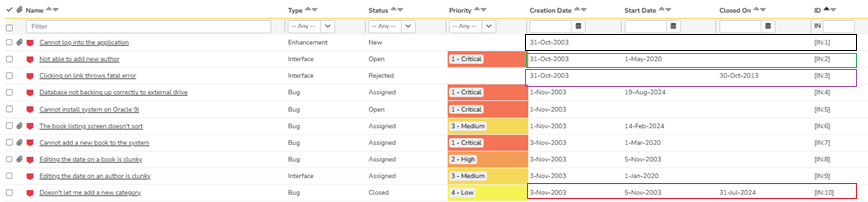
Given below is a screenshot. The Incidents 1, 2, 3, and 10 are specifically setup for the following scenarios.
- Incident 1 has both the start date and closed on fields empty.
- Incident 2 has the start date filled but closed on field empty.
- Incident 3 has the the start date empty but closed field filled.
- Incident 4 has both the start date and closed on fields filled.
Steps
- Add a new report
- Give it a name
- Select the custom section of the report
- Name the custom section
- Type the ESQL section from the file into the highlighted section.
- Click "Preview Results" to make sure the query is working.
- Click on "Create Default Template" (No Modification is required to the default XSLT).
- Save the section
- Save the report
ESQL
Given below is the ESQL for this report.
select
 R.INCIDENT_ID,
 R.NAME,
 R.CREATION_DATE,
 R.START_DATE,
 R.CLOSED_DATE,
 CASE WHEN R.START_DATE IS NOT NULL
  Then DiffDays(R.CREATION_DATE, R.START_DATE)
  else 0
 end as START_RESPONSE_TIME,
 CASE WHEN R.START_DATE IS NOT NULL Then
     CASE WHEN R.CLOSED_DATE IS NOT NULL Then
        DiffDays(R.START_DATE, R.CLOSED_DATE)
     else
        DiffDays(R.START_DATE, CurrentDateTime())
    end
 else
     CASE WHEN R.CLOSED_DATE IS NOT NULL Then
        DiffDays(R.CREATION_DATE, R.CLOSED_DATE)
      else
        DiffDays(R.CREATION_DATE, CurrentDateTime())
     end
 end as CURRENT_TIME_IF_NOT_CLOSED,
 R.INCIDENT_STATUS_NAME
from
 SpiraTestEntities.R_Incidents as R
where
 R.PROJECT_ID = ${ProjectId} and
 R.IS_DELETED = False
ESQL Explanation
- This ESQL is pretty straight forward as only one table is used.
- The complexity is in applying the logic based on two dates (START_DATE, CLOSED) and their values (empty, filled) giving four combinations.
- So, a CASE logic is applied on START DATE not being empty. Within that, we apply another CASE logic on CLOSED ON not being or being empty.
- If the outer CASE logic returns false (that is START DATE is empty), then another CASE logic apply on CLOSED ON not being or being empty.
- The final logic is as follows:
| START DATE | CLOSED DATE | Date Logic |
| Not Null | Not Null | CLOSED DATE - START DATE |
| Not Null | Null | Current DateTime - START DATE |
| Null | Not Null | CLOSED DATE - CREATION DATE |
| Null | Null | Current DateTime - CREATION DATE |
Report Output
Given below is the report output.

Alternatives
If you desire the start date response time to be the difference between current time and creation date if the start date is not filled, then, you can use the following instead "0"
else DiffDays(R.CREATION_DATE, CurrentDateTime())