Overview
Spira’s out-of-the-box standard reports showing only the date component or basic timestampsdate fields (such as `CreationDate`, `ExecutionDate`, or `LastUpdateDate`).
If your team needs full audit visibility - such as knowing the exact minute a test run finished or a change occurred - you can easily upgrade your cloned report. This article provides a reusable XSLT helper template that transforms raw ISO timestamps in any cloned report into a friendly date and 12-hour AM/PM time format (for example, "Aug 04, 2026 01:45 PM").
Solution
You can implement this solution in any custom XSLT report by adding a Named Template Helper to your stylesheet and calling it wherever a date/time string needs to be rendered.
Prerequisites:
Administrative Access: You must be logged in with System Administrator or Report Administrator privileges to access Spira System Administration and edit custom report templates
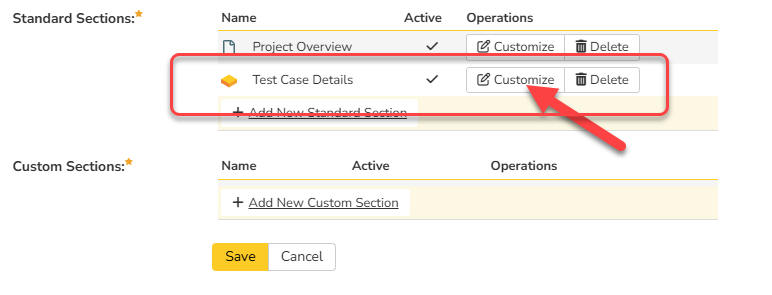
Cloned Report Template: Built-in standard reports in Spira are read-only and cannot be modified directly. You must first clone an existing standard report (e.g., Test Case Detail, Incident Summary, or Test Execution) to create an editable custom report copy. Once cloned, you need to Edit the cloned report and click on Customize the existing Standard section (In this case, Test Case Details):
Step 1: Add the Helper Template to Your XSLT
Paste the following XML snippet at the very bottom of your XSLT document, directly before the closing </xsl:stylesheet> tag:
<xsl:template name="format-date">
<xsl:param name="datetime"/>
<xsl:choose>
<xsl:when test="string-length($datetime) > 0">
<xsl:variable name="date" select="substring-before($datetime, 'T')" />
<xsl:variable name="year" select="substring-before($date, '-')" />
<xsl:variable name="month" select="substring-before(substring-after($date, '-'), '-')" />
<xsl:variable name="day" select="substring-after(substring-after($date, '-'), '-')" />
<xsl:variable name="raw-time" select="substring-after($datetime, 'T')" />
<xsl:variable name="clean-time">
<xsl:choose>
<xsl:when test="contains($raw-time, '.')">
<xsl:value-of select="substring-before($raw-time, '.')" />
</xsl:when>
<xsl:when test="contains($raw-time, 'Z')">
<xsl:value-of select="substring-before($raw-time, 'Z')" />
</xsl:when>
<xsl:otherwise>
<xsl:value-of select="$raw-time" />
</xsl:otherwise>
</xsl:choose>
</xsl:variable>
<!-- Hour & Minute Calculations -->
<xsl:variable name="hour-raw" select="number(substring($clean-time, 1, 2))" />
<xsl:variable name="minute" select="substring($clean-time, 4, 2)" />
<xsl:variable name="ampm">
<xsl:choose>
<xsl:when test="$hour-raw >= 12">PM</xsl:when>
<xsl:otherwise>AM</xsl:otherwise>
</xsl:choose>
</xsl:variable>
<xsl:variable name="hour12">
<xsl:choose>
<xsl:when test="$hour-raw = 0">12</xsl:when>
<xsl:when test="$hour-raw > 12">
<xsl:value-of select="format-number($hour-raw - 12, '00')"/>
</xsl:when>
<xsl:otherwise>
<xsl:value-of select="format-number($hour-raw, '00')"/>
</xsl:otherwise>
</xsl:choose>
</xsl:variable>
<!-- Month Lookup -->
<xsl:variable name="monthname">
<xsl:choose>
<xsl:when test="$month='01'">Jan</xsl:when>
<xsl:when test="$month='02'">Feb</xsl:when>
<xsl:when test="$month='03'">Mar</xsl:when>
<xsl:when test="$month='04'">Apr</xsl:when>
<xsl:when test="$month='05'">May</xsl:when>
<xsl:when test="$month='06'">Jun</xsl:when>
<xsl:when test="$month='07'">Jul</xsl:when>
<xsl:when test="$month='08'">Aug</xsl:when>
<xsl:when test="$month='09'">Sep</xsl:when>
<xsl:when test="$month='10'">Oct</xsl:when>
<xsl:when test="$month='11'">Nov</xsl:when>
<xsl:when test="$month='12'">Dec</xsl:when>
<xsl:otherwise></xsl:otherwise>
</xsl:choose>
</xsl:variable>
<!-- Output Format -->
<xsl:value-of select="concat($monthname, ' ', $day, ', ', $year, ' ', $hour12, ':', $minute, ' ', $ampm)" />
</xsl:when>
<xsl:otherwise></xsl:otherwise>
</xsl:choose>
</xsl:template>
Step 2: Call the Helper in Your Report Layout
Replace any direct <xsl:value-of select="[FieldName]"/> calls for date fields with a template invocation.
Example Call Structure:
<xsl:call-template name="format-date">
  <xsl:with-param name="datetime" select="CreationDate" />
</xsl:call-template>
Supported Fields Across Spira Artifacts:
This block can process any standard or custom Spira date-time XML element, including:
- Test Cases / Runs: CreationDate, ExecutionDate, LastUpdateDate
- Incidents / Requirements: CreationDate, DetectedDate, ClosedDate
- Custom Properties: <xsl:with-param name="datetime" select="Value" /> (when custom property type='Date')
Result Comparison
Raw Spira XML Data | Rendered Output |
2026-08-04T14:05:00Z | Aug 04, 2026 02:05 PM |
2026-01-15T09:30:15.123 | Jan 15, 2026 09:30 AM |
2026-12-31T00:00:00 | Dec 31, 2026 12:00 AM |
Customization Tips
If your organization prefers a different final format, update the concat(...) line at the very bottom of the helper template:
<xsl:value-of select="concat($day, '-', $monthname, '-', $year, ' ', $clean-time)" />
- US Standard Numeric (
08/04/2026 02:05 PM):
<xsl:value-of select="concat($month, '/', $day, '/', $year, ' ', $hour12, ':', $minute, ' ', $ampm)" />
Output result
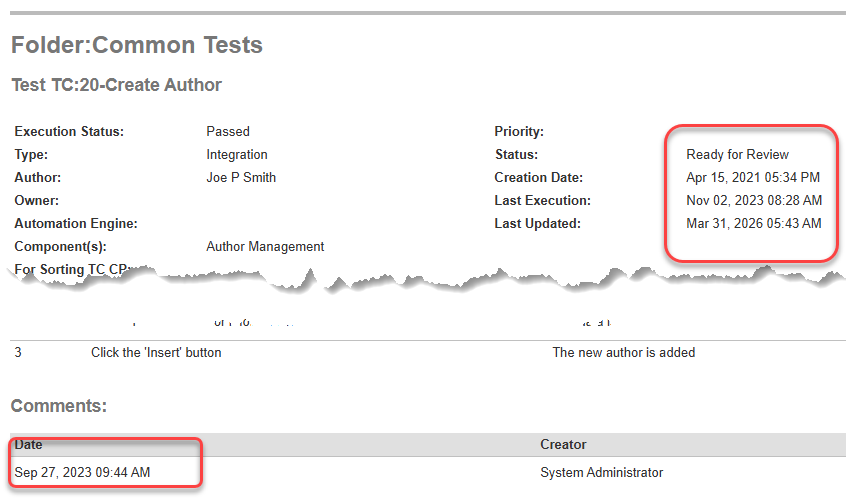
Once new XSLT template applied, you will be able to see the timestamp for all date type fields:
See attached sample XSLT report templates (ready to use), you just need to copy the content and paste into appropriate section.