Create a report:
This article assumes you are familiar with the basics of writing custom reports in Spira.
In this example we will build a custom report with custom ESQL section.
To create the report you need to:
- Go to Administration > Edit Reports
- Click on Create a new Report (at the bottom of the list of existing Reports)
- Specify HTML format (the dynamic elements won't work in Word/PDF/Excel)
- Choose to add a Custom Section:

The ESQL Query
5. Click Add New Custom Section and then
6. Copy and paste the below simple query to pull some incident information into the Query section of the window displayed:
SELECT value R
FROM SpiraTestEntities.R_Requirements AS R
WHERE R.PROJECT_ID = ${ProjectId}
  AND R.IS_DELETED = FALSE
You can click Preview Results button to see the sample of the results.
Configure the XSLT Template
7. Paste the following code into the Template (XSLT) editor of your Custom Section and click Save:
<?xml version="1.0" encoding="utf-8"?>
<xsl:stylesheet version="1.0" xmlns:xsl="http://www.w3.org/1999/XSL/Transform" xmlns:msxsl="urn:schemas-microsoft-com:xslt" exclude-result-prefixes="msxsl">
<!-- Muenchian Grouping Keys for Dynamic Option Extraction -->
<xsl:key name="k-type" match="ROW | Row" use="normalize-space(REQUIREMENT_TYPE_NAME | RequirementTypeName)" />
<xsl:key name="k-priority" match="ROW | Row" use="normalize-space(IMPORTANCE_NAME | ImportanceName)" />
<xsl:key name="k-status" match="ROW | Row" use="normalize-space(REQUIREMENT_STATUS_NAME | RequirementStatusName)" />
<xsl:key name="k-owner" match="ROW | Row" use="normalize-space(OWNER_NAME | OwnerName)" />
<xsl:key name="k-component" match="ROW | Row" use="normalize-space(COMPONENT_NAME | ComponentName)" />
<xsl:template match="/">
<div>
<style>
.filter-panel {
background-color: #f4f5f7;
border: 1px solid #dfe1e6;
border-radius: 4px;
padding: 15px;
margin-bottom: 20px;
display: flex;
flex-wrap: wrap;
gap: 15px;
font-family: Arial, sans-serif;
}
.filter-group {
display: flex;
flex-direction: column;
}
.filter-group label {
font-size: 11px;
font-weight: bold;
color: #5e6c84;
margin-bottom: 4px;
text-transform: uppercase;
}
.filter-group select {
padding: 6px 10px;
border-radius: 3px;
border: 1px solid #cccccc;
min-width: 150px;
}
.button-group {
display: flex;
gap: 10px;
align-items: flex-end;
margin-left: auto;
}
.action-btn {
padding: 7px 14px;
color: white;
border: none;
border-radius: 3px;
cursor: pointer;
font-weight: bold;
}
.apply-btn { background-color: #00875A; }
.apply-btn:hover { background-color: #00a36c; }
.reset-btn { background-color: #0052cc; }
.reset-btn:hover { background-color: #0065ff; }
</style>
<!-- Filter Controls Panel -->
<div class="filter-panel">
<div class="filter-group">
<label for="filterType">Type</label>
<select id="filterType">
<option value="">All Types</option>
<xsl:for-each select="(//ROW | //Row)[generate-id() = generate-id(key('k-type', normalize-space(REQUIREMENT_TYPE_NAME | RequirementTypeName))[1])]">
<xsl:sort select="normalize-space(REQUIREMENT_TYPE_NAME | RequirementTypeName)" />
<xsl:variable name="val" select="normalize-space(REQUIREMENT_TYPE_NAME | RequirementTypeName)" />
<xsl:if test="string-length($val) > 0">
<option value="{$val}"><xsl:value-of select="$val"/></option>
</xsl:if>
</xsl:for-each>
</select>
</div>
<div class="filter-group">
<label for="filterImportance">Priority / Importance</label>
<select id="filterImportance">
<option value="">All Priorities</option>
<xsl:for-each select="(//ROW | //Row)[generate-id() = generate-id(key('k-priority', normalize-space(IMPORTANCE_NAME | ImportanceName))[1])]">
<xsl:sort select="normalize-space(IMPORTANCE_NAME | ImportanceName)" />
<xsl:variable name="val" select="normalize-space(IMPORTANCE_NAME | ImportanceName)" />
<xsl:if test="string-length($val) > 0">
<option value="{$val}"><xsl:value-of select="$val"/></option>
</xsl:if>
</xsl:for-each>
</select>
</div>
<div class="filter-group">
<label for="filterStatus">Status</label>
<select id="filterStatus">
<option value="">All Statuses</option>
<xsl:for-each select="(//ROW | //Row)[generate-id() = generate-id(key('k-status', normalize-space(REQUIREMENT_STATUS_NAME | RequirementStatusName))[1])]">
<xsl:sort select="normalize-space(REQUIREMENT_STATUS_NAME | RequirementStatusName)" />
<xsl:variable name="val" select="normalize-space(REQUIREMENT_STATUS_NAME | RequirementStatusName)" />
<xsl:if test="string-length($val) > 0">
<option value="{$val}"><xsl:value-of select="$val"/></option>
</xsl:if>
</xsl:for-each>
</select>
</div>
<div class="filter-group">
<label for="filterOwner">Owner</label>
<select id="filterOwner">
<option value="">All Owners</option>
<xsl:for-each select="(//ROW | //Row)[generate-id() = generate-id(key('k-owner', normalize-space(OWNER_NAME | OwnerName))[1])]">
<xsl:sort select="normalize-space(OWNER_NAME | OwnerName)" />
<xsl:variable name="val" select="normalize-space(OWNER_NAME | OwnerName)" />
<xsl:if test="string-length($val) > 0">
<option value="{$val}"><xsl:value-of select="$val"/></option>
</xsl:if>
</xsl:for-each>
</select>
</div>
<div class="filter-group">
<label for="filterComponent">Component</label>
<select id="filterComponent">
<option value="">All Components</option>
<xsl:for-each select="(//ROW | //Row)[generate-id() = generate-id(key('k-component', normalize-space(COMPONENT_NAME | ComponentName))[1])]">
<xsl:sort select="normalize-space(COMPONENT_NAME | ComponentName)" />
<xsl:variable name="val" select="normalize-space(COMPONENT_NAME | ComponentName)" />
<xsl:if test="string-length($val) > 0">
<option value="{$val}"><xsl:value-of select="$val"/></option>
</xsl:if>
</xsl:for-each>
</select>
</div>
<div class="button-group">
<!-- Inline Apply Filter Logic -->
<button type="button" class="action-btn apply-btn">
<xsl:attribute name="onclick">
var ids=['Type','Importance','Status','Owner','Component'];
var f={};
for(var i=0; i<ids.length; i++){
var e=document.getElementById('filter'+ids[i]);
f[ids[i]] = e ? e.value.trim().toLowerCase() : '';
}
var rows=document.getElementById('reqReportTable').getElementsByTagName('tr');
for(var i=1; i<rows.length; i++){
var r=rows[i];
if(!r.hasAttribute('data-type')) continue;
var match=true;
for(var j=0; j<ids.length; j++){
var fVal = f[ids[j]];
var rVal = (r.getAttribute('data-'+ids[j].toLowerCase())||'').trim().toLowerCase();
if(fVal !== '' && fVal !== rVal) { match=false; break; }
}
r.style.display = match ? '' : 'none';
}
</xsl:attribute>
Apply Filters
</button>
<!-- Inline Reset Filter Logic -->
<button type="button" class="action-btn reset-btn">
<xsl:attribute name="onclick">
var ids=['Type','Importance','Status','Owner','Component'];
for(var i=0; i<ids.length; i++){
var e=document.getElementById('filter'+ids[i]);
if(e) e.value='';
}
var rows=document.getElementById('reqReportTable').getElementsByTagName('tr');
for(var i=1; i<rows.length; i++){
if(rows[i].hasAttribute('data-type')) rows[i].style.display='';
}
</xsl:attribute>
Reset Filters
</button>
</div>
</div>
<!-- Report Table -->
<table class="DataGrid" id="reqReportTable" style="width:100%">
<thead>
<tr>
<th>Req #</th>
<th>Name</th>
<th>Description</th>
<th>Type</th>
<th>Priority</th>
<th>Status</th>
<th>Author</th>
<th>Owner</th>
<th>Component</th>
<th>Creation Date</th>
<th>Last Modified</th>
<th>Release #</th>
<th>Estimate</th>
<th>Est. Effort</th>
</tr>
</thead>
<tbody>
<xsl:for-each select="//ROW | //Row">
<xsl:variable name="reqId" select="normalize-space(REQUIREMENT_ID | RequirementId)" />
<xsl:variable name="reqName" select="normalize-space(NAME | Name)" />
<xsl:variable name="desc" select="DESCRIPTION | Description" />
<xsl:variable name="typeName" select="normalize-space(REQUIREMENT_TYPE_NAME | RequirementTypeName)" />
<xsl:variable name="importance" select="normalize-space(IMPORTANCE_NAME | ImportanceName)" />
<xsl:variable name="status" select="normalize-space(REQUIREMENT_STATUS_NAME | RequirementStatusName)" />
<xsl:variable name="author" select="normalize-space(AUTHOR_NAME | AuthorName)" />
<xsl:variable name="owner" select="normalize-space(OWNER_NAME | OwnerName)" />
<xsl:variable name="component" select="normalize-space(COMPONENT_NAME | ComponentName)" />
<xsl:variable name="creationDate" select="normalize-space(CREATION_DATE | CreationDate)" />
<xsl:variable name="updateDate" select="normalize-space(LAST_UPDATE_DATE | LastUpdateDate)" />
<xsl:variable name="release" select="normalize-space(RELEASE_VERSION_NUMBER | ReleaseVersionNumber)" />
<xsl:variable name="estimate" select="normalize-space(ESTIMATE_POINTS | EstimatePoints)" />
<xsl:variable name="effort" select="normalize-space(ESTIMATED_EFFORT | EstimatedEffort)" />
<xsl:variable name="isSummary" select="normalize-space(IS_SUMMARY | IsSummary)" />
<xsl:variable name="indent" select="normalize-space(INDENT_LEVEL | IndentLevel)" />
<tr data-type="{$typeName}"
data-importance="{$importance}"
data-status="{$status}"
data-owner="{$owner}"
data-component="{$component}">
<td>RQ<xsl:value-of select="$reqId"/></td>
<td>
<xsl:attribute name="style">
padding-left: <xsl:value-of select="string-length($indent)*6"/>px;
</xsl:attribute>
<xsl:if test="$isSummary='true' or $isSummary='True' or $isSummary='1'">
<b><xsl:value-of select="$reqName"/></b>
</xsl:if>
<xsl:if test="not($isSummary='true' or $isSummary='True' or $isSummary='1')">
<xsl:value-of select="$reqName"/>
</xsl:if>
</td>
<td><xsl:value-of select="$desc" disable-output-escaping="yes"/></td>
<td><xsl:value-of select="$typeName"/></td>
<td><xsl:value-of select="$importance"/></td>
<td><xsl:value-of select="$status"/></td>
<td><xsl:value-of select="$author"/></td>
<td><xsl:value-of select="$owner"/></td>
<td><xsl:value-of select="$component"/></td>
<td class="Date">
<xsl:call-template name="format-date">
<xsl:with-param name="datetime" select="$creationDate" />
</xsl:call-template>
</td>
<td class="Date">
<xsl:call-template name="format-date">
<xsl:with-param name="datetime" select="$updateDate" />
</xsl:call-template>
</td>
<td><xsl:value-of select="$release"/></td>
<td class="Timespan"><xsl:value-of select="$estimate" /></td>
<td class="Timespan"><xsl:value-of select="$effort" /></td>
</tr>
</xsl:for-each>
</tbody>
</table>
</div>
</xsl:template>
<!-- Friendly Date & Time Formatter -->
<xsl:template name="format-date">
<xsl:param name="datetime"/>
<xsl:choose>
<xsl:when test="string-length($datetime) > 0">
<xsl:variable name="date" select="substring-before($datetime, 'T')" />
<xsl:variable name="year" select="substring-before($date, '-')" />
<xsl:variable name="month" select="substring-before(substring-after($date, '-'), '-')" />
<xsl:variable name="day" select="substring-after(substring-after($date, '-'), '-')" />
<xsl:variable name="raw-time" select="substring-after($datetime, 'T')" />
<xsl:variable name="clean-time">
<xsl:choose>
<xsl:when test="contains($raw-time, '.')">
<xsl:value-of select="substring-before($raw-time, '.')" />
</xsl:when>
<xsl:when test="contains($raw-time, 'Z')">
<xsl:value-of select="substring-before($raw-time, 'Z')" />
</xsl:when>
<xsl:otherwise>
<xsl:value-of select="$raw-time" />
</xsl:otherwise>
</xsl:choose>
</xsl:variable>
<xsl:variable name="hour-raw" select="number(substring($clean-time, 1, 2))" />
<xsl:variable name="minute" select="substring($clean-time, 4, 2)" />
<xsl:variable name="ampm">
<xsl:choose>
<xsl:when test="$hour-raw >= 12">PM</xsl:when>
<xsl:otherwise>AM</xsl:otherwise>
</xsl:choose>
</xsl:variable>
<xsl:variable name="hour12">
<xsl:choose>
<xsl:when test="$hour-raw = 0">12</xsl:when>
<xsl:when test="$hour-raw > 12">
<xsl:value-of select="format-number($hour-raw - 12, '00')"/>
</xsl:when>
<xsl:otherwise>
<xsl:value-of select="format-number($hour-raw, '00')"/>
</xsl:otherwise>
</xsl:choose>
</xsl:variable>
<xsl:variable name="monthname">
<xsl:choose>
<xsl:when test="$month='01'">Jan</xsl:when>
<xsl:when test="$month='02'">Feb</xsl:when>
<xsl:when test="$month='03'">Mar</xsl:when>
<xsl:when test="$month='04'">Apr</xsl:when>
<xsl:when test="$month='05'">May</xsl:when>
<xsl:when test="$month='06'">Jun</xsl:when>
<xsl:when test="$month='07'">Jul</xsl:when>
<xsl:when test="$month='08'">Aug</xsl:when>
<xsl:when test="$month='09'">Sep</xsl:when>
<xsl:when test="$month='10'">Oct</xsl:when>
<xsl:when test="$month='11'">Nov</xsl:when>
<xsl:when test="$month='12'">Dec</xsl:when>
<xsl:otherwise></xsl:otherwise>
</xsl:choose>
</xsl:variable>
<xsl:value-of select="concat($monthname, ' ', $day, ', ', $year, ' ', $hour12, ':', $minute, ' ', $ampm)" />
</xsl:when>
<xsl:otherwise></xsl:otherwise>
</xsl:choose>
</xsl:template>
</xsl:stylesheet>
Verification Steps
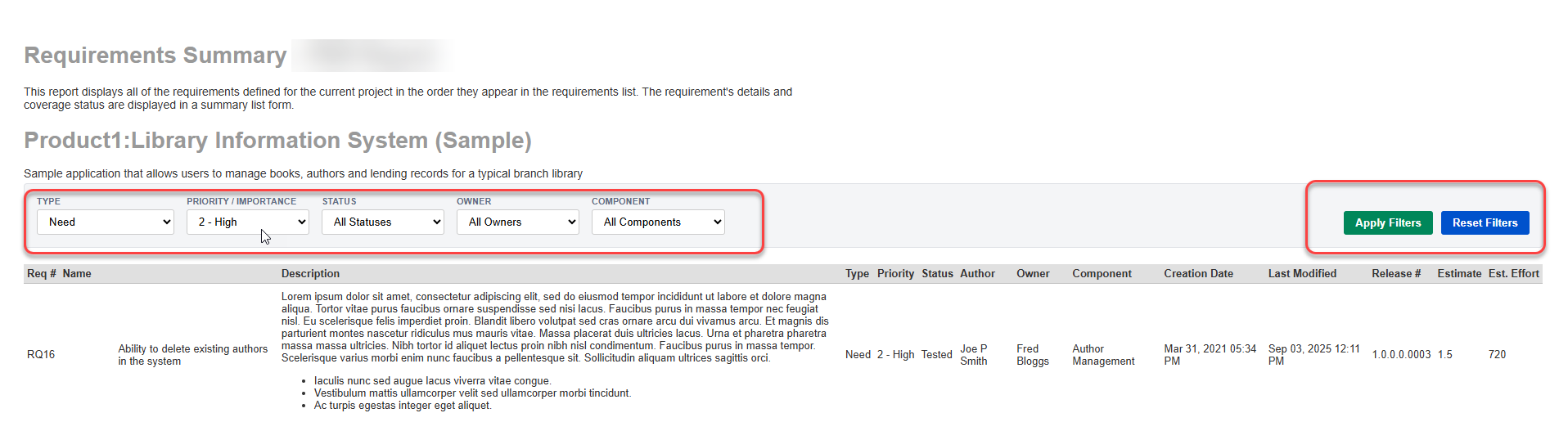
Navigate to the Reports menu and run your new Custom Report.
Select HTML as the export format and click Generate Report.
Select desired filter values from the Type, Priority, Status, Owner, or Component dropdowns.
Click Apply Filters. The table will immediately update to display matching requirements.
Click Reset Filters to clear selections and display all records.
How to Extend the Report with Additional Dropdown Filters
To add a new filter dropdown (for example, Author), update the XSLT code across 4 key areas.
1. Define a new grouping key
At the top of your XSLT stylesheet (alongside the existing <xsl:key> tags), add a grouping key to extract unique values for the new field:
<xsl:key name="k-author" match="ROW | Row" use="normalize-space(AUTHOR_NAME | AuthorName)" />
2. Add the dropdown select control
Inside the <div class="filter-panel"> section, add a new .filter-group block for the dropdown. Replace Author with your new field name:
<div class="filter-group">
<label for="filterAuthor">Author</label>
<select id="filterAuthor">
<option value="">All Authors</option>
<xsl:for-each select="(//ROW | //Row)[generate-id() = generate-id(key('k-author', normalize-space(AUTHOR_NAME | AuthorName))[1])]">
<xsl:sort select="normalize-space(AUTHOR_NAME | AuthorName)" />
<xsl:variable name="val" select="normalize-space(AUTHOR_NAME | AuthorName)" />
<xsl:if test="string-length($val) > 0">
<option value="{$val}"><xsl:value-of select="$val"/></option>
</xsl:if>
</xsl:for-each>
</select>
</div>
3. Attach the data attribute to table rows
Scroll down to the <tbody> row loop <tr ...> and add a matching data-* attribute so the filter engine can compare the row value against the dropdown selection:
<!-- Example: Added data-author attribute -->
<tr data-type="{$typeName}"
    data-importance="{$importance}"
    data-status="{$status}"
    data-owner="{$owner}"
    data-component="{$component}"
    data-author="{$author}">
4. Update the JavaScript ids array in buttons
Update the var ids array in the onclick attributes of both the Apply Filters and Reset Filters buttons to include your new filter ID suffix ('Author'):
In Apply Filters Button:
// Append 'Author' to the ids array
var ids=['Type','Importance','Status','Owner','Component','Author'];
In Reset Filters Button:
// Append 'Author' to the ids array
var ids=['Type','Importance','Status','Owner','Component','Author'];
Note: Ensure the column selected in your ESQL query matches the field name used in the grouping key (e.g., AUTHOR_NAME or AuthorName).
Example output: