Overview
In computing time elapsed metrices like lead time, cycle time, turn around time and response time, customers can use the ESQL function (DiffDays) to compute the difference between two date values. But, when the duration spans over a weekend or nationally recognized holidays, then, the canonical custom ESQL functions does not directly provide an easier way to address them. This need can be augmenting the XSLT with custom JavaScript function.
Data Setup
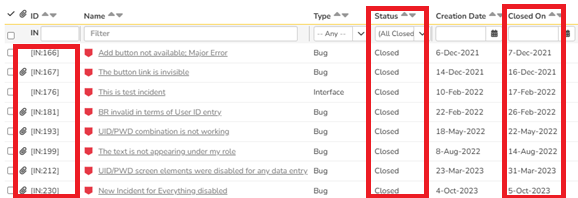
In this article, we will use turnaround time as an example. Please refer to earlier KB912 that explains the SQL Query in Part 1 to develop the data set that looks for data where the incident creation date is after 2020. For illustration, the data set we are using is as follows. You can see here that we are bringing all closed incidents and that the column "closed on" is filled in. In the
Steps
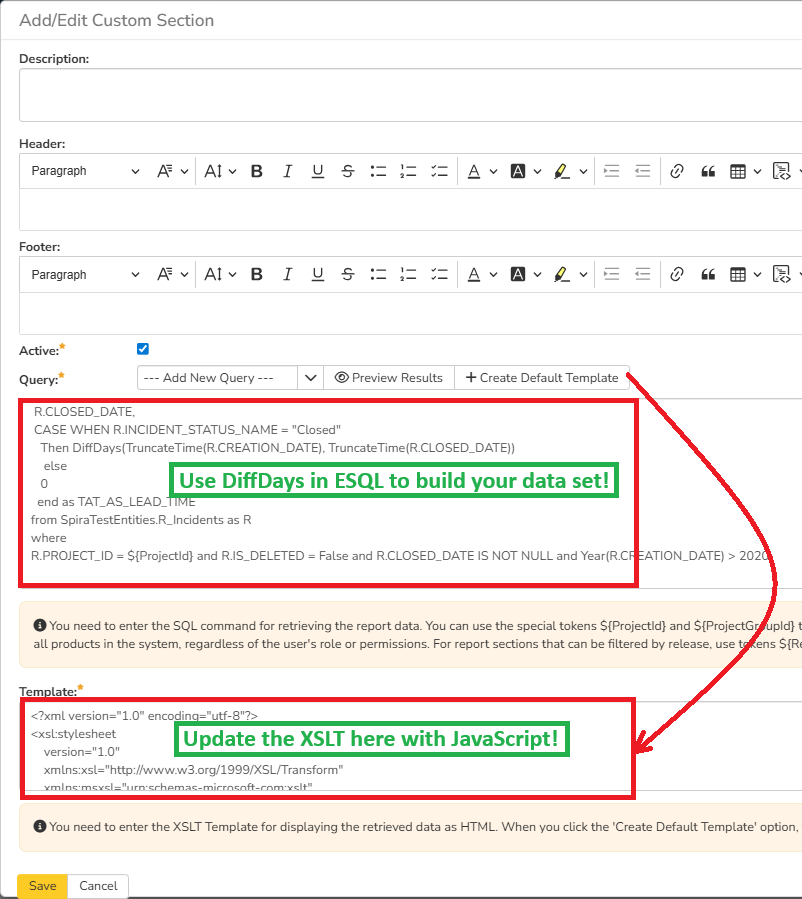
Once the ESQL query has been created, you can click on the "Create Default Template" to create the XSLT. Given below is the screenshot confirming where you would use ESQL to build the required result set and update the XSLT with additional logic involving JavaScript.
XSLT Update
Update the XSLT section with the following code.
<?xml version="1.0" encoding="utf-8"?>
<xsl:stylesheet
    version="1.0"
    xmlns:xsl="http://www.w3.org/1999/XSL/Transform"
    xmlns:msxsl="urn:schemas-microsoft-com:xslt"
    xmlns:js="urn:custom-js"
    exclude-result-prefixes="msxsl js">

  <!-- ===========================
       JavaScript (JScript) business-day logic
       ===========================

    businessDays(startDate, endDate)
 - startDate, endDate: YYYY-MM-DD (We already pass substring-before(...,'T') to remove timestamps)
    - holidaysCSV: See section below where the company recognized holidays observed for the years needed
    Behavior: count workdays from (start+1) through end inclusive, skipping Sat/Sun and holidays.
  -->
  <msxsl:script language="JScript" implements-prefix="js">
  <![CDATA[
    function businessDays(startDateText, endDateText) {
        // Validate inputs
        if (!startDateText || !endDateText) return "0";

        // Normalize & trim
        startDateText = startDateText.toString().replace(/^\s+|\s+$/g, "");
        endDateText   = endDateText.toString().replace(/^\s+|\s+$/g, "");

        // Parse YYYY-MM-DD into numeric components
        var sParts = startDateText.split("-");
        var eParts = endDateText.split("-");

        if (sParts.length < 3 || eParts.length < 3) return "0";

        var sY = parseInt(sParts[0], 10);
        var sM = parseInt(sParts[1], 10) - 1;
        var sD = parseInt(sParts[2], 10);

        var eY = parseInt(eParts[0], 10);
        var eM = parseInt(eParts[1], 10) - 1;
        var eD = parseInt(eParts[2], 10);

        if (isNaN(sY) || isNaN(sM) || isNaN(sD) ||
            isNaN(eY) || isNaN(eM) || isNaN(eD)) {
            return "0";
        }

        // Construct Date objects
        var start = new Date(sY, sM, sD);
        var end = new Date(eY, eM, eD);

        if (isNaN(start) || isNaN(end)) return "0";

        var HOLIDAYS = [
            // -- 2021 Holidays --
            "2021-03-24",
            "2021-03-27",
           // -- 2022 Holidays --
            "2022-02-15",
            "2022-02-24",
           // -- 2023 Holidays --
            "2023-03-24",
            "2023-03-27"
        ];

        // Start counting from the day AFTER start
        var d = new Date(start);
        d.setDate(d.getDate() + 1);

        // Normalize time to midnight
        d.setHours(0,0,0,0);
        end.setHours(0,0,0,0);

        // If the first candidate day is after end -> zero
        if (d > end) return "0";

        var count = 0;

        while (d <= end) {

            var dow = d.getDay(); // 0=Sun,6=Sat

            // Build ISO date
            var yyyy = d.getFullYear();
            var mm   = (d.getMonth()+1 < 10 ? "0" : "") + (d.getMonth()+1);
            var dd   = (d.getDate() < 10 ? "0" : "") + d.getDate();
            var iso  = yyyy + "-" + mm + "-" + dd;

            // Check holiday inline — no helper function!
            var isHoliday = false;
            var i;
            for (i = 0; i < HOLIDAYS.length; i++) {
                if (HOLIDAYS[i] === iso) {
                    isHoliday = true;
                    break;
                }
            }

            // Count only weekdays & not holidays
            if (dow != 0 && dow != 6 && !isHoliday) {
                count++;
            }

            d.setDate(d.getDate() + 1);
        }

        return count.toString();
    }
  ]]>
  </msxsl:script>

  <!-- MAIN TEMPLATE (keeps your existing layout) -->
  <xsl:template match="/RESULTS">
    <table class="DataGrid">
      <tr>
        <th>INCIDENT_ID</th>
        <th>SEVERITY</th>
        <th>NAME</th>
        <th>CREATION_DATE</th>
        <th>CLOSED_DATE</th>
        <th>TAT_AS_LEAD_TIME</th>
        <th>TAT_AS_LT_WITHOUT_WKEND_HOLIDAY</th>
      </tr>

      <xsl:for-each select="ROW">
        <tr>
          <td><xsl:value-of select="INCIDENT_ID"/></td>
          <td><xsl:value-of select="SEVERITY"/></td>
          <td><xsl:value-of select="NAME"/></td>
		  <td class="Date">
		     <xsl:call-template name="format-date">
		     <xsl:with-param name="datetime" select="CREATION_DATE" />
		  </xsl:call-template>
		  </td>
		  <td class="Date">
           <xsl:call-template name="format-date">
		     <xsl:with-param name="datetime" select="CLOSED_DATE" />
		    </xsl:call-template>
		  </td>
          <td style="text-align: center;"><xsl:value-of select="TAT_AS_LEAD_TIME"/></td>

          <!-- Pass date-only strings and optional holidays CSV as 3rd arg -->
          <td style="text-align: center;">
            <xsl:value-of
              select="js:businessDays(string(substring-before(CREATION_DATE, 'T')), string(substring-before(CLOSED_DATE, 'T')))"
            />
          </td>
        </tr>
      </xsl:for-each>

    </table>
  </xsl:template>

  <xsl:template name="format-date">
    <xsl:param name="datetime"/>
    <xsl:variable name="date" select="substring-before($datetime, 'T')" />
    <xsl:variable name="year" select="substring-before($date, '-')" />
    <xsl:variable name="month" select="substring-before(substring-after($date, '-'), '-')" />
    <xsl:variable name="day" select="substring-after(substring-after($date, '-'), '-')" />
    <xsl:variable name="time" select="substring-before(substring-after($datetime, 'T'), '.')" />
    <xsl:variable name="monthname">
      <xsl:choose>
        <xsl:when test="$month='01'">
          <xsl:value-of select="'Jan'"/>
        </xsl:when>
        <xsl:when test="$month='02'">
          <xsl:value-of select="'Feb'"/>
        </xsl:when>
        <xsl:when test="$month='03'">
          <xsl:value-of select="'Mar'"/>
        </xsl:when>
        <xsl:when test="$month='04'">
          <xsl:value-of select="'Apr'"/>
        </xsl:when>
        <xsl:when test="$month='05'">
          <xsl:value-of select="'May'"/>
        </xsl:when>
        <xsl:when test="$month='06'">
          <xsl:value-of select="'Jun'"/>
        </xsl:when>
        <xsl:when test="$month='07'">
          <xsl:value-of select="'Jul'"/>
        </xsl:when>
        <xsl:when test="$month='08'">
          <xsl:value-of select="'Aug'"/>
        </xsl:when>
        <xsl:when test="$month='09'">
          <xsl:value-of select="'Sep'"/>
        </xsl:when>
        <xsl:when test="$month='10'">
          <xsl:value-of select="'Oct'"/>
        </xsl:when>
        <xsl:when test="$month='11'">
          <xsl:value-of select="'Nov'"/>
        </xsl:when>
        <xsl:when test="$month='12'">
          <xsl:value-of select="'Dec'"/>
        </xsl:when>
        <xsl:otherwise>
          <xsl:value-of select="''" />
        </xsl:otherwise>
      </xsl:choose>
    </xsl:variable>
    <xsl:value-of select="concat($day, '-' ,$monthname, '-', $year , ' ', $time)" />
  </xsl:template>
</xsl:stylesheet>
Explanation
There is a lot of logic built in here. So, let us go through some of these essential areas.
XSLT Explanation
1. In the XSLT portion where there is a table header, you will see an entry. This is where you would name the column. In this case, we are calling Turn Around Time as lead time without weekend and holidays (TAT_AS_LT_WITHOUT_WKEND_HOLIDAY).
<th>TAT_AS_LT_WITHOUT_WKEND_HOLIDAY</th>
2. Since we are suppressing the time component, we are reformatting the date with a <format-date> template newly created. The details of the template is inside a separate section. For every date field added, apply this logic. The following snippet shows how this is applied.
<td class="Date">
 <xsl:call-template name="format-date">
   <xsl:with-param name="datetime" select="CLOSED_DATE" />
 </xsl:call-template>
</td>
3. Spira stores both the date and time component. Computing the weekends and holidays will be very involved if the timestamp is also included where there will have to be additional considerations for start/close on midnight and timezone considerations to one particular timezone and converting them back. To keep this simple, we are removing the time component. So, we are using the XSLT functions string and substring-before to suppress the time component that appears after the prefix T.
select="js:businessDays(string(substring-before(CREATION_DATE, 'T')), string(substring-before(CLOSED_DATE, 'T')))"/>
4. Since the turnaround time metric is a number, we center it with the HTML align property.
<td style="text-align: center;">
5. Now, we invoke js:businessdays. The "js" must align with the implement-prefix where the script language is set. Note that JScript is a Microsoft version of JavaScript.
<msxsl:script language="JScript" implements-prefix="js">
JavaScript Explanation
In the JavaScript, we are handling two things. The first is computing the weekend. The second is suppressing known holidays listed explicitly.
1. We receive the dates as string and want to ensure that we are getting rid of white spaces. Then, we do some error checking to avoid any computation if data is bad.
        // Validate inputs
        if (!startDateText || !endDateText) return "0";

        // Normalize & trim
        startDateText = startDateText.toString().replace(/^\s+|\s+$/g, "");
        endDateText   = endDateText.toString().replace(/^\s+|\s+$/g, "");

        // Parse YYYY-MM-DD into numeric components
        var sParts = startDateText.split("-");
        var eParts = endDateText.split("-");

        if (sParts.length < 3 || eParts.length < 3) return "0";

        var sY = parseInt(sParts[0], 10);
        var sM = parseInt(sParts[1], 10) - 1;
        var sD = parseInt(sParts[2], 10);

        var eY = parseInt(eParts[0], 10);
        var eM = parseInt(eParts[1], 10) - 1;
        var eD = parseInt(eParts[2], 10);

        if (isNaN(sY) || isNaN(sM) || isNaN(sD) ||
            isNaN(eY) || isNaN(eM) || isNaN(eD)) {
            return "0";
        }

        // Construct Date objects
        var start = new Date(sY, sM, sD);
        var end = new Date(eY, eM, eD);

        if (isNaN(start) || isNaN(end)) return "0";
2. We build an array called HOLIDAYS and list all our holidays there.
- Note that we are intentionally not seeking any APIs or calling external helper functions to determine holidays because they may not be accurate, raise security issues and performance issues.
- We are avoiding building the list of holidays as a CSV or XML file externally to be called in here as that would require IT system admin access to put the file in the right location and then refer it from within the JavaScript! It may invoke additional administrative challenges to maintain this.
- Since a customer may have teams in different parts of the world, this gets too complicated. So, we request that the customer incrementally updates the holidays.
        var HOLIDAYS = [
            // -- 2021 Holidays --
            "2021-03-24",
            "2021-03-27",
           // -- 2022 Holidays --
            "2022-02-15",
            "2022-02-24",
           // -- 2023 Holidays --
            "2023-03-24",
            "2023-03-27"
        ];
3. We are looping through every date in between these two dates.
- We compute the day of the week using the built in JavaScript function (getDay) defined on the JavaScript. It returns 0 for Sun, 1 for Mon, 2 for Tue, 3 for Wed, 4 for Thu, 5 for Fri, and 6 for Sat.
- After we have accounted for the day to be a weekend AND if the weekday is NOT a holiday, we iterate through this. Only portions of the code that shows this logic is shown below.
- The logic starts from the day after the first date. So, if we say an incident (in our example, IN 212) was created on Mar 23, 2023 and closed on Mar 31, 2023, the elapsed days will be a total of eight (8) days (24th, 25th, 26th, 27th, 28th, 29th, 30th, and 31st). It is in this set, we will remove weekends and any listed holidays.
       while (d <= end) {

            var dow = d.getDay(); // 0=Sun,6=Sat

            // Build ISO date
            var yyyy = d.getFullYear();
            var mm   = (d.getMonth()+1 < 10 ? "0" : "") + (d.getMonth()+1);
            var dd   = (d.getDate() < 10 ? "0" : "") + d.getDate();
            var iso  = yyyy + "-" + mm + "-" + dd;

            // Check holiday inline — no helper function!
            var isHoliday = false;
            var i;
            for (i = 0; i < HOLIDAYS.length; i++) {
                if (HOLIDAYS[i] === iso) {
                    isHoliday = true;
                    break;
                }
            }

            // Count only weekdays & not holidays
            if (dow != 0 && dow != 6 && !isHoliday) {
                count++;
            }

            d.setDate(d.getDate() + 1);
        }
Report Output
Given below is the report output for the data set up earlier.
- Highlighted in red is the new column computed for every record and for every day between the two dates (creation and closed, in this example).
- Shown in green is an example we will evaluate for accuracy.

Validating Accuracy
- Earlier, we mentioned that the number of days elapsed for an incident 212 that was created on March 23, 2023 and closed on March 31, 2023 had 8 days. You can see this appear as 8 in the first column (show after the dates in green box but outside of the red box).
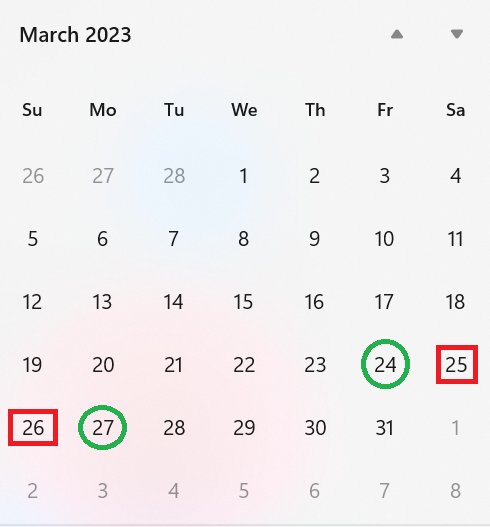
- Let us review the March 2023 calendar below. The weekend is highlighted in red boxes for our IN 212 date range. The days March 24 and March 27 were listed as holidays in the Holidays array.
- So, we remove the 2 weekends and 2 holidays from our data range for IN 212, we get 4 (8 elapsed days - 2 weekend days - 2 holidays).
Additional Thoughts
- The holidays listed in the Holidays array is edited directly. It should be listed in the YYYY-MM-DD format.
- Since days may not be passed in this format for the dates in the ESQL query, we are sending them as text, extracting individual components and constructing the date ourself. To ensure that it is suppressed against the holidays listed in the YYYY-MM-DD format, we are also creating the ISO standard format of the date.
- You can use the comment line used in JavaScript to create a single line comment so that you can keep track of the holidays spreading over multiple years. But, please make sure that these lines are single lines.
- Each date entry in the Holiday list has a double quote around it. This is the ASCII version of a double quote. If you use Word or other Rich Text Editors that allows smart quotes, then, the script will fail.
- The comma should be appearing after the double quote ends for every date entry except the very last date entry as the array is ending.
- Counting is from (StartDate + 1) to End Date in the JavaScript. That is, it excludes start date but includes the end date since we are doing this counting in the script.
- We are suppressing the Time component as discussed already and so look only for date component (i.e., year, month, date).
- If you want to have another metric like response time or cycle time, you may have to duplicate a column and call the script again but passing the appropriate date columns so long as that is available as part of your data set.
- Think about the data set in your report, number of date metrics, and the extreme date ranges for some data! The report is running for every date for every metric (turn around time, response time) within the date ranges for every row. So, if you have several hundred rows with date ranges exceeding huge gaps, you may encounter slower performance.