Create a report:
This article assumes you are familiar with the basics of writing custom reports in Spira.
To create a clone of the existing report you need to:
- Log in to Spira as a Report Administrator.
- Go to Administration-> System-> Edit Reports.
- Click Clone to the existing built-in (non-editable) report, Requirement Summary in this case
- Give it a meaningful name like "Requirement Summary - user details"
- Select output formats you'd like to export data to
- You should see two entries under the Standard Section:
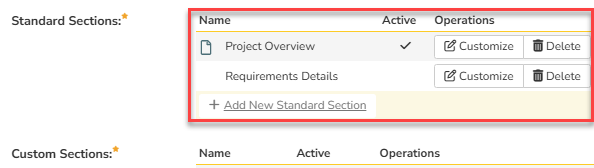
- Custom Section is yet empty
Identifying fields for building custom ESQL query:
- Open a new tab and generate a standard Requirement Summary report as-is
- You should get the report as designed:
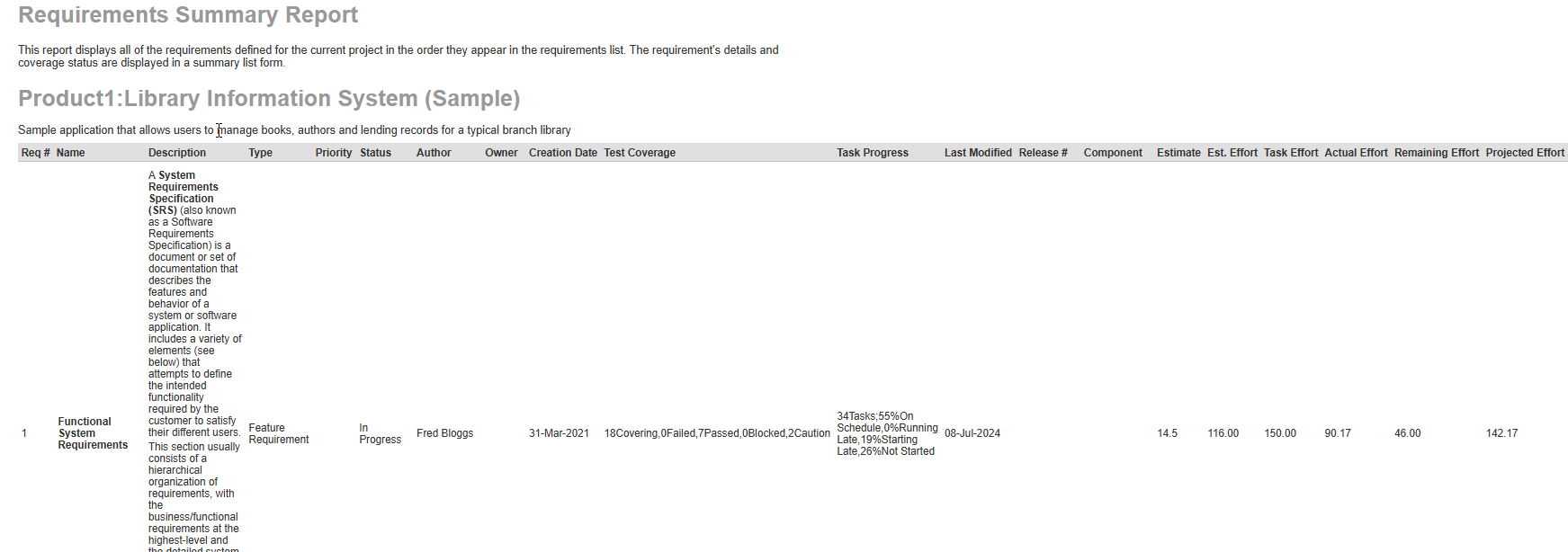
- Based on displayed fields, identify the columns we need to include in our custom query (since there is no original ESQL query in standard reports).
These are:
R.Requirement_ID, R.INDENT_LEVEL, R.Is_Summary, R.Name, R.Description, R.Requirement_Type_Name, R.Importance_Name, R.REQUIREMENT_STATUS_NAME AS RequirementStatusName, R.AUTHOR_NAME, R.OWNER_NAME, R.Creation_Date, R.COVERAGE_COUNT_TOTAL, R.COVERAGE_COUNT_PASSED, R.COVERAGE_COUNT_FAILED, R.COVERAGE_COUNT_CAUTION, R.COVERAGE_COUNT_BLOCKED, R.TASK_COUNT, R.TASK_PERCENT_ON_TIME, R.TASK_PERCENT_LATE_FINISH, R.TASK_PERCENT_NOT_START, R.TASK_PERCENT_LATE_START, R.LAST_UPDATE_DATE, R.RELEASE_VERSION_NUMBER, R.Component_Name, R.Estimate_Points, R.Estimated_Effort, R.Task_Estimated_Effort, R.Task_Actual_Effort, R.Task_Remaining_Effort, R.Task_Projected_Effort
New fields we need to add - not part of the Requirement or Task standard report view:
For Author:
U1.Department AS AuthorDepartment, U1.Organization AS AuthorOrganization.
For Owner:
U2.Department AS OwnerDepartment, U2.Organization AS OwnerOrganization.
Note: This needs to be done for each new artifact summary report, since the query columns are not the same.
Custom ESQL Query:
- In the report configuration, click Add on Custom Section
- Paste the following Entity SQL into the query box:
SELECT
    R.Requirement_ID,
    R.INDENT_LEVEL,
    R.Is_Summary,
    R.Name,
    R.Description,
    R.Requirement_Type_Name,
    R.Importance_Name,
    R.REQUIREMENT_STATUS_NAME AS RequirementStatusName,
    R.AUTHOR_NAME,
    U1.Department AS AuthorDepartment,
    U1.Organization AS AuthorOrganization,
    R.OWNER_NAME,
    U2.Department AS OwnerDepartment,
    U2.Organization AS OwnerOrganization,
    R.Creation_Date,
    R.COVERAGE_COUNT_TOTAL, R.COVERAGE_COUNT_PASSED, R.COVERAGE_COUNT_FAILED, R.COVERAGE_COUNT_CAUTION, R.COVERAGE_COUNT_BLOCKED,
    R.TASK_COUNT, R.TASK_PERCENT_ON_TIME, R.TASK_PERCENT_LATE_FINISH, R.TASK_PERCENT_NOT_START, R.TASK_PERCENT_LATE_START,
    R.LAST_UPDATE_DATE,
    R.RELEASE_VERSION_NUMBER,
    R.Component_Name,
    R.Estimate_Points, R.Estimated_Effort, R.Task_Estimated_Effort, R.Task_Actual_Effort, R.Task_Remaining_Effort, R.Task_Projected_Effort
FROM SpiraTestEntities.R_Requirements AS R
LEFT JOIN SpiraTestEntities.R_Users AS U1 ON R.AUTHOR_ID = U1.USER_ID
LEFT JOIN SpiraTestEntities.R_Users AS U2 ON R.OWNER_ID = U2.USER_ID
WHERE R.PROJECT_ID = ${ProjectId} AND R.IS_DELETED = False
ORDER BY R.Requirement_Id ASC
ESQL query explanation:
- Since the User information is not a part of RequirementData template, we need to use a JOIN in our custom query:-- Join for Author
LEFT JOIN SpiraTestEntities.R_Users AS U1 ON R.AUTHOR_ID = U1.USER_ID
-- Join for Owner
LEFT JOIN SpiraTestEntities.R_Users AS U2 ON R.OWNER_ID = U2.USER_ID
- We need to filter items that were deleted from the UI but still exist in the database, together with filtering artifacts that belong to the current product only:
WHERE R.PROJECT_ID = ${ProjectId} AND R.IS_DELETED = False
- Ordering by ascending for ease navigation:
ORDER BY R.Requirement_Id ASC
Custom XSLT template:
Unlike the default XSLT Template given in the built-in report's standard section, customized report requires XSLT template changes as well.
Here is the ready-to-use one, just copy and paste it into Template text box:
<?xml version="1.0" encoding="utf-8"?>
<xsl:stylesheet version="1.0" xmlns:xsl="http://www.w3.org/1999/XSL/Transform" xmlns:msxsl="urn:schemas-microsoft-com:xslt" exclude-result-prefixes="msxsl">
  <xsl:template match="/RESULTS">
    <table class="DataGrid" style="width:100%">
      <tr>
        <th>Req #</th>
        <th>Name</th>
        <th>Description</th>
        <th>Type</th>
        <th>Priority</th>
        <th>Status</th>
        <th>Author</th>
        <th>Author Dept</th>
        <th>Author Org</th>
        <th>Owner</th>
        <th>Owner Dept</th>
        <th>Owner Org</th>
        <th>Creation Date</th>
        <th>Test Coverage</th>
        <th>Task Progress</th>
        <th>Last Modified</th>
        <th>Release #</th>
        <th>Component</th>
        <th>Estimate</th>
        <th>Est. Effort</th>
        <th>Task Effort</th>
        <th>Actual Effort</th>
        <th>Remaining Effort</th>
        <th>Projected Effort</th>
      </tr>
      <xsl:for-each select="ROW">
        <tr>
          <td>
            <xsl:value-of select="Requirement_ID"/>
          </td>
          <td>
            <xsl:attribute name="style">
              padding-left: <xsl:value-of select="string-length(IndentLevel)*2"/>px;
            </xsl:attribute>
              <xsl:choose>
                <xsl:when test="Is_Summary='True'">
                    <b><xsl:value-of select="Name"/></b>
                </xsl:when>
                <xsl:otherwise>
                    <xsl:value-of select="Name"/>
                </xsl:otherwise>
            </xsl:choose>
          </td>
          <td>
            <xsl:value-of select="Description" disable-output-escaping="yes"/>
          </td>
          <td>
            <xsl:value-of select="Requirement_Type_Name"/>
          </td>
          <td>
            <xsl:value-of select="Importance_Name"/>
          </td>
          <td>
            <xsl:value-of select="RequirementStatusName"/>
          </td>
          <td>
            <xsl:value-of select="AUTHOR_NAME"/>
          </td>
          <td>
            <xsl:value-of select="AuthorDepartment"/>
          </td>
          <td>
            <xsl:value-of select="AuthorOrganization"/>
          </td>
         <td>
            <xsl:value-of select="OWNER_NAME"/>
          </td>
          <td>
            <xsl:value-of select="OwnerDepartment"/>
          </td>
          <td>
            <xsl:value-of select="OwnerOrganization"/>
          </td>
          <td class="Date">
            <xsl:call-template name="format-date">
              <xsl:with-param name="datetime" select="Creation_Date" />
            </xsl:call-template>
          </td>
          <td>
            <xsl:value-of select="COVERAGE_COUNT_TOTAL"/><xsl:text> </xsl:text>Covering,
            <xsl:value-of select="COVERAGE_COUNT_FAILED"/><xsl:text> </xsl:text>Failed,
            <xsl:value-of select="COVERAGE_COUNT_PASSED"/><xsl:text> </xsl:text>Passed,
            <xsl:value-of select="COVERAGE_COUNT_BLOCKED"/><xsl:text> </xsl:text>Blocked,
            <xsl:value-of select="COVERAGE_COUNT_CAUTION"/><xsl:text> </xsl:text>Caution
          </td>
          <td>
            <xsl:value-of select="TASK_COUNT"/><xsl:text> </xsl:text>Tasks;
            <xsl:value-of select="TASK_PERCENT_ON_TIME"/>%<xsl:text> </xsl:text>On Schedule,
            <xsl:value-of select="TASK_PERCENT_LATE_FINISH"/>%<xsl:text> </xsl:text>Running Late,
            <xsl:value-of select="TASK_PERCENT_NOT_START"/>%<xsl:text> </xsl:text>Starting Late,
            <xsl:value-of select="TASK_PERCENT_LATE_START"/>%<xsl:text> </xsl:text>Not Started
          </td>
          <td class="Date">
            <xsl:call-template name="format-date">
              <xsl:with-param name="datetime" select="LAST_UPDATE_DATE" />
            </xsl:call-template>
          </td>
          <td>
            <xsl:value-of select="RELEASE_VERSION_NUMBER"/>
          </td>
          <td>
            <xsl:value-of select="Component_Name"/>
          </td>
          <td class="Timespan">
            <xsl:value-of select="Estimate_Points" />
          </td>
          <td class="Timespan">
            <xsl:value-of select="Estimated_Effort" />
          </td>
          <td class="Timespan">
            <xsl:value-of select="Task_Estimated_Effort" />
          </td>
          <td class="Timespan">
            <xsl:value-of select="Task_Actual_Effort" />
          </td>
          <td class="Timespan">
            <xsl:value-of select="Task_Remaining_Effort" />
          </td>
          <td class="Timespan">
            <xsl:value-of select="Task_Projected_Effort" />
          </td>
        </tr>
      </xsl:for-each>
    </table>
  </xsl:template>

  <xsl:template name="format-date">
    <xsl:param name="datetime"/>
    <xsl:variable name="date" select="substring-before($datetime, 'T')" />
    <xsl:variable name="year" select="substring-before($date, '-')" />
    <xsl:variable name="month" select="substring-before(substring-after($date, '-'), '-')" />
    <xsl:variable name="day" select="substring-after(substring-after($date, '-'), '-')" />
    <xsl:variable name="time" select="substring-before(substring-after($datetime, 'T'), '.')" />
    <xsl:variable name="monthname">
      <xsl:choose>
        <xsl:when test="$month='01'">Jan</xsl:when>
        <xsl:when test="$month='02'">Feb</xsl:when>
        <xsl:when test="$month='03'">Mar</xsl:when>
        <xsl:when test="$month='04'">Apr</xsl:when>
        <xsl:when test="$month='05'">May</xsl:when>
        <xsl:when test="$month='06'">Jun</xsl:when>
        <xsl:when test="$month='07'">Jul</xsl:when>
        <xsl:when test="$month='08'">Aug</xsl:when>
        <xsl:when test="$month='09'">Sep</xsl:when>
        <xsl:when test="$month='10'">Oct</xsl:when>
        <xsl:when test="$month='11'">Nov</xsl:when>
        <xsl:when test="$month='12'">Dec</xsl:when>
        <xsl:otherwise></xsl:otherwise>
      </xsl:choose>
    </xsl:variable>

    <xsl:if test="$date != ''">
        <xsl:value-of select="concat($day, '-' ,$monthname, '-', $year , ' ', $time)" />
    </xsl:if>
    <xsl:if test="$date = ''">
        <xsl:value-of select="$datetime" />
    </xsl:if>
  </xsl:template>
</xsl:stylesheet>
Changes explanation:
- Original template matches match="/RequirementData" template, while the modified one works with match="/RESULTS", typical for ESQL query export.
- Original template works with select="Requirement" while the custom one queries select="ROW". This is due to the data items are now generic rows rather than specific "Requirement" objects.
- Added Author and Owner details by splitting: Author into Author, Author Dept, and Author Organd Owner into Owner, Owner Dept, and Owner Org.
Note: This needs to be done for each new artifact summary report, since the query columns are not the same.
Preliminary results:
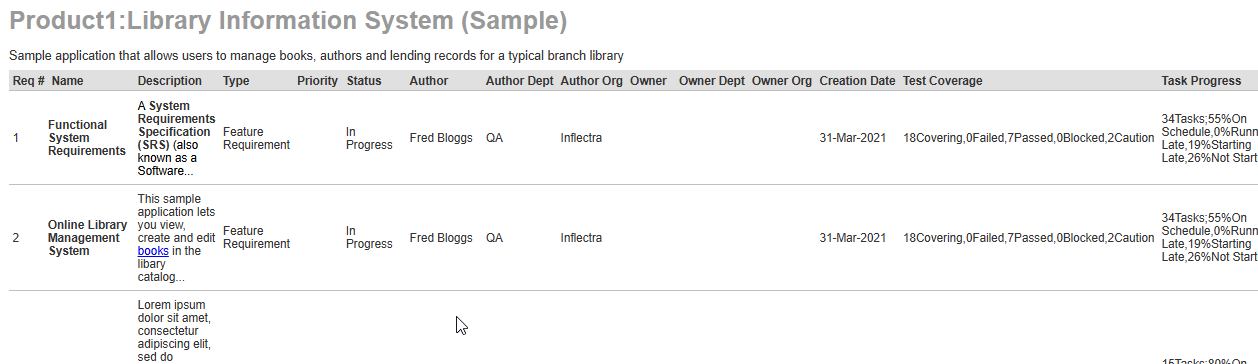
You should get after saving report and its execution something similar to this:
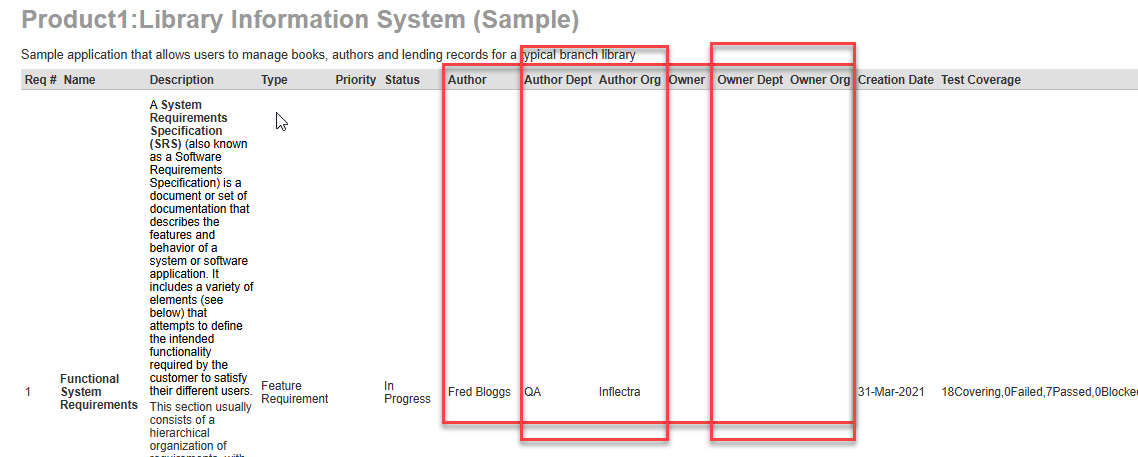
Note: Do not forget to delete the original Requirement Details standard section, so to avoid duplication of output.
Other summary reports - Test Case summary
For test cases, the query will be:
SELECT
  TC.Test_Case_Id AS Test_Case_ID,
  TC.Name AS Name,
  TC.Description AS Description,
  TC.Test_Case_Priority_name AS Priority_Name,
  TC.Execution_Status_name AS Execution_Status_Name,
  TC.Test_Case_Type_name AS Type_Name,
  TC.Test_Case_Status_name AS Status_Name,
  TCF.Name AS Folder_Name,
  TC.Test_Case_Folder_Id AS Folder_Id, -- Added for grouping
  TC.Author_Name AS AUTHOR_NAME,
  Auth.Department AS Author_Department,
  Auth.Organization AS Author_Organization,
  TC.Owner_Name AS OWNER_NAME,
  Own.Department AS Owner_Department,
  Own.Organization AS Owner_Organization,
  TC.Automation_Engine_Name AS Automation_Engine,
  Comp.Name AS Component_Name,
  TC.Estimated_Duration AS Est_Duration,
  TC.Creation_Date AS Creation_Date,
  TC.Last_Update_Date AS Last_Update_Date,
  TC.Execution_Date AS Last_Executed_Date,
  TS.Position AS Step_Number,
  TS.Description AS Step_Description,
  TS.Expected_Result AS Step_Expected_Result,
  TS.Sample_Data AS Step_Sample_Data

FROM SpiraTestEntities.R_TestCases AS TC
-- Join Folder
LEFT JOIN SpiraTestEntities.R_TestCaseFolders AS TCF ON TC.Test_Case_Folder_Id = TCF.Test_Case_Folder_Id
-- Join Author
LEFT JOIN SpiraTestEntities.R_Users AS Auth ON TC.Author_Id = Auth.User_Id
-- Join Owner
LEFT JOIN SpiraTestEntities.R_Users AS Own ON TC.Owner_Id = Own.User_Id
-- Join Component
LEFT JOIN SpiraTestEntities.R_Components AS Comp
  ON (',' + TC.Component_Ids + ',') LIKE ('%,' + CAST(Comp.Component_Id AS Edm.String) + ',%')
-- Join Test Steps
LEFT JOIN SpiraTestEntities.R_TestSteps AS TS ON TC.Test_Case_Id = TS.Test_Case_Id

WHERE TC.Project_Id = ${ProjectId} AND TC.Is_Deleted = False
ORDER BY TCF.Name ASC, TC.Test_Case_Id DESC, TS.Position ASC
Now, its time to align XSLT template to the original, so to keep the structure of the report to be the same, but now with a Organization and Department details in it:
<?xml version="1.0" encoding="utf-8"?>
<xsl:stylesheet version="1.0" xmlns:xsl="http://www.w3.org/1999/XSL/Transform" xmlns:msxsl="urn:schemas-microsoft-com:xslt" exclude-result-prefixes="msxsl">
<xsl:key name="folder_group" match="ROW" use="Folder_Id" />
<xsl:key name="testcase_group" match="ROW" use="Test_Case_ID" />
<xsl:template match="/RESULTS">
<table class="DataGrid">
<tr>
<th>Test #</th>
<th>Name</th>
<th>Description</th>
<th>Priority</th>
<th>#</th>
<th>Step Desc</th>
<th>Exp Result</th>
<th>Sample Data</th>
<th>Exec. Status</th>
<th>Type</th>
<th>Status</th>
<th>Author</th>
<th>Author Org</th>
<th>Author Dept</th>
<th>Owner</th>
<th>Owner Org</th>
<th>Owner Dept</th>
<th>Automation Engine</th>
<th>Component</th>
<th>Est. Duration</th>
<th>Created On</th>
<th>Last Modified</th>
<th>Last Executed</th>
</tr>
<xsl:for-each select="ROW[generate-id() = generate-id(key('folder_group', Folder_Id)[1])]">
<xsl:variable name="current_folder_id" select="Folder_Id"/>
<tr>
<td>
<b>
<xsl:value-of select="count(key('folder_group', $current_folder_id)[generate-id() = generate-id(key('testcase_group', Test_Case_ID)[1])])"/>
</b>
</td>
<td>
<b>
<xsl:choose>
<xsl:when test="Folder_Name != ''">
<xsl:value-of select="Folder_Name"/>
</xsl:when>
<xsl:otherwise>Root</xsl:otherwise>
</xsl:choose>
</b>
</td>
<td colspan="21" style="background-color:#eee;"></td>
</tr>
<xsl:for-each select="key('folder_group', $current_folder_id)">
<xsl:if test="generate-id() = generate-id(key('testcase_group', Test_Case_ID)[1])">
<xsl:variable name="current_tc_id" select="Test_Case_ID"/>
<tr>
<td><xsl:value-of select="Test_Case_ID"/></td>
<td><xsl:value-of select="Name"/></td>
<td>
<xsl:choose>
<xsl:when test="string-length(Description) > 150">
<xsl:value-of select="substring(Description, 1, 150)" disable-output-escaping="yes"/>...
</xsl:when>
<xsl:otherwise>
<xsl:value-of select="Description" disable-output-escaping="yes"/>
</xsl:otherwise>
</xsl:choose>
</td>
<td><xsl:value-of select="Priority_Name"/></td>
<td></td><td></td><td></td><td></td>
<td><xsl:value-of select="Execution_Status_Name"/></td>
<td><xsl:value-of select="Type_Name"/></td>
<td><xsl:value-of select="Status_Name"/></td>
<td><xsl:value-of select="AUTHOR_NAME"/></td>
<td><xsl:value-of select="Author_Organization"/></td>
<td><xsl:value-of select="Author_Department"/></td>
<td><xsl:value-of select="OWNER_NAME"/></td>
<td><xsl:value-of select="Owner_Organization"/></td>
<td><xsl:value-of select="Owner_Department"/></td>
<td><xsl:value-of select="Automation_Engine"/></td>
<td><xsl:value-of select="Component_Name"/></td>
<td><xsl:value-of select="Est_Duration"/></td>
<td><xsl:call-template name="format-date"><xsl:with-param name="datetime" select="Creation_Date"/></xsl:call-template></td>
<td><xsl:call-template name="format-date"><xsl:with-param name="datetime" select="Last_Update_Date"/></xsl:call-template></td>
<td><xsl:call-template name="format-date"><xsl:with-param name="datetime" select="Last_Executed_Date"/></xsl:call-template></td>
</tr>
<xsl:for-each select="key('testcase_group', $current_tc_id)">
<xsl:if test="Step_Number != ''">
<tr>
<td></td><td></td><td></td><td></td>
<td><xsl:value-of select="Step_Number"/></td>
<td><xsl:value-of select="Step_Description" disable-output-escaping="yes"/></td>
<td><xsl:value-of select="Step_Expected_Result" disable-output-escaping="yes"/></td>
<td><xsl:value-of select="Step_Sample_Data" disable-output-escaping="yes"/></td>
<td colspan="15"></td>
</tr>
</xsl:if>
</xsl:for-each>
</xsl:if>
</xsl:for-each>
</xsl:for-each>
</table>
</xsl:template>
<xsl:template name="format-date">
<xsl:param name="datetime"/>
<xsl:if test="$datetime != ''">
<xsl:value-of select="substring-before($datetime, 'T')"/>
</xsl:if>
</xsl:template>
</xsl:stylesheet>
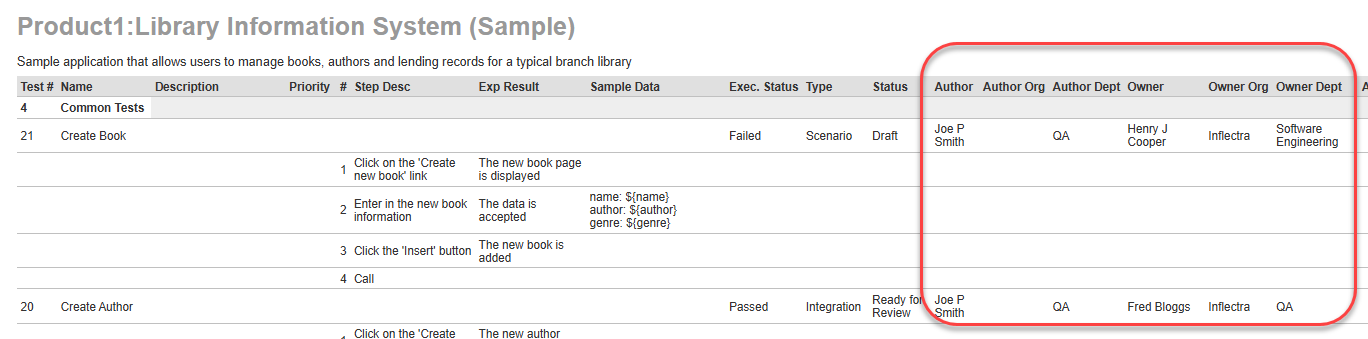
You should get the report, similar to standard with Organization and Department included:
Fine-Tuning: Description field
As you can see, due to the large description the row is getting to stretched.
We can modify this by setting specific width value and limiting the number of characters to be displayed:
For that, replace the <th> tag row #9 with
<th style="width: 40%">Description</th>
And
Replace the row #49-51 with the following:
<td>
<xsl:choose>
<xsl:when test="string-length(Description) > 150">
<xsl:value-of select="substring(Description, 1, 150)" disable-output-escaping="yes"/>...
</xsl:when>
<xsl:otherwise>
<xsl:value-of select="Description" disable-output-escaping="yes"/>
</xsl:otherwise>
</xsl:choose>
</td>
As a result of the report execution, you should get the output similar to this: