Rapise vs. Selenium WebDriver: 2026 Comparison of Automated Testing Platforms
When companies evaluate test automation tools for web testing, they often face a similar question: Should we use commercial tools like Rapise or open source tools like Selenium? Today, we’ll dig deeper into this comparison to highlight the advantages of each tool and what situations and environments each might lose some of its value.
Key Takeaways of Rapise vs. Selenium:
- Engineering Control & Language Freedom: Selenium offers more flexibility than Rapise here, supporting a multitude of languages and an API-first design that provides more comprehensive framework control. Keep in mind that teams will need to be comfortable building this surrounding tooling.
- AI Features Becoming a Baseline Expectation: As AI becomes table stakes for testing tools, Selenium has the required flexibility but lacks the out-of-the-box capabilities to incorporate these features. Rapise’s native AI tools are tightly coupled to execution, such as self-healing, AI during playback, parameterized AI commands, etc.
- Test Maintenance Pain Points: Rapise’s SmartAction, paired with its advanced self-healing, can smoothly recover from broken locators, log what changed, and generate a patch that you can review and apply to keep the repository current. Selenium significantly lags in this area, requiring significantly more manual upkeep.
- Scope of Automated Testing: Selenium is primarily focused on testing and automating web browsers for users with programming knowledge. Rapise can automate across web browsers, desktop apps, mobile systems, APIs, ERPs, and more for scripted and scriptless methods (for both technical and non-technical users), reducing tool sprawl.
- Operational Visibility as a Differentiator: Because of its open-source nature, Selenium often relies on external systems stitched together to create a “system of record.” Rapise and SpiraTest form a single system for natively scheduling tests, archiving results, and linking outcomes to QA artifacts.
Rapise vs. Selenium WebDriver: Overview Table
To help you better understand the similarities and differences between Rapise and Selenium WebDriver, we’ve compiled the following table that provides an overview of some of the features that should be expected in modern test automation platforms:
|
Feature |
Selenium |
|
|
Setup and Configuration Factors |
||
|
Easy installation for non-programmers |
✅ Yes |
❌ No |
|
Technology Support Factors |
||
|
Desktop application automated testing |
✅ Yes |
❌ No |
|
Web browser application automated testing |
✅ Yes |
✅ Yes |
|
Mobile application automated testing |
✅ Yes |
❌ No |
|
API automated testing |
✅ Yes |
❌ No |
|
Native AI-driven workflows |
✅ Yes |
❌ No |
|
Object Identification Factors |
||
|
Robust object identification |
✅ Yes |
✅ Yes |
|
Use of XPath expressions |
✅ Yes |
✅ Yes |
|
Use of CSS expressions |
✅ Yes |
✅ Yes |
|
Integrated web-spy tools |
✅ Yes |
❌ No |
|
UI Object Tree Editor |
✅ Yes |
❌ No, UI objects have to be managed on the code level |
|
Automatic UI object synchronization |
✅ Yes |
❌ No |
|
Self-healing tests that adapt automatically to changes |
✅ Yes |
❌ No |
|
Support for Dynamic IDs Factors |
||
|
Robust identification |
✅ Yes |
✅ Yes |
|
Customizable XPath generator with choice of methodologies out of the box (ARIA, IDs, indexes, etc.) |
✅ Yes |
❌ No |
|
Record and Learning Factors |
||
|
Recording of test scripts |
✅ Yes |
❌ No |
|
Actions table for editing recorded steps |
✅ Yes |
❌ No |
|
Maintainability Factors |
||
|
Easy maintenance |
✅ Yes |
❌ No |
|
Scriptless authoring for writing tests |
✅ Yes, via RVL |
❌ No |
|
Built-in programming language for script-based tests |
✅ Yes (JavaScript) |
❌ No |
|
Web profiles are used to train for each application under test |
✅ Yes |
❌ No |
|
Flaky-test handling |
✅ SmartAction can “wait” or “skip” optional actions based on AI inspection |
❌ Manual waits and branching logic |
|
Test management and traceability |
✅ Tight unification with SpiraTest |
❌ Requires external tools and custom integrations |
|
Reusability Factors |
||
|
Easy modularization and reusability |
✅ Yes |
❌ No click & go functionality, understanding of object-oriented programming required |
|
Execute Factors (Local & Remote) |
||
|
Easy execution of tests with local dashboards for executing tests |
✅ Yes |
❌ No |
|
Web-based test management that allows easy execution on multiple machines and environments |
✅ Yes |
❌ No |
|
Support and Assistance Factors |
||
|
Public forums |
✅ Yes |
✅ Yes |
|
Dedicated support team |
✅ Yes |
❌ No |
|
Personalized email support |
✅ Yes |
❌ No |
|
Personalized phone support |
✅ Yes |
❌ No |
|
Ideal User |
Teams looking for a single, enterprise-ready, and AI-enhanced automation platform across web, desktop, mobile, API, and more. |
Engineering-led teams who want a free, code-first way to automate web browsers. |
Key Advantages of Rapise
- Broader Automation Scope: From the Rapise platform, teams can automate web, desktop, mobile, APIs, and ERP systems. This consolidates automation environments, even when coverage extends beyond the browser, while Selenium is primarily for browser automation.
- Out-of-the-Box Test Governance: Because it integrates seamlessly with SpiraTest to form a unified system, automated tests can be stored with version control, scheduled for execution on multiple remote machines, and report results back into the centralized QA system. Selenium requires separate tooling and add-ons for the equivalent “system of record.”
- AI-Based Self-Healing: Instead of basic “retry logic,” Rapise features SmartAction that pairs a human-readable object description with the intended action to recover when the underlying locator breaks. This self-healing layer for web tests provides more advanced maintainability than tools like Selenium.
- Scriptless Automation for Non-Developers: Rapise offers codeless authoring for QA and domain testers. On the other hand, Selenium is a code API and therefore requires programming skills and knowledge to build and maintain test suites. Rapise also offers scripting, but has the flexibility to support teams that are not all developers.
- Embedded AI Workflows: Inflectra.ai has been integrated as a core component of Rapise rather than added like a simple plugin. This built-in functionality for Rapise enables parameterized AI commands from plain language, synthetic data generation, test step translation, and more.
Key Advantages of Selenium
- Fully Open Source: Because Selenium’s source code is freely available and community-driven, there are no license fees. This makes it a great fit for teams that need to optimize tool costs or fit open-source stacks, but keep in mind that paid add-ons are commonly sold to enhance Selenium’s capabilities.
- Broad Language Support: Selenium officially supports Java, JavaScript, Python, C#, Ruby, and Kotlin for ample flexibility. Automation engineers who use more niche languages in their apps or DevOps ecosystems will benefit from this versatility.
- Massive Community and Ecosystem: The adoption and open source nature of Selenium means that it has vast amounts of examples, libraries, and 3rd-party integrations. Rapise has plenty of integrations to avoid locking you into an ecosystem, but Selenium’s offerings are wider (by nature of it being open source).
Rapise vs. Selenium: In-Depth Evaluation Across Nine Key Factors
1. Setup + Configuration
Testers typically are not familiar with setting up a development environment, but Selenium generally requires a good understanding of software development to configure both the Selenium IDE and the Selenium Server.
Conversely, Rapise is easy to install through a standard installation wizard that takes just a couple of minutes and provides everything you need within a single IDE, allowing you to get started immediately.

2. Barrier to Entry
As a tester, you're always asked to deliver testing results and reports to management, regardless of whether they are generated from a manual or automated test run. Creating a powerful test automation framework based on reusability on keywords, data-driven testing, or test maintenance is not something you can build up within a day with Selenium.
Rapise helps you generate rapid results quickly and easily by having visual tools for viewing objects in the application, a built-in recorder and playback engine that lets you use the application normally, and have a complete test script at the end.
Rapise also provides support for recording and playing back manual test cases (stored in SpiraTest, our web-based test management tool) so you can use the same tool for both types of testing.

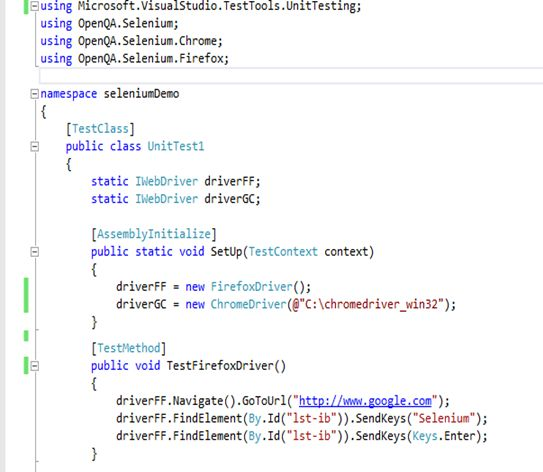
With Selenium, you have to use a programming language to write your test scripts. You have the flexibility to use different languages, but you need to provide your own IDE and compiler just to write the scripts. If you are not familiar with the language (e.g. Java or C#), then you need to learn the language, the IDE, and the Selenium API just to write tests.
For example, a sample Selenium script written using C# in Visual Studio would look like:
In contrast, Rapise comes with the powerful but easy-to-use Rapise Visual Language (RVL) that makes editing test scripts straightforward and natural:
For those testers who already know how to program, you can still use JavaScript to write test functions (or entire test scripts) with Rapise’s built-in IDE and debugger available to help you out.
3. Technology Support
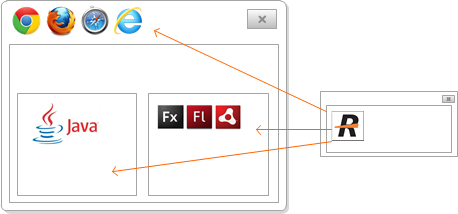
Rapise supports the testing of desktop, web, and mobile apps in a single application, but Selenium is limited to testing only web applications. In addition, some web applications include non-HTML/HTML5 components like Java Applets or MS Silverlight controls, which Selenium may not be able to recognize.
Rapise supports all of these technologies, even when these technologies are mixed with standard HTML pages (e.g. an embedded Java applet or Silverlight control).

4. Object Identification
Having a robust object identification mechanism is essential to the success of your test automation project. From a technical point of view, both tools use a similar approach to address UI elements on a web page. An XPath or CSS query is used by Selenium and Rapise to navigate through an HTML object tree. In Selenium, you can only use the XPath/CSS query at the code level, with the result that you'd have to maintain your test scripts in case of changes on the UI level of your web application.
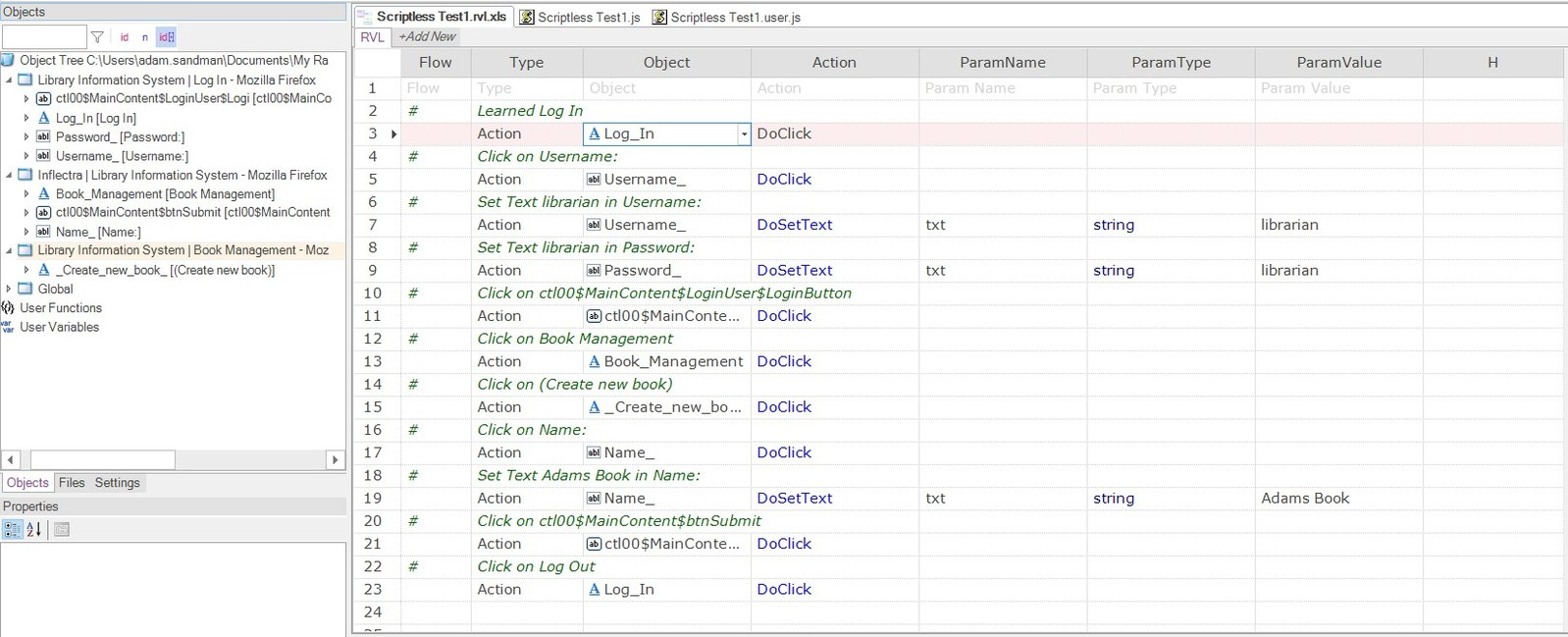
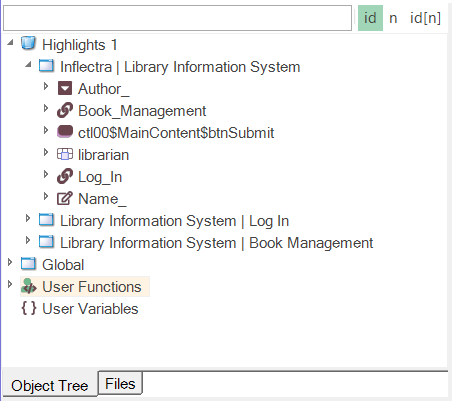
Rapise offers a dedicated Object Tree to arrange and organize all UI elements needed during automation:
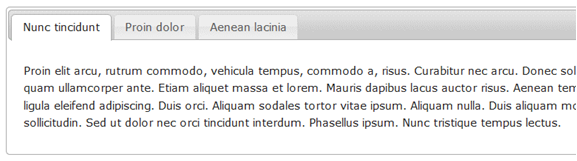
Rapise comes with pre-built support for common UI elements such as menus, treeviews, tab controls, and grids that would have to be manually coded in Selenium. For teams dealing with large applications like Microsoft Dynamics 365, having native support for the UI elements makes testing much easier and more reliable:
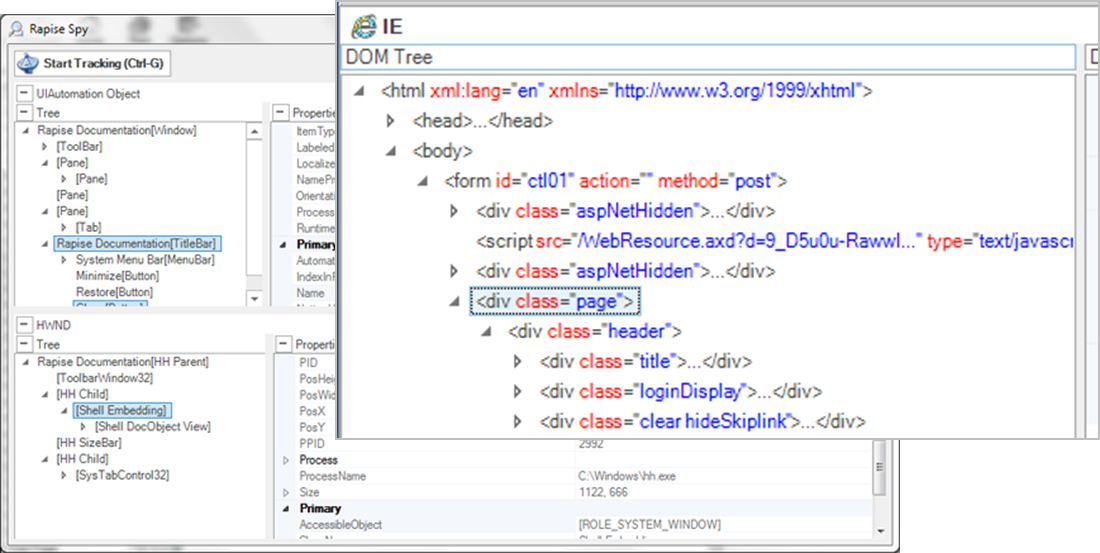
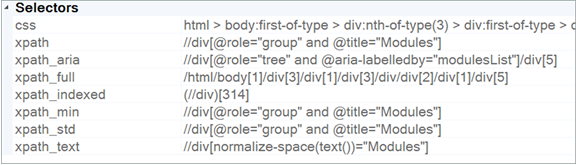
The Rapise Web Spy tool simplifies creating and editing XPath expressions using a dedicated path editor with pre-built templates for ARIA, ID, or Index-based queries. Although using XPath on a code level is possible with Rapise as well, the visual nature of using the Rapise Object Tree elements helps keep your code clean and easier to read.
Rapise includes a self-healing mode, where the recorder will learn multiple locators for each web object on the page. If the application is modified, Rapise can calculate a probabilistic match based on how likely the change is to be an intended change, vs. a test failure. Its machine learning algorithms respond to user feedback to improve its model, so that as you teach Rapise, it will get better at knowing intended vs. unintended changes.
5. Dynamic IDs
Another growing challenge for Selenium users is to address UI elements (like input tags) exposed dynamic identifiers, making them difficult to identify and not allowing for good repeatability of recognizing objects. The primary reason for that is that many web developers make use of web development kits instead of developing everything from scratch.
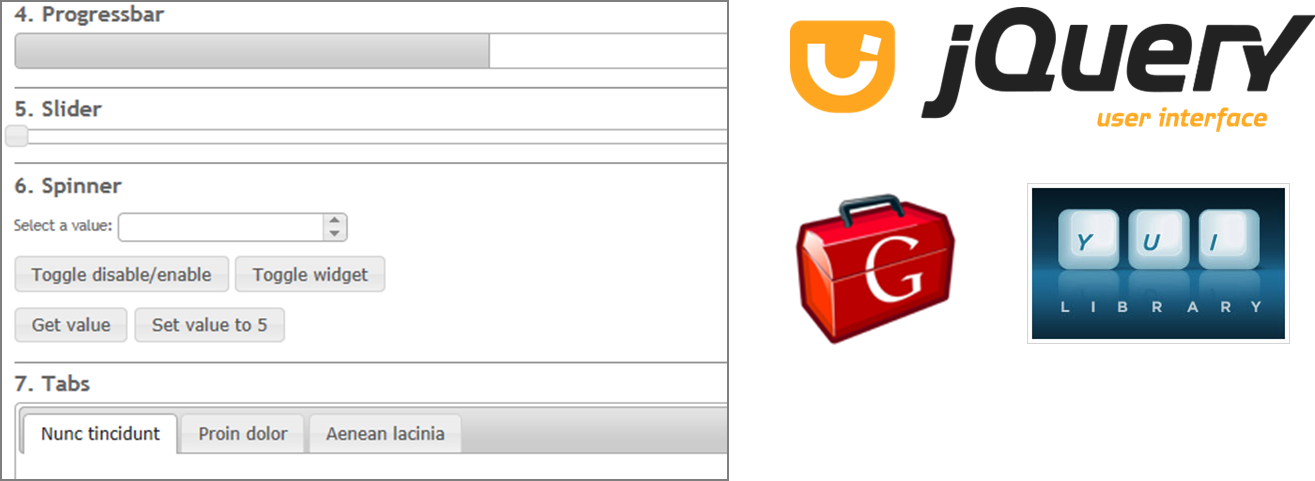
Rapise faces that challenge by offering different rule sets for all well-known web UI frameworks like GWT, YUI, jQuery, etc. These rules automatically recognize the use of 3rd party frameworks when working with the Rapise Recorder or Web Spy tool. These solutions build robust XPath expressions that are reliable and repeatable.
6. Maintainability
Test maintenance is the main reason for pushing testers across the globe to think negatively about test recording and playback. No one is interested in adapting scripts or code every time the application under test changes. This is the case when working with tools like Selenium Recorder, which only generate scripts.
The Rapise recorder instead generates a table of actions combined with the Rapise Object Tree. The object identification is always separated from the automated test steps. The recorded actions can easily be modified or extended without writing any line of code. In addition, the Rapise recorder automatically reuses elements from the Object Tree, which have already been created during a previous recording session.
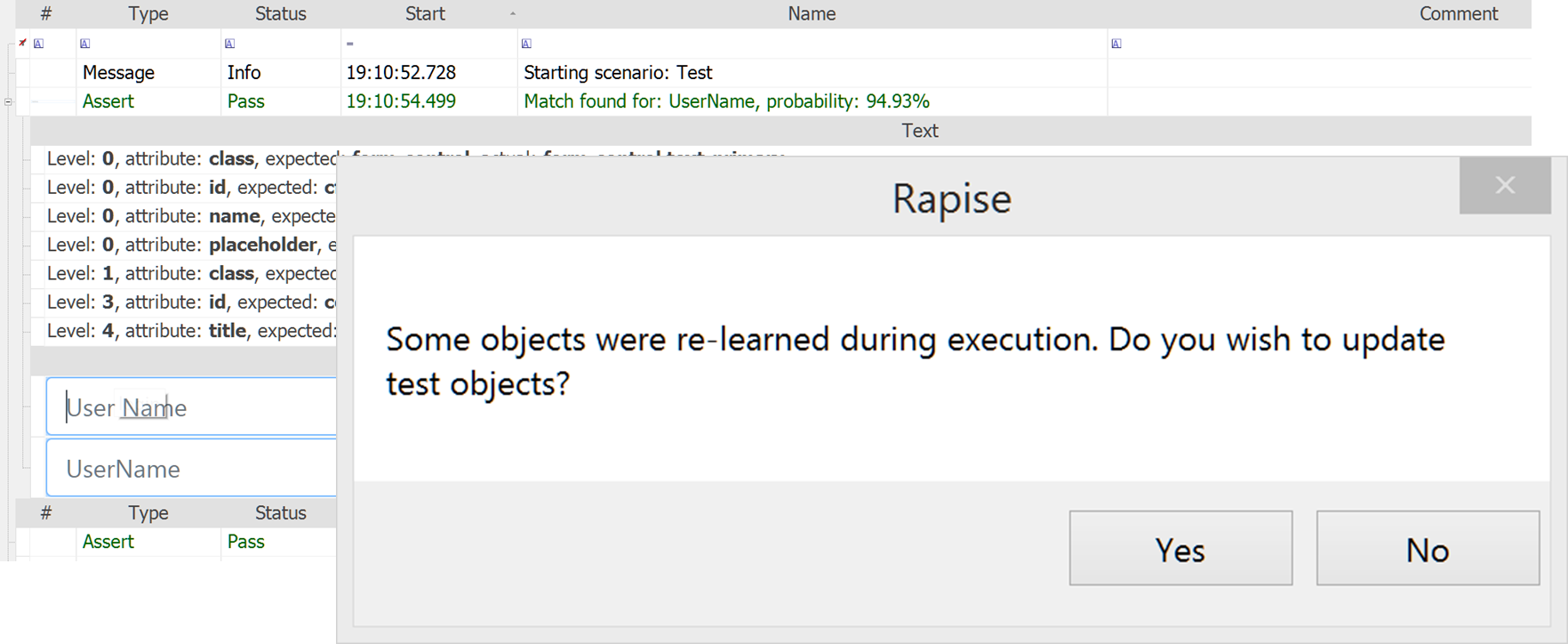
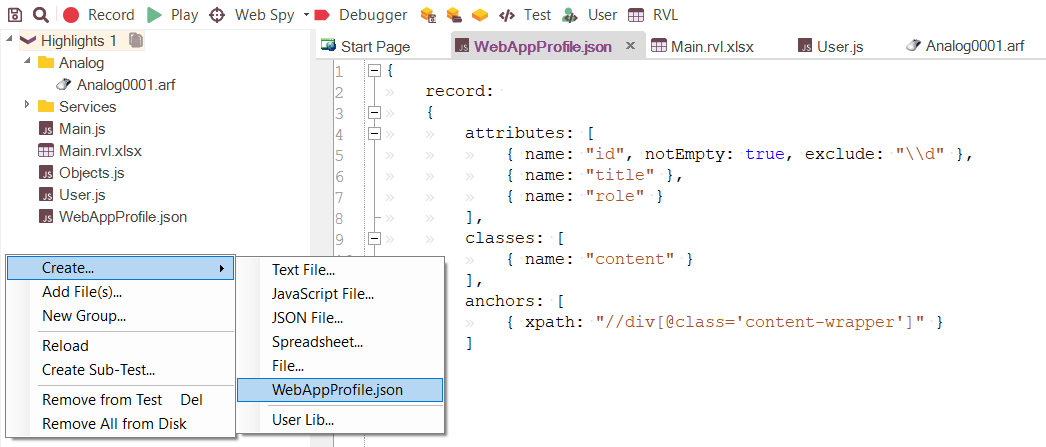
Rapise also features a somewhat unique concept called the Web Application Profile. This is a simple JSON file of a defined structure that instructs Rapise how to build XPath for elements in a particular application. This helps Rapise understand each application and create reliable tests the first time.
The web profile can be manually created, or Rapise can generate/update it based on what it learns from your application.
7. Reusability of Test Objects
When you want to design a test automation framework with Selenium, it requires implementing the same methodologies as developers are constructing on the code level. In other words, you need strong knowledge of object-oriented programming principles.
Conversely, the Rapise IDE provides Learn and Go Functionality™ from the very beginning to ensure reusability of test actions and UI elements with a team of different technical skill levels. Entry-level automation engineers can record a simple scenario by clicking objects, whereas more skilled engineers can Learn objects on the page and then drag and drop the objects after the fact to compose the test script.
8. Easy to Execute – Local & Remote
Selenium makes it more difficult than Rapise to execute tests, because you have to code the tests using a specific technology (e.g. Java, .NET, Ruby, Python) and then integrate that into your execution environment. Users would need to be familiar with the development language, the platform, and your local environment to run any tests. With Selenium, the reporting is just local — you would need to implement your own scheduling, execution, and reporting mechanism so that your QA Manager knows what’s going on.
Rapise makes it easy to playback tests locally — just click the “Play” button from within Rapise. However, most users will choose to connect Rapise to our SpiraTest test management platform, which takes care of all your scheduling and versioning needs in one go. With SpiraTest and Rapise, you can schedule tests to run on different machines anywhere in the world from the comfort of your web browser. All of the results will be automatically uploaded back to SpiraTest, where your QA Manager can see them in real-time as they get executed.
9. Support and Assistance
The last consideration between these platforms is the support you receive. Every test automation project has its individual challenges, and we’re here to help you on your test automation journey. Selenium itself does not cost anything to download. Because of this, most people don’t account for the technical limitations and maintenance costs when implementing this in a production environment. When you run into issues, you are at the mercy of the public forums and any local knowledge.
With every purchase of Rapise comes the Inflectra support promise. We provide unlimited phone and email support with Rapise as well as access to our help desk, moderated forums, and knowledge base.
Invest in Your Automated Testing for Stable, Cutting-Edge Capabilities
Selenium offers a compelling case due to its open-source nature. However, investing in your QA stack (especially for regulated and more advanced industries) is critical to staying ahead of competitors. Open source tools have their place, but in a space where advancements are being made as quickly as they currently are (such as AI test case generation), you don’t want to be left behind with a community-driven tool. Incorporating Rapise into your tech stack immediately puts your team ahead of the curve with advanced features, an easy-to-use UX, and seamless unification of traditionally disparate tools into a single platform.
Explore Rapise with the links below, or request a demo to see how it can bolster your testing activities and efficiency today:
DISCLAIMER: All information regarding the compared products has been made on the basis of information available on the product websites, from former customers, and analysis of trial installations of the product. The analysis and views expressed in this section and the information made available are purely those of Inflectra Corporation. It is possible that the compared products have additional features not mentioned in this whitepaper.
Try Rapise free for 30 days, no credit cards, no contracts
Start My Free TrialAnd if you have any questions, please email or call us at +1 (202) 558-6885