Use Case Template & Examples for Software Development
Use cases serve as an important bridge between software requirements and testing. They give development and QA teams enough detail to understand how a user is expected to interact with a system, what the successful path should look like, and what can happen when the interaction takes a different route. That makes them especially useful when teams need to move from a high-level requirement toward concrete development and testing activities.
We’re not going to go over what a use case is or does in this article — for more context about this topic, see our article: What is a Use Case? Purpose & Diagrams
Who Should Write Use Cases for Testing?
Use cases shouldn’t be written in isolation by a tester, developer, product owner, or business analyst. Because they describe both the business goal and the interaction needed to achieve it, they should be treated as a collaborative activity.
A business analyst or product owner is typically the logical person to create an initial draft because they’re often closest to the user's needs, business objectives, and functional requirements. From there, developers and engineers can identify assumptions, dependencies, and interactions that might be missing or unrealistic. QA engineers and testers can challenge the happy path, identify alternate and exception flows, clarify preconditions and postconditions, and ask whether each behavior can ultimately be verified. Relevant users or business stakeholders can then validate that the documented scenario actually reflects how the process should work in practice.
What Makes an Effective Use Case in Software Development?
An effective use case should contain enough detail for the team to understand the interaction from beginning to end without becoming a test script or low-level implementation specification. In other words, they should include:
- Use Case ID: A unique identifier that makes the use case easy to reference, organize, and trace to related requirements and tests.
- Use Case Name, Description, and Goal: A concise explanation of the outcome the actor is trying to achieve. The goal helps keep the use case focused on one meaningful objective rather than allowing unrelated functionality to creep into the scenario.
- Actors: The people, systems, services, or other external entities interacting with the system. Identify the primary actor whose goal the use case is intended to fulfill, along with supporting actors where relevant.
- Stakeholders: People or groups that have an interest in the outcome even if they do not directly perform the interaction.
- Trigger: The event or condition that begins the use case. This provides a clear starting point for the scenario.
- Preconditions: Anything that must already be true before the use case can begin, such as the user being authenticated, an account existing, or required data being available.
- Main Success Scenario: The normal sequence of actor and system interactions that leads to the intended outcome when everything works as expected.
- Alternate and Exception Flows: Variations from the main scenario, including different valid paths, errors, missing information, failed actions, permissions issues, and other conditions that change the flow.
- Postconditions: The expected state of the system when the scenario ends, including both successful and relevant unsuccessful outcomes.

Software Use Case Template for Download
We’ve created a free template that you can download as an Excel workbook or PDF document to use as a starting point for your own software use cases:
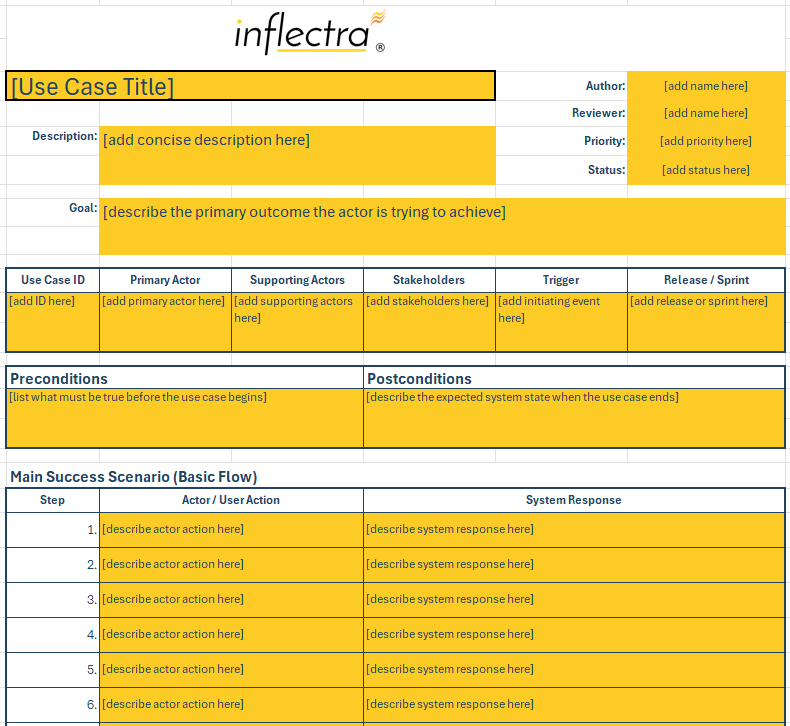
Download our use case template here:
Benefits of Using a Use Case Template
A use case template does more than just save you from starting with a blank page. Because they contain branching behaviors, actors, system states, and relationships to requirements, a structured and standardized format can directly improve how teams discover, communicate, and eventually test those behaviors.
- Reduces “happy path” bias: Dedicated fields for alternate and exception flows prompt teams to consider what happens when users make different choices, information is missing, or an action fails. This helps surface important behavioral branches before they are discovered during development or testing.
- Creates a clearer path from requirements to test cases: A standardized structure gives testers a predictable place to find preconditions, scenario steps, alternate flows, and expected end states. In Spira, teams can even create a test case directly from a requirement, with existing use case steps becoming test steps.
- Makes scenario coverage easier to review: Separating actors, the main flow, and alternative scenarios makes missing behaviors easier to spot during requirements review. Teams can more readily determine whether different roles, permissions, errors, and valid variations have been accounted for.
- Keeps use cases at the right level of detail: A defined structure prevents use cases from becoming so vague that they provide little guidance or so detailed that they turn into test scripts. Fields like goals, actors, conditions, flows, and outcomes keep the focus on system behavior rather than execution-specific test data.
- Improves traceability as the number of use cases grows: Consistent IDs and fields for related requirements make it easier to connect use cases with the functionality and tests they support. SpiraTeam extends this by linking requirements and use cases with test coverage, related requirements, defects, releases, and other lifecycle artifacts.
Use Case Examples: Enterprise Procurement Platform
Using the template above, let’s look at a realistic example of how it might be used. In this scenario, a team is building a web-based procurement app that allows employees to request purchases, routes requests through company approval workflows, and sends approved purchase orders to the organization’s ERP system:
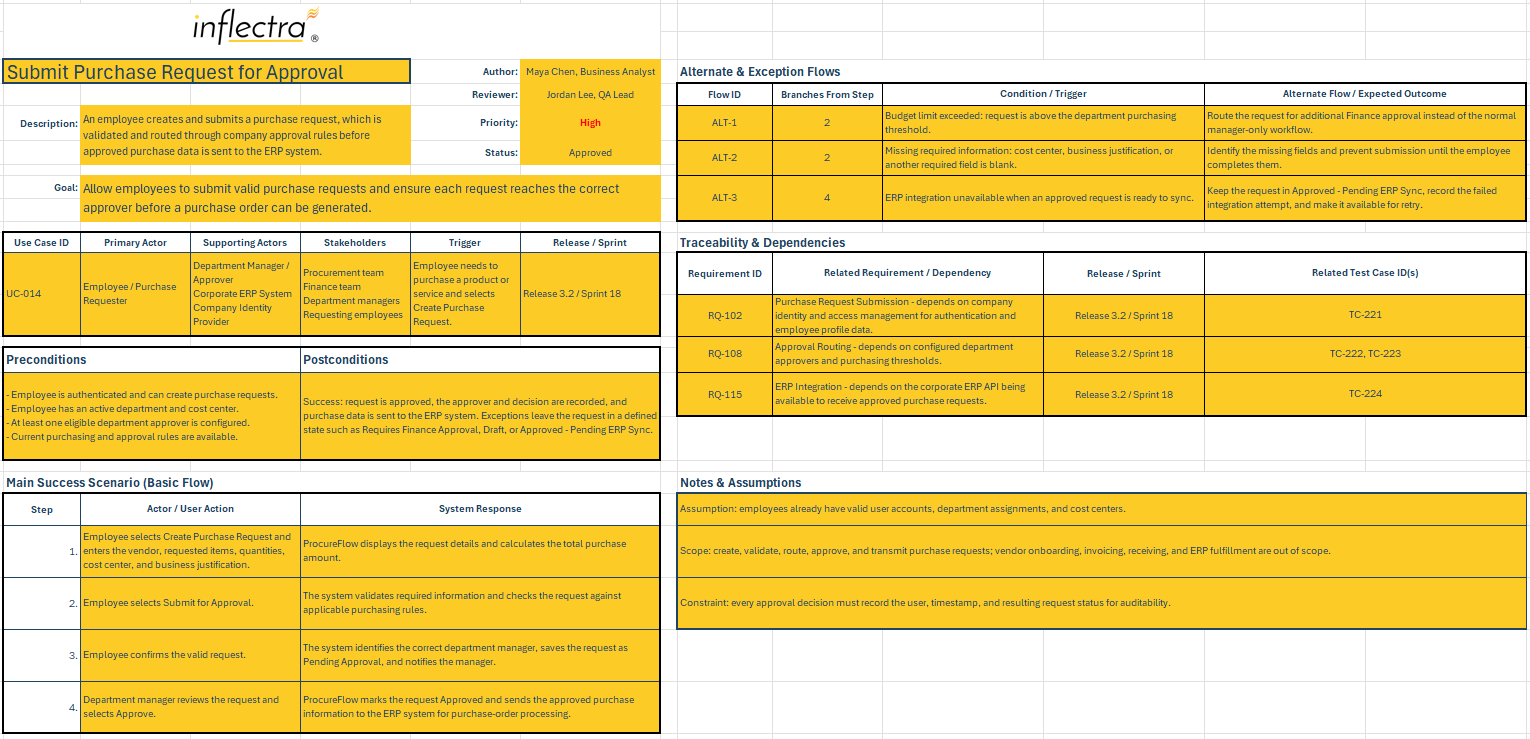
|
Component |
Sample Data for Procurement Platform |
|
Use Case Title |
Submit Purchase Request for Approval |
|
Description |
An employee creates and submits a purchase request for goods or services. The system validates the request and routes it to the appropriate manager for approval according to the organization’s purchasing rules. |
|
Goal |
Allow employees to submit valid purchase requests and ensure each request reaches the correct approver before a purchase order can be generated. |
|
Use Case ID |
UC-014 |
|
Author |
Maya Chen, Business Analyst |
|
Reviewer |
Jordan Lee, QA Lead |
|
Actors |
Primary Actor: Employee / Purchase Requester Supporting Actors: - Department Manager / Approver - Corporate ERP System - Company Identity Provider |
|
Stakeholders |
- Procurement team - Finance team - Department managers - Employees requesting purchases |
|
Trigger |
The employee needs to purchase a product or service for business use and selects Create Purchase Request in ProcureFlow. |
|
Preconditions |
- The employee is authenticated and has permission to create purchase requests. - The employee is assigned to an active department and cost center. - At least one eligible approver has been configured for the employee’s department. - ProcureFlow can access the current purchasing and approval rules. |
|
Main Success Scenario |
1. Employee selects Create Purchase Request and enters the vendor, requested items, quantities, cost center, and business justification. 2. Employee selects Submit for Approval. 3. Employee confirms the valid request. 4. Department manager reviews the request and selects Approve. |
|
Alternate & Exception Flows |
- A1 (Budget Limit Exceeded): If the request exceeds the employee’s department purchasing threshold, the system does not submit it to the normal manager workflow and instead routes it for additional Finance approval. - A2 (Missing Required Information): If required information such as a cost center or business justification is missing, the system identifies the missing fields and prevents submission until they are completed. - A3 (ERP Integration Unavailable): If the ERP system cannot receive the approved request, ProcureFlow keeps the request in an Approved — Pending ERP Sync state and records the failed integration attempt for retry. |
|
Postconditions |
Successful outcome: - The purchase request is recorded as approved. - The approval decision and approver are recorded in the audit history. - The approved request is sent to the ERP system for purchase-order creation. Exception outcome: The request remains in a defined state such as Requires Finance Approval, Draft, or Approved — Pending ERP Sync, depending on the exception encountered. |
|
Related Requirements |
- RQ-102 (Purchase Request Submission): Authorized employees must be able to create and submit purchase requests. - RQ-108 (Approval Routing): The system must route purchase requests according to department and purchase-value approval rules. - RQ-115 (ERP Integration): Approved requests must be transmitted to the corporate ERP system. |
|
Related Test Cases |
- TC-221: Submit a valid purchase request - TC-222: Route above-threshold request to Finance - TC-223: Prevent submission with missing required fields - TC-224: Handle ERP synchronization failure |
|
Dependencies |
- Identity and Access Management: ProcureFlow depends on the company identity provider to authenticate employees and supply their user and department information. - Approval Rules Configuration: Department approvers and purchasing thresholds must be configured before requests can be routed correctly. - ERP Integration: The corporate ERP API must be available for approved requests to progress to purchase-order processing. |
|
Notes & Assumptions |
- Assumptions: Employees already have valid user accounts, department assignments, and cost centers before using the purchasing workflow. - Constraints: Every approval decision must be recorded with the user, timestamp, and resulting request status for auditability. |
How to Write a Use Case: Best Practices for Testers & Engineering Teams
Even when using a template, we recommend incorporating these best practices to ensure the effectiveness of your use cases:
- Start with one clear user goal: Center each use case on a specific outcome the primary actor wants to accomplish. If the scenario begins covering several unrelated goals, split it into separate or related use cases.
- Define the actor before defining the flow: Identify the primary actor and any supporting users or systems before documenting their interactions. This is especially important when different roles or permissions produce different scenarios, which Inflectra notes may require separate use cases.
- Establish the starting conditions: Clearly document the trigger and any preconditions that must be satisfied before the scenario begins. This gives developers and testers a shared understanding of the system state the use case assumes.
- Write the main success scenario first: Document the most direct sequence of actor and system interactions that leads to the desired outcome. Establishing this baseline makes it easier to identify where alternate and exception paths branch away from normal behavior.
- Tie alternate flows to specific decision points: Identify where each alternate or exception flow branches from the main scenario and what condition causes it. This gives developers clearer behavior to implement and testers clearer scenarios to validate.
- Describe behavior, not implementation: Focus on what the actor does and how the system responds rather than prescribing internal architecture or technical implementation details. This keeps the use case useful even when the underlying implementation changes.
- Make outcomes observable: Define postconditions in terms of a system state or result that developers and testers can recognize. Concrete outcomes also provide a stronger foundation for the expected results that will eventually appear in related test cases.
- Review use cases collaboratively: Have product or business stakeholders, developers, and QA review important use cases before treating them as complete. Each group can identify different gaps in the goal, technical assumptions, alternate paths, and testability.
- Keep use cases and test cases connected but separate: Use cases should describe the behavior that needs to occur, while test cases add execution-specific steps, data, and expected results. SpiraTeam supports this relationship by mapping test cases back to the requirements they validate, preserving coverage and traceability.
- Maintain use cases as requirements change: Review the actors, conditions, flows, and related coverage whenever the underlying requirement changes. Keeping use cases linked to requirements and tests makes it easier to understand the impact of those changes across the development lifecycle.
Easily Generate & Manage Use Cases with Inflectra’s ALM Capabilities
A good use case starts with a clear goal but becomes useful through the details surrounding that goal:
- Who is involved
- What must be true before the interaction begins
- How the expected scenario unfolds
- What alternative paths need to be considered
- What state the system should reach afterward
Using a purpose-built template helps teams capture those details in a repeatable format while preserving the connection between requirements and the tests that will eventually verify them. Our downloadable use case template gives product, engineering, and QA teams a practical starting point that can be adapted to the complexity of their project.
As those use cases grow beyond what is practical to manage in individual spreadsheets, SpiraTeam acts like an intuitive pane of glass that brings requirements, use cases, testing, development work, defects, and releases into a single, connected ALM environment. Teams can capture use cases and scenario steps directly within requirements, visualize those steps as process flows, link requirements to their test coverage, and even create test cases from requirements so that existing use case steps become the starting test steps. SpiraTeam also provides end-to-end traceability across requirements, tests, defects, tasks, releases, and source code, helping modern development and QA teams keep the original user need connected to implementation and validation throughout the lifecycle. See how it works by requesting a demo, or start a free 30-day trial today!