Free Requirements Traceability Matrix (RTM) Template & Example
In modern software development, it’s rare to have requirements all kept neatly in a single document across the entire project lifecycle. As development progresses and evolves, requirements become connected to user stories, tasks, test cases, releases, source code changes, and other artifacts. All of this makes it harder to maintain a clear view of how all of these pieces relate — but a requirements traceability matrix provides that visibility.
We’re not going to cover the basics of what requirements traceability is in this article — for more background on this topic, see our article: What is Requirements Traceability?
What is a Requirements Traceability Matrix?
A requirements traceability matrix (RTM) is a table that maps individual requirements to the project artifacts associated with them. These artifacts might include the requirement’s original source, related business objectives, design elements, development activities, defects, releases, or implementation details. A typical RTM uses a unique identifier for each requirement, and then adds relevant relationships in adjacent columns. A good matrix can support both forward and backward traceability:
- Forward traceability: Follows the requirement through design, development, and testing to confirm that it has been implemented and validated.
- Backward traceability: Connects downstream work back to the requirement or business need that justified it in the first place.
Although we’re going to focus on spreadsheet-based RTMs today (because that is how we built our template), they don’t have to live in this format. Modern test management platforms like SpiraTeam facilitate direct connections from requirements to test cases, tasks, incidents, risks, and other lifecycle artifacts. It also enables teams to view test coverage and task progress simultaneously, ensuring continuous insight into these relationships and any changes.
What is the Purpose of a Requirements Traceability Matrix?
The core function of an RTM is to give teams more confidence and visibility that every requirement has been carried through the development lifecycle and that the work being performed can be traced back to an actual requirement. More specifically, it aims to help:
- Find missing requirement coverage
- Understand the impact of changing requirements
- Reduce disconnected or unnecessary work
- Bring fragmented project information together
This is especially important for larger projects that tend to have information spread across different teams, tools, and phases of development.
Benefits of an Effective Requirements Traceability Matrix
We’ve alluded to some of the obvious benefits above (like centralizing information and reducing unnecessary work), but what specifically should you expect to see from better RTMs?
- Better Test Coverage: Mapping requirements to test cases makes it easier to identify functionality that hasn’t been adequately tested.
- Faster Change-Impact Analysis: When requirements are tied to downstream artifacts, teams can follow trace links to evaluate the impact of changes.
- Improved Visibility into Delivery Status: Static requirement lists show what the team intends to build, but traceability provides context around what actually happens.
- Stronger Cross-Team Collaboration: An RTM connects the various artifacts that developers, testers, business analysts, and project managers work on separately.
- More Reliable Auditability: Documentation helps demonstrate how requirements were implemented and verified so you don’t need to reconstruct evidence later.

Key Components of a Requirements Traceability Matrix
Before we go over the template we created, it’s important to explain each of the key pieces of a requirements traceability matrix. However, keep in mind that the exact fields will vary from project to project. We recommend including at least these components in your RTM:
|
Component |
What it is/does |
|
Requirement ID |
Unique identifier for each requirement that makes it easy to reference and trace across project artifacts. |
|
Requirement Description |
Concise explanation of the functionality, capability, or outcome the requirement defines. |
|
Requirement Source |
Where the requirement originated, such as a stakeholder request, business objective, specification, or regulation. |
|
Priority |
Relative importance of the requirement to help teams focus attention on critical functionality. |
|
Owner |
Person or team responsible for managing or delivering the requirement. |
|
Status |
Where the requirement currently stands, such as requested, approved, in development, tested, or completed. |
|
Parent/Related Requirement |
Higher-level, dependent, or otherwise related requirements to maintain requirement hierarchy and lineage. |
|
Release/Sprint |
When the requirement is expected to be implemented or delivered. |
|
Design/Development Artifacts |
Relevant designs, use cases, components, tasks, or other implementation work. |
|
Test Case ID |
Unique identifier(s) of the test case or cases used to verify that the requirement has been implemented correctly. |
|
Test Status |
Whether the associated testing has been completed, not run, or otherwise remains incomplete. |
|
Test Result |
Whether the associated testing has passed or failed. |
|
Defect/Incident ID |
Unique identifier(s) of the defects discovered during development or testing back related to this requirement. |
|
Last Updated |
When the traceability information was most recently reviewed or changed. |
Requirements Traceability Matrix Template
Below, we’ve included a free RTM template for you to download so you can hit the ground running:
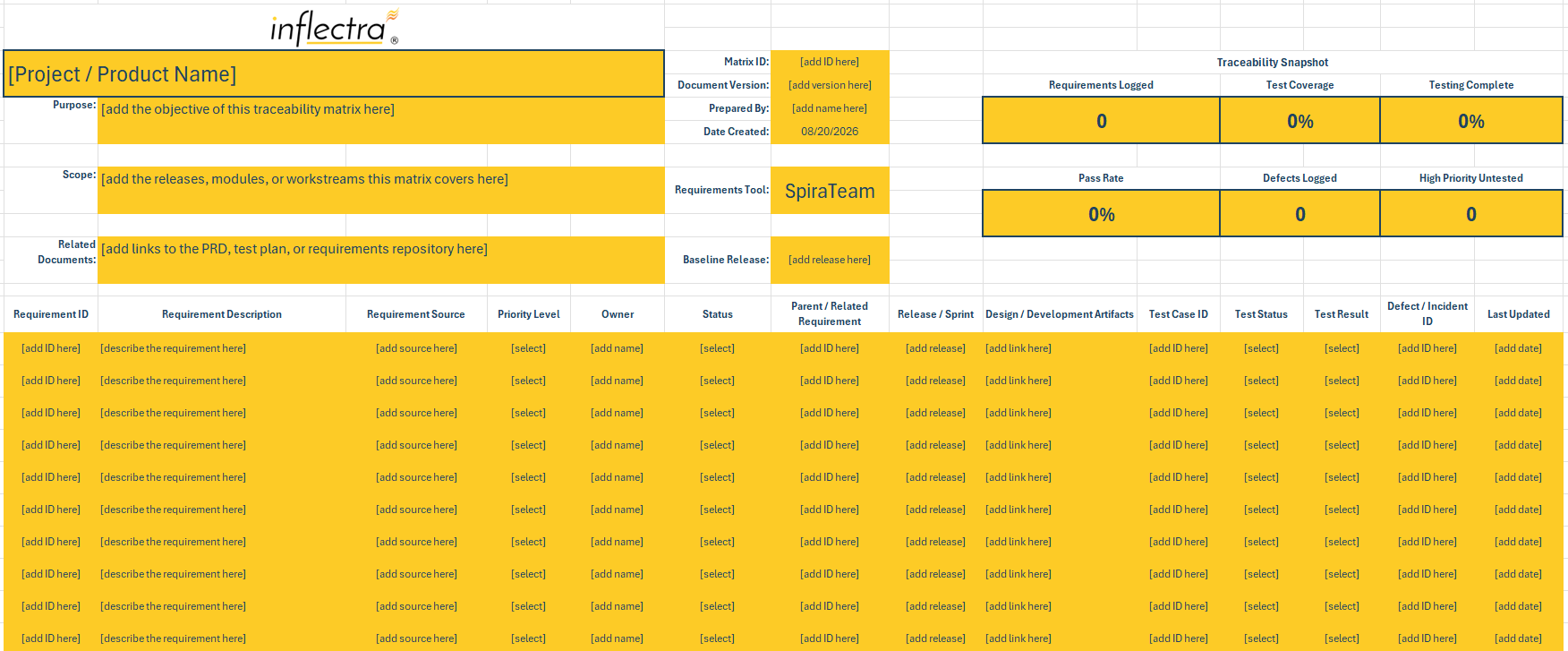
Download our pre-built requirements traceability matrix template here:
Why You Should Use a Requirements Traceability Matrix Template
While you can build a requirements traceability matrix from scratch, using a template document offers a number of advantages. Instead of deciding how to organize traceability while requirements are already moving through development, your team can start with the fields and relationships that it’s likely to need.
- Start Tracing Requirements Sooner: Setting up IDs, columns, formatting, and other fields manually takes time that could otherwise be spent documenting the actual relationships between requirements and project work.
- Capture Overlooked Information: Although requirement descriptions and test cases are relatively obvious fields, a template forces you to consider other information like requirement sources, owners, and test results.
- Establish Consistency: If every team member records traceability differently, the matrix quickly becomes difficult to interpret. Templates use standardized fields, naming conventions, and statuses for more consistent documentation.
- Simplify Reporting & Reviews: Building on consistency, matrices with the same format and layout are much easier to filter, sort, and review because stakeholders know where to look.
- Adapt the Process Without Rebuilding: Templates provide a baseline that you can tailor to fit your specific needs without rebuilding a matrix from scratch and requiring extensive time and resources to adapt.

Requirements Traceability Matrix Example: Medical Device Software
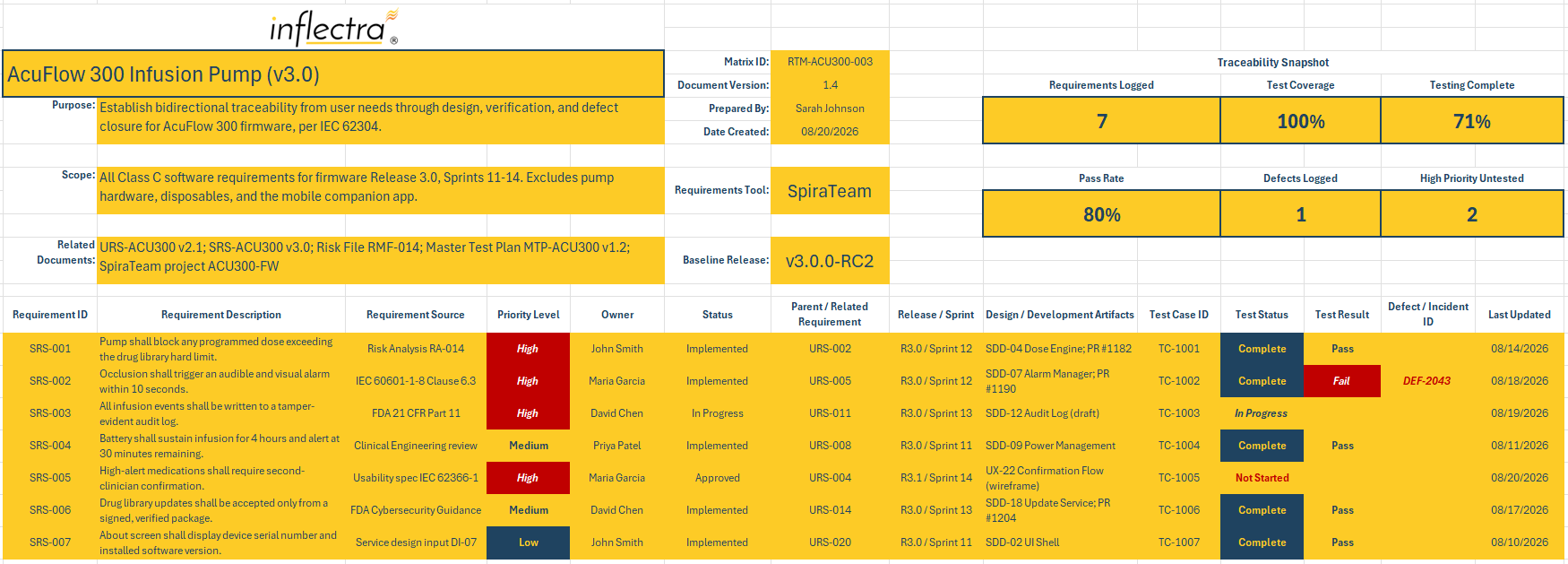
Let’s take an example of an infusion pump — this software falls under IEC 62304, so traceability isn’t optional:
|
ID |
Requirement |
Source |
|
SRS-001 |
Block doses above the drug library hard limit |
Risk Analysis RA-014 |
|
SRS-002 |
Occlusion alarm within 10 seconds |
IEC 60601-1-8 |
|
SRS-003 |
Tamper-evident audit log |
|
|
SRS-004 |
4-hour battery, alert at 30 min remaining |
Clinical Engineering review |
|
SRS-005 |
Second-clinician confirmation for high-alert meds |
IEC 62366-1 |
|
SRS-006 |
Signed, verified drug library updates |
FDA cybersecurity guidance |
|
SRS-007 |
Serial number and version on About screen |
Service design input DI-07 |
How to Create a Requirements Traceability Matrix
Once you have a template or document for your RTM, we need to fill it out like the example above. We recommend following these steps to build effective requirements traceability:
- Define the scope of your traceability: Decide what the matrix needs to demonstrate before filling it in. A straightforward project might primarily focus on connecting requirements to test cases, while a more complex one might trace requirements from their original business source through design, testing, and releases.
- Gather and identify your requirements: Add each approved requirement to the matrix and assign a unique ID that can be used consistently throughout the project. We recommend not duplicating the same requirement in multiple rows just because it has multiple relationships — list the requirement once and record its relationships via their identifiers.
- Record the source of each requirement: Document where each requirement came from, whether that’s a higher-level requirement, a stakeholder request, a contract, a specification, a business objective, or another source. This will support backward traceability and help explain why the functionality exists.
- Map requirements to implementation work: Connect each requirement to the downstream artifacts used to deliver it. Depending on the project, these might include use cases, design elements, source code changes, or releases (and keep in mind that requirements can have multiple references when needed).
- Link requirements to test cases and results: Identify the tests used to verify each requirement and record their current execution status or results. Similar to the last step, a requirement might have multiple test cases, or one test case might validate multiple requirements, so keep these relationships in mind.
- Check for traceability gaps: Review the completed matrix for requirements with no implementation or test links, tests that can’t be traced back to a requirement, missing source information, incomplete results, or disconnected downstream artifacts. These might point to missing functionality or insufficient testing.
- Update the matrix as the project changes: Unfortunately, requirements traceability is not a one-time documentation exercise. New requirements are often added, existing requirements may change, tests can be revised, and defects will be discovered — the RTM needs to reflect these changes to remain useful.
This last step is where spreadsheet-based traceability can become difficult at scale. Every new requirement, updated test result, changed task, uncovered defect, or updated relationship can require another manual update to the matrix. Without those updates, the spreadsheet quickly becomes out-of-date and stops being useful.

Take Your Requirements Management to the Next Level with SpiraTeam
Thankfully, dedicated requirements and application lifecycle management software like SpiraTeam can replace manual traceability with automated relationships. Instead of clinging to old-fashioned spreadsheets and manual tracking, invest in modern solutions that can connect requirements to test cases and tasks, automatically calculate test coverage and test progress from the underlying data, and more. Learn more about SpiraTeam’s industry-leading capabilities here, or hear from our partners about what makes it so valuable for risk management. Ready to get started? View pricing or get a free 30-day trial.