Automated Mobile Testing for Modern Apps: Complete Guide for 2026
Mobile apps have become the primary way that most users access services, complete transactions, and communicate with businesses. What used to be limited to social media, entertainment, and casual consumer experiences is now central to almost every industry across the globe. Healthcare organizations use mobile apps to connect patients with records and care teams. Financial institutions rely on them for payments, investing, and account management. Utilities companies, manufacturers, and even government agencies use apps to collect data, approve work, document inspections, and support employees beyond the traditional office.
At the same time, mobile applications can present complex testing challenges that desktop software doesn’t always encounter. From different operating systems and device models to near-infinite screen size variations, network conditions, and interaction methods, evaluating your mobile app for bugs has become more difficult than ever. Today, we’ll explore how this has evolved in recent years and how your QA team can stay on top of modern practices to deliver the best (and most secure) mobile experience possible.
What is Automated Mobile App Testing?
As the name suggests, automated mobile app testing is how modern QA teams evaluate applications at scale. It typically involves software tools and reusable test scripts to run through a large volume of tests with limited manual intervention. In other words, instead of asking a human tester to repeat the same sequence of taps, data entries, navigation steps, and validations after every software change across every OS, an automated test performs those actions and compares the results for quick analysis.
As an example, a test could automatically:
- Open your mobile banking app
- Enter valid login credentials
- Confirm that multifactor authentication appears
- Navigate to an account
- Submit a payment
- Verify that the correct confirmation message and transaction details are displayed
This test can then be re-run whenever devs update the authentication process, payment workflow, user interface, or backend service. However, it’s important to remember that automation doesn’t remove the need for manual testing. These are usually complementary and combine manual exploratory testing, subjective usability testing, and more with the automation of predictable and repeatable tests.
Types of Automated Mobile Testing
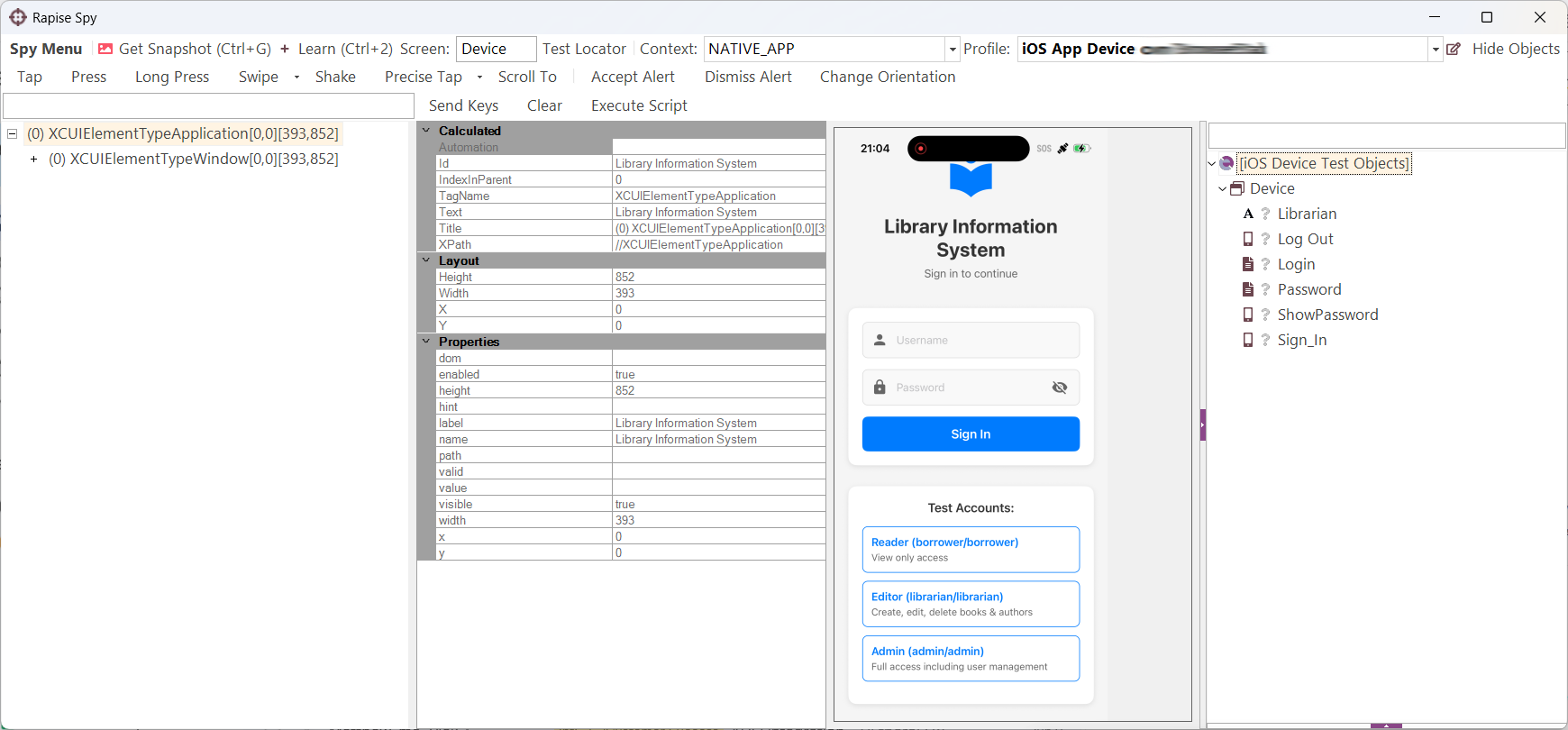
Automated mobile testing can be performed on physical devices, emulators, simulators, or devices hosted via a cloud testing service. It can also be used across the primary categories of mobile apps:
- Native Apps: Developed specifically for an operating system like Android or iOS.
- Mobile Web Apps: Developed to run through a mobile browser like Safari or Chrome.
- Hybrid Apps: Developed to combine native app components with web-based content.
It also spans the same test types as “regular” software testing, such as functional and non-functional testing, regression testing, integration testing, cross-device testing, performance testing, and security testing. All of these different approaches, devices, and frameworks make it nearly impossible to effectively cover via manual testing, which is why automation has become central to modern app development.
Why is it So Critical Now?
As development teams are expected to release software more frequently while simultaneously supporting increasingly mobile-centric usage, testing needs to keep pace. Modern software delivery is usually iterative, meaning that apps receive regular interface changes, security patches, OS compatibility updates, and new features on an ongoing basis. Deployment frequency, change failure rate, recovery time, and deployment rework are all now recognized by DORA as core measures of software delivery performance.
However, balancing quick improvements with the risk of regression can be difficult to manage. For instance, a release that fixes one issue could accidentally disrupt authentication, alter stored data, or break an integration. For consumer games, defects like these might cause frustration — for regulated or operational software, the consequences are often much more substantial. The FDA directly oversees the safety and effectiveness of certain device software functions, including a subset of mobile medical applications. As a result, testing cannot simply be a final check before release, it needs to be an integrated part of your broader quality, risk management, and software assurance processes.
To circle back to why it’s so important now, the answer is fairly simple. Manual testing alone cannot keep pace with this combination of frequent change, expanding complexity, and higher privacy standards. A tester may be able to verify certain workflows on one or two devices, but repeating the same process across dozens of configurations after every update isn’t feasible. Automated testing gives modern teams a repeatable, consistent, and fast way to check critical workflows whenever changes are made.

How do Automated Tools Improve App Development?
Automated testing helps move quality checks earlier in the lifecycle (whether for mobile apps or other systems):
- Faster Feedback: More efficient test execution means earlier feedback about broken functionality, which makes problems easier and less expensive to resolve than if they were uncovered after release.
- More Consistent Testing: Manual tests are inherently performed slightly differently every time, but automation can execute the exact same actions, data, and validations consistently every time.
- Broader Test Coverage: More tests across more configurations result in more comprehensive testing coverage, such as Android and iOS across various device profiles and different test data, all of which reduces business risk.
- Safer Regression Testing: Reusable test suites like those provided by Rapise enable teams to check established functionality whenever a new feature or patch is introduced, ensuring that older workflows still get attention.
- Better Use of Resources: When automation handles the repetitive checks, human testers can spend more time on exploratory testing, risk analysis, accessibility, unusual edge cases, and complex scenarios that require human interpretation.
- Improved Traceability: Because automated testing tools record whether tests passed or failed (and capture those logs, screenshots, and execution details), investigating defects is easier and more formalized for future audits.
Key Features to Look for in Automated Mobile Testing
When evaluating automated mobile testing platforms, look for tools that help teams expand coverage without creating extensive overhead for configuration, maintenance, and auditing. We recommend prioritizing the following capabilities:
- Cross-Platform Support: Can automate tests across both Android and iOS (ideally also supporting native, hybrid, and mobile web apps) so you don’t need several testing tools for each application type.
- Cloud Device Farm Connectivity: Access to cloud-hosted devices enables teams to test a wider range of operating systems, screen sizes, manufacturers, and hardware than they actually keep internally. For example, Rapise connects to Android and iOS devices via Appium and can be configured to use Appium-compatible cloud device farms.
- Reliable Object Identification: Your testing platform should be able to recognize interface elements based on stable properties rather than just screen coordinates, which are often brittle and time-consuming to maintain.
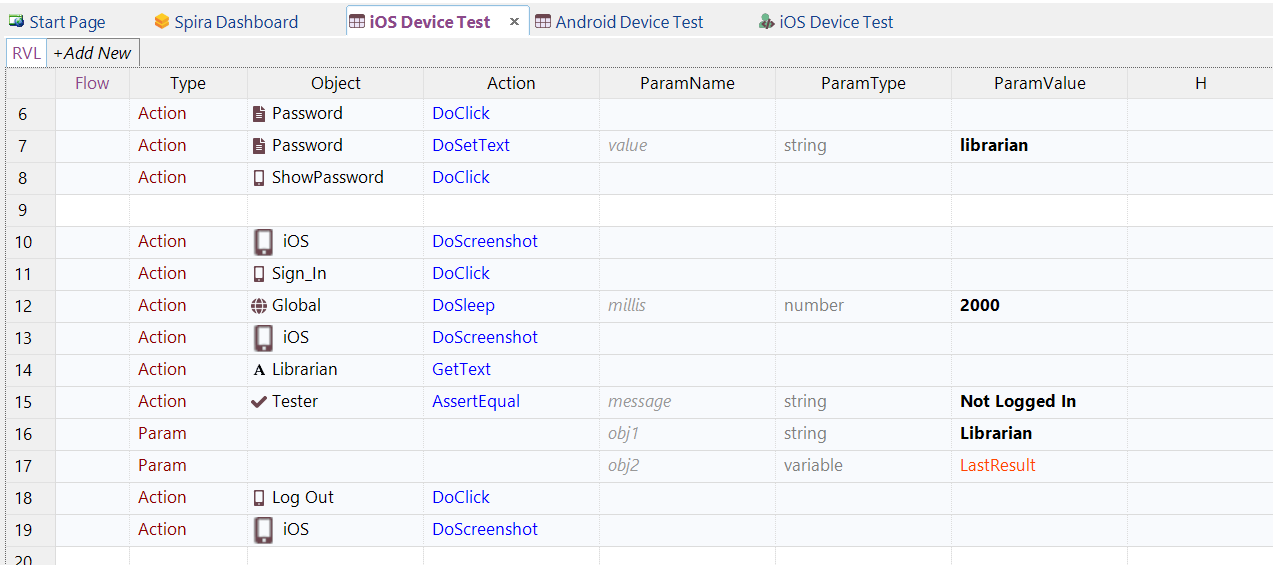
- Both Codeless & Script-Based Creation: Codeless test design makes it more accessible to non-technical users, but script-based testing is still critical for advanced logic, custom integrations, and unusual workflows. Rapise supports both of these through its visual language and JavaScript for technical users.
- CI/CD Integration: You should be able to schedule and run automated tests from build and deployment workflows or on remote test machines for faster feedback and more integrated regression testing (rather than a separate activity at the very end).
- Detailed Results & Diagnostic Evidence: Useful test reports should not only show which test step failed but also capture supporting information like logs, screenshots, timestamps, device configurations, and execution history so teams can reproduce and review defects.
- Support for Test Management & Requirements Traceability: Connecting requirements, test cases, executions, defects, releases, and approvals is an effective way to boost your project’s traceability from start to finish, but many testing tools don’t go beyond simple testing. Rapise works with SpiraTest to automatically make these connections and centralize test results, schedules, and reports with requirements and more.
Pitfalls to Avoid in Automated Mobile Testing
At the same time, there are hurdles to implementing effective automated mobile testing that we’ve come across in our partnerships:
- Trying to Automate Every Test: Not every test offers enough value to justify automation, such as one-time scenarios, subjective usability reviews, and exploratory investigations.
- Unstable Interface Details: Tests that depend on specific coordinates, changing text, temporary object IDs, or fragile locator paths frequently fail for reasons unrelated to app quality or functionality.
- Only Testing on Emulators/Simulators: Virtual devices are valuable, but they might not reveal problems that involve cameras, biometrics, battery use, memory constraints, or other factors that would appear on physical devices.
- Allowing Flaky Test to Accumulate: When a test sometimes passes and sometimes fails (without meaningful app changes), it erodes confidence in the entire testing suite — be sure to investigate and correct or remove these results instead of simply re-running them until they pass.

Best Practices to Maximize Your Automated Mobile Testing
It’s important to keep in mind that a good tool is one part of a successful test automation strategy, but not the entire thing. It’s essential that your tests accurately identify meaningful risks and provide useful feedback, so follow these best practices:
- Prioritize Testing According to Risk: Begin by evaluating workflows that affect safety, security, regulated records, core operations, or a large number of users. This will direct automation’s value towards failures with the highest potential impact.
- Use a Balanced Strategy: Don’t place every check at the end-to-end UI level, incorporate unit tests more frequently and pair with a more focused set of UI tests that you run periodically for critical user journeys.
- Create a Representative Device Matrix: Using analytics of your app, determine which operating systems, versions, screen sizes, and devices matter most so you can test where risk is high instead of trying to cover every device equally.
- Design Modular & Reusable Tests: Separate common actions, test data, platform-specific behavior, and other reusable components so teams only have to update one shared element instead of dozens of tests.
- Test Realistic Conditions & Edge Cases: This should go without saying, but make sure that you’re evaluating real-world conditions like interrupted connectivity, slow responses, invalid inputs, app restarts, and recovery from failed transactions.
- Maintain Security & Privacy Testing Throughout: Do not leave security testing for the very end of your development. Incorporate authentication controls, encryption tests, session handling, and resistance to known weaknesses as early as possible and throughout the lifecycle for maximum readiness.
Build Reliable, Compliance Apps via Rapise’s Automated Mobile Testing
Mobile apps now support healthcare delivery, financial transactions, government services, field work, and many other processes where reliability isn’t just about convenience. Automation is especially valuable for these systems because it makes the most important test repeatable. This consistency supports your broader compliance program by expanding coverage and providing clear evidence about what was tested and how the app behaved.

Rapise supports this by bringing Android and iOS automation into a platform designed for far more than basic mobile interface testing. Its advanced capabilities around test generation, reporting, and ongoing maintenance make Rapise a leading candidate for modern automated mobile testing across regulated and non-regulated industries alike. Inflectra is built around this philosophy of risk-based development and enhancing compliance for these sectors from a single connected environment. All Inflectra software is compliant with the following global regulations and certifications, so you can rest assured that your data is always protected and secure — including in strictly-regulated industries like aerospace, healthcare, and finance:
|
Inflectra Global Regulations Compliance |
Inflectra ISO/IEC Certifications |
|
GDPR (General Data Protection Regulation) HIPAA (Health Insurance Portability and Accountability Act) GAMP (Good Automated Manufacturing Practice) DORA (Digital Operational Resilience Act) NIST (National Institute of Standards and Technology) Center of Excellence FMEA (Failure Mode and Effects Analysis) FDA 21 CFR Part 11 Eudralex Volume 4 Part I & II DO-178C (Airborne Software) |
ISO 26262 ISO 13485 ISO 31000 ISO 20022 ISO 27001:2013 ISO 9001:2015 IEC 62304 (Cybersecurity for Industrial Automation and Control Systems) IEC 62443 (Medical Device Software) |
Automated Mobile Testing FAQs
Can I automate mobile app testing?
Yes. Mobile app testing can be automated by creating reusable tests that interact with the application, enter data, navigate between screens, and verify that the expected results appear. Automation can cover common activities such as login, form completion, account updates, transaction processing, permissions, navigation, and other repeatable user workflows.
Can I automate mobile tests without writing code?
Yes. Many common mobile tests can be created without manually writing traditional test scripts. Record-and-playback tools can capture actions performed in the application and translate them into reusable automated steps. Rapise Visual Language, or RVL, presents test steps in a visual, table-based format based on keyword-driven and data-driven testing principles, making automation more accessible to testers and subject-matter experts who do not regularly write code.
How can I automate mobile regression testing?
A practical mobile regression testing process includes the following steps:
- Prioritize tests according to business and compliance risk.
- Record or build reusable tests for the most important workflows.
- Separate test data from the underlying test logic.
- Configure profiles for the devices and operating systems that matter most.
- Run a small smoke suite after frequent code changes.
- Run a broader regression suite before releases or on a scheduled basis.
- Review failures, screenshots, logs, and device details rather than relying only on the final pass rate.
How does automated mobile testing integrate with CI/CD pipelines?
Automated mobile tests can be triggered by a CI/CD platform after a build, code merge, deployment to a test environment, or another defined event. Fast smoke tests can run after each important code change, while larger regression and multi-device suites can run nightly, before release, or when an application is deployed to a staging environment. This provides timely feedback without making every build wait for the entire mobile test suite. Rapise tests can be launched from the command line and produce reports in XML and text formats, which allows them to be incorporated into automation workflows.
How should I balance testing across real devices, emulators, and simulators?
Use emulators and simulators for speed and breadth, then use physical devices for realism and final confidence. A balanced strategy might use:
- Emulators and simulators for frequent development tests and broad configuration coverage.
- A smaller internal set of physical devices for critical workflows and common user configurations.
- Cloud device farms for additional operating systems, manufacturers, screen sizes, and less common device combinations.